



Data backups 101: A complete guide
Are you tired of dealing with spotty Wi-Fi, researching "how to extend Wi-Fi range" for answers? To combat this, follow these steps to boost your Wi-Fi signal.


Data backup definition
A data backup is a copy or archive of the important information stored on your devices such as a computer, phone, or tablet, and it’s used to restore that original information in the event of a data loss.
Have you ever lost a lot of important data? Or, short of that, have you ever felt a moment of panic where you thought you did?
Whether it’s images of a family vacation, a report from work, or a semester’s worth of homework, you probably have data on your computer’s hard drive or your mobile device that’s too valuable to lose. That’s where a data backup comes in. There’s even an entire day dedicated to its importance: World Backup Day.
But a backup strategy isn’t something to focus on just one day of the year. It should be a regular part of your cyber hygiene. To that end, consider this your ultimate guide to backing up your data.
What is a data backup?
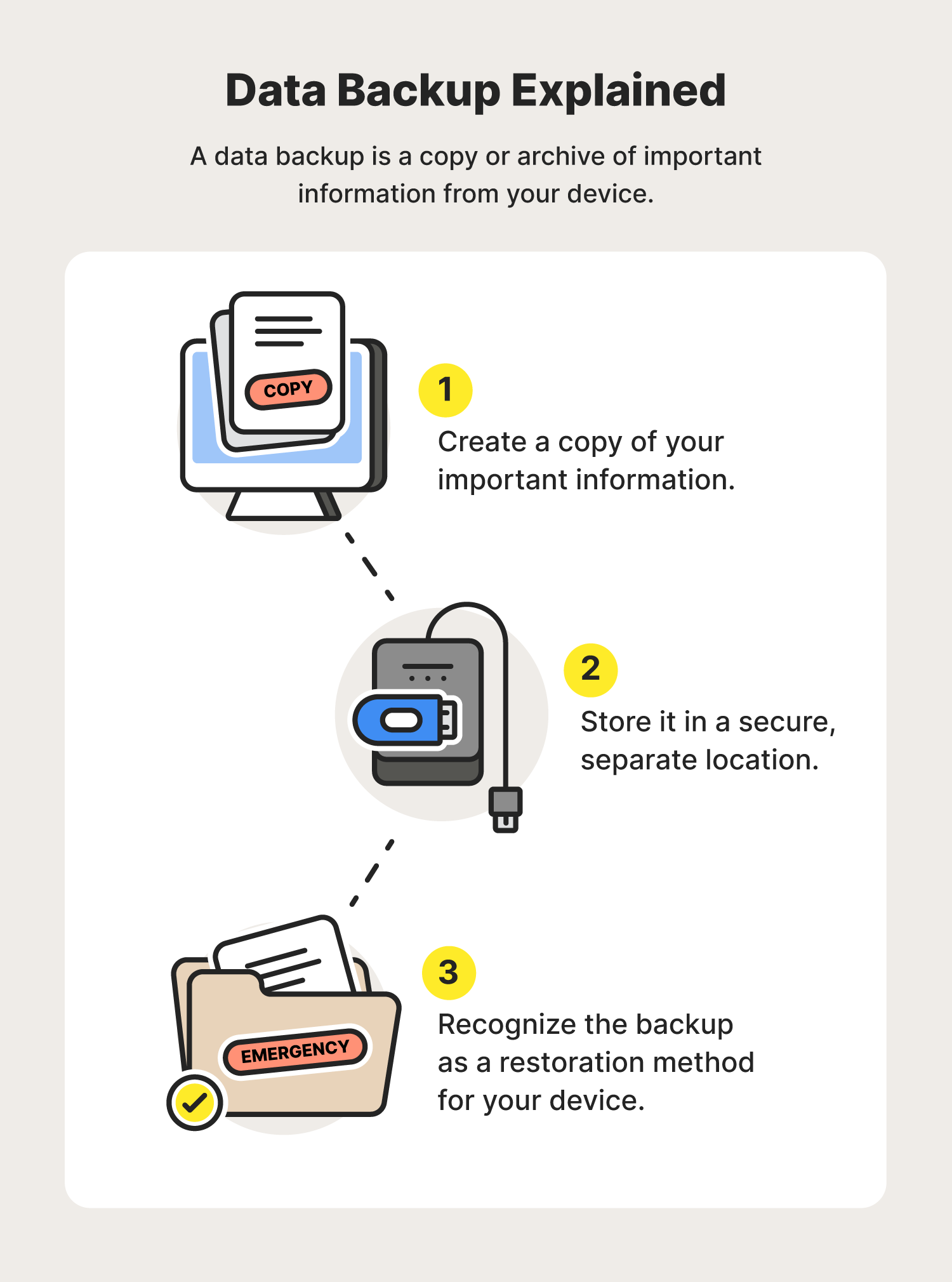
A data backup is a copy or archive of the important information stored on your devices such as a computer, phone, or tablet, and it’s used to restore that original information in the event of a data loss.
Data losses can occur in many forms, from hard drive failures to ransomware attacks and even human error or physical theft. No matter the misfortune, a data backup could be the respite you’re looking for to restore the data on your devices. A backup is typically stored in a secure, separate location from an original device, such as the cloud.
This way, whenever you have that crushing feeling that all your hard work and treasured memories are gone, you can rest assured that a data backup has your back.
Types of data backups
When deciding on a backup data storage strategy, there are different types of data backups you can perform to help protect your personal data. Depending on the size of the data you’d like to protect and the frequency with which you’d like to back it up, you can decide between these three data backup options:
- Full backups: This method backs up every single file on your device. Because of this, the process could take many hours depending on the size of the data. A full backup is recommended when you’re backing up your data for the first time.
- Differential backups: With a differential backup, you’re only backing up files that have changed or have been added since your last full backup. Because of this, differential backups can be performed much more quickly than a full backup.
- Incremental backups: Like a differential backup, incremental backups also only back up data that has been changed or added since the last backup. The difference is that incremental backups will back up any changed data since the last backup, whether it was a full, differential, or incremental backup. These types of backups are often performed by backup software because they can be done frequently due to their small size and fast backup time.
Now that you understand what a data backup is and the different types of backups you can choose from, let’s look at the importance of backing up your data.
What is the importance of a data backup?
The main reason for a data backup is to have a secure archive of your important information, whether that’s classified documents for your business or treasured photos of your family, so that you can restore your device quickly and seamlessly in the event of data loss.
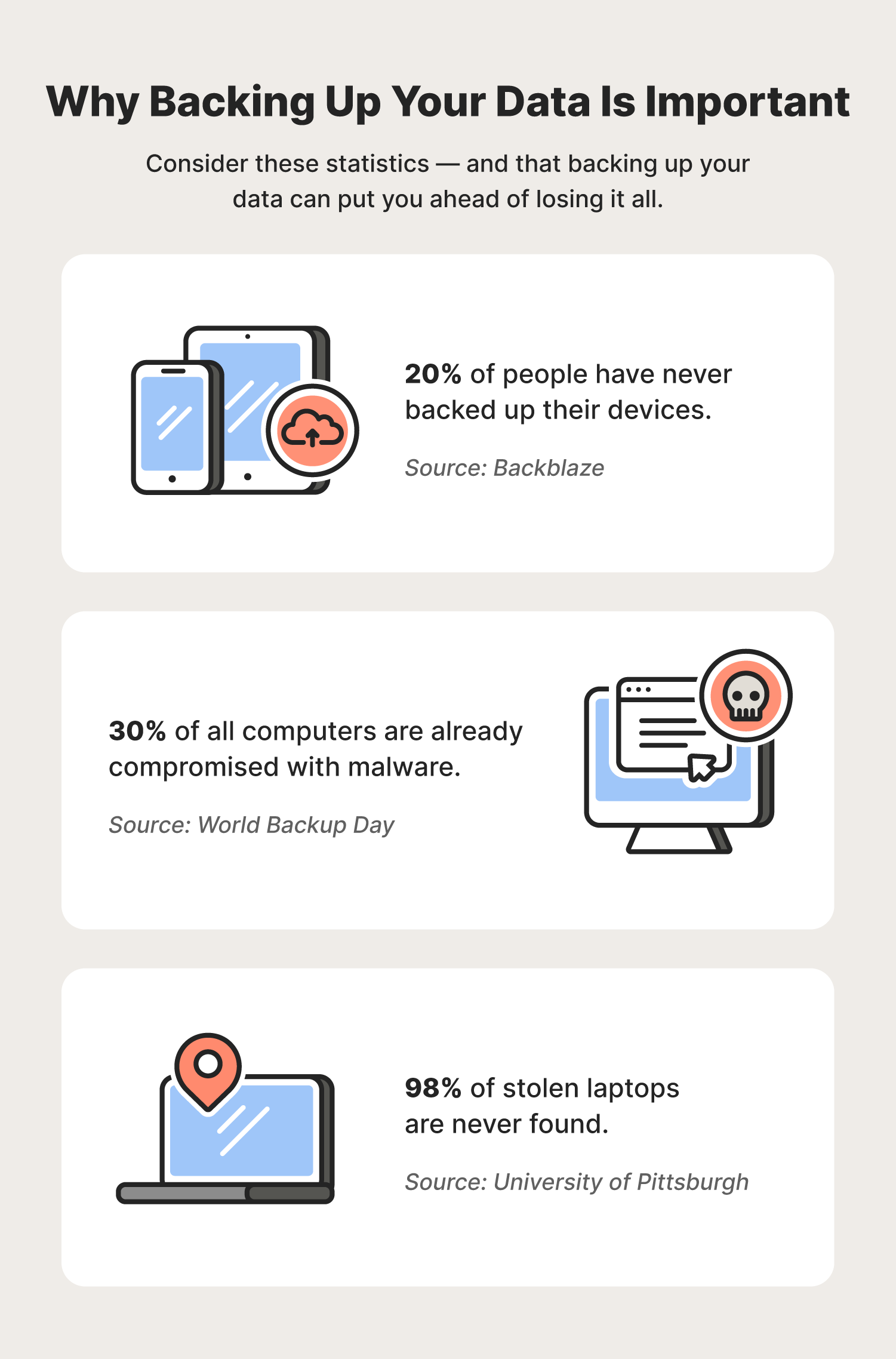
Still, 20% of people have never backed up their devices as of 2022. This might not seem like a lot — until you put it in perspective with how often data is lost:
- 113 phones are lost or stolen every minute. (World Backup Day)
- 30% of all computers are already compromised with malware. (World Backup Day)
- 98% of stolen laptops are never found. (University of Pittsburgh)
- Over 70 million cell phones are lost each year. (Kensington)
So, think of a data backup as the bedrock of your digital disaster recovery plan. By backing up your devices, you’re already one step ahead of any cyberthreats that might result in data loss.
It’s worth noting, however, that data loss isn’t always the result of cyberthreats. It can also be the case that your external hard drive or computer wears out and you lose your data. That’s just the nature of any piece of hardware, and backing up your data can help you restore it on a new device.
What data should I back up?
As a baseline, you should back up anything that can’t be replaced if it’s lost. For individuals, this might include:
- Address books
- Pictures
- Videos
- Music files
- Emails
- Documents
- Spreadsheets
- Financial databases
For businesses, data backup options become a bit more technical — think of backing up customer databases, configuration files, machine images, operating systems, and registry files — and there’s typically an IT department in place to manage them.
4 data backup storage options + storage considerations for individuals
In choosing a data backup solution, individuals can take cues from how businesses develop their own data backup strategies. Do this by considering the recovery point objectives (RPO) and recovery time objectives (RTO):
- RPO is the amount of time between your data backups, whether that’s 24 hours or a month, and understanding that this is the span of time for which you’ll lose your data in the event of an incident. The shorter your RPO, the less data you lose, and vice versa.
- RTO is the time it takes to restore your data. Generally, the faster or more streamlined your storage solution, the faster your recovery time will be.
At the end of the day, the best data backup solution is one that suits your needs — and that’s different for everyone. For this reason, you also might want to consider:
- Ease of set up
- Cost
- The security of your data
- How quickly your data can be backed up
- Ease of access to your data backup
- Storage space
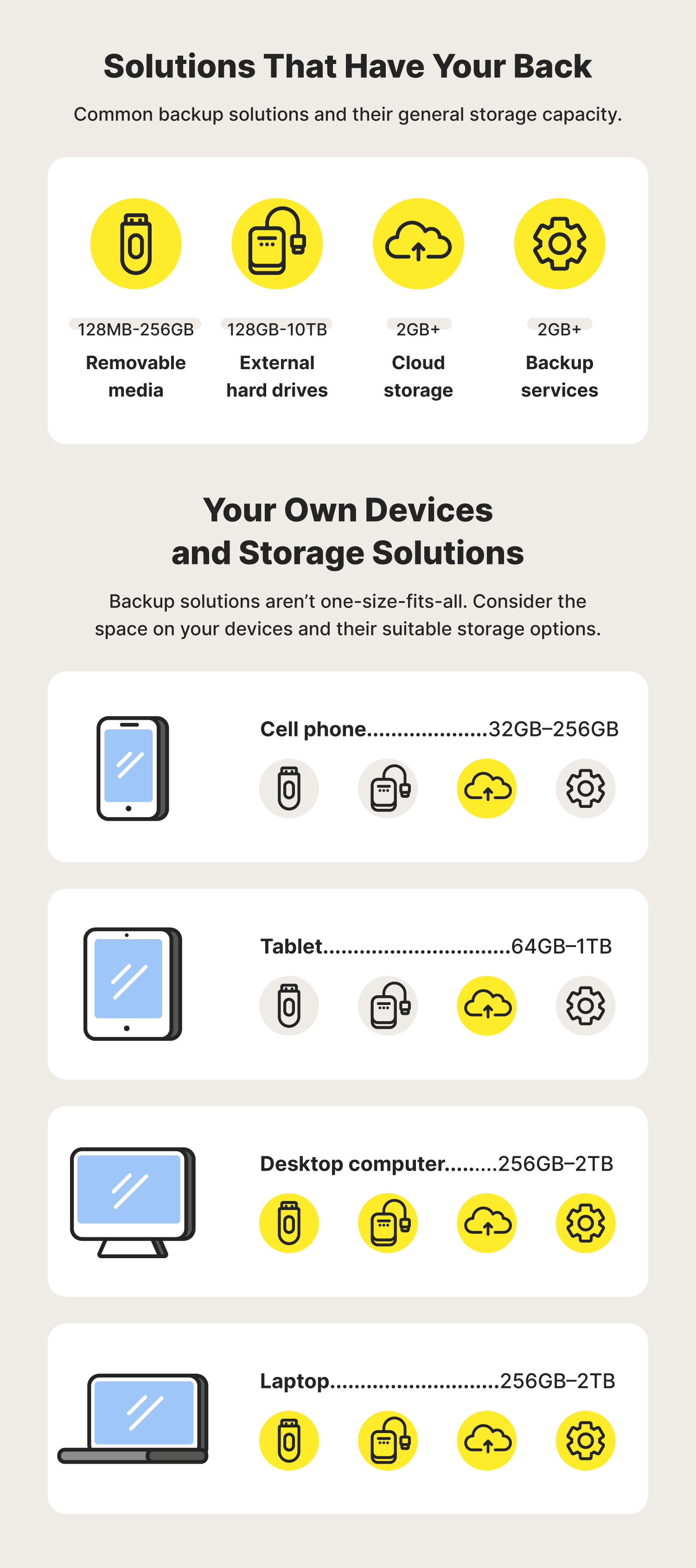
As individuals, we’re left to figure out how much backup storage is needed for our devices. For perspective, here are the general storage sizes across some common gadgets:
- Cell phones: 32 GB–256 GB
- Tablets: 64 GB–1 TB
- Desktop computers: 256 GB–2 TB
- Laptops: 256 GB–2 TB
Please keep in mind that these can vary widely depending on manufacturers and types of devices. Here, we’ve highlighted four common data backup solutions.
1. Removable media: The smallest storage
Removable media generally refers to small portable devices mostly used to transfer files between devices. This includes CDs, DVDs, and USB flash drives, also called pen drives, thumb drives, or jump drives, all of which are compatible with laptop and desktop computers.
Unlike other backup technologies, removable media does not come with a large storage capacity and does not have additional security features should your drive be lost or stolen.
Their size is an indication of their storage capacity, with some supporting as little as 128 MB, with others capable of storing up to 256 GB.
2. External hard drives: Ample storage
As the name indicates, an external hard drive is connected to the computer or laptop on the outside via cables or wirelessly. Examples of external hard drives can include USB flash drives and solid-state drives, also known as SSDs.
Like removable media, external hard drives are portable and easy to use, but they’re capable of storing larger files — anywhere from 128 GB to 10 TB. They are most compatible with computers and laptops.
3. Cloud backup: Flexible storage
Cloud backups, or “the cloud” as some affectionately refer to it, allow users to back up their data to hardware that’s in a remote location. Users can access and manage their data anytime on any device via the internet.
Most cloud storage services provide a large amount of storage space — by some counts, infinite amounts — and encrypt the content for data security. Some common cloud storage solutions you probably already use include iCloud, Google Drive, or Dropbox*, all of which are compatible with cell phones, tablets, desktop computers, and laptops.
4. Backup services: The most storage
If you have a trove of important data and treasured files, you might want to consider calling in the pros to help with your data backup by hiring a backup service.
This method of data backup is like that of a backup administrator in a business, meaning you’re putting a person or service in charge of your data backups because they have access to robust data backup software, hardware appliances, or even hybrid data backup solutions.
Essentially, you’re paying a service to manage and help secure your data. (Most backup services offer encryption.) Like the cloud, you can consider the storage options for this unlimited.
What is a 3-2-1 backup strategy? + data backup best practices
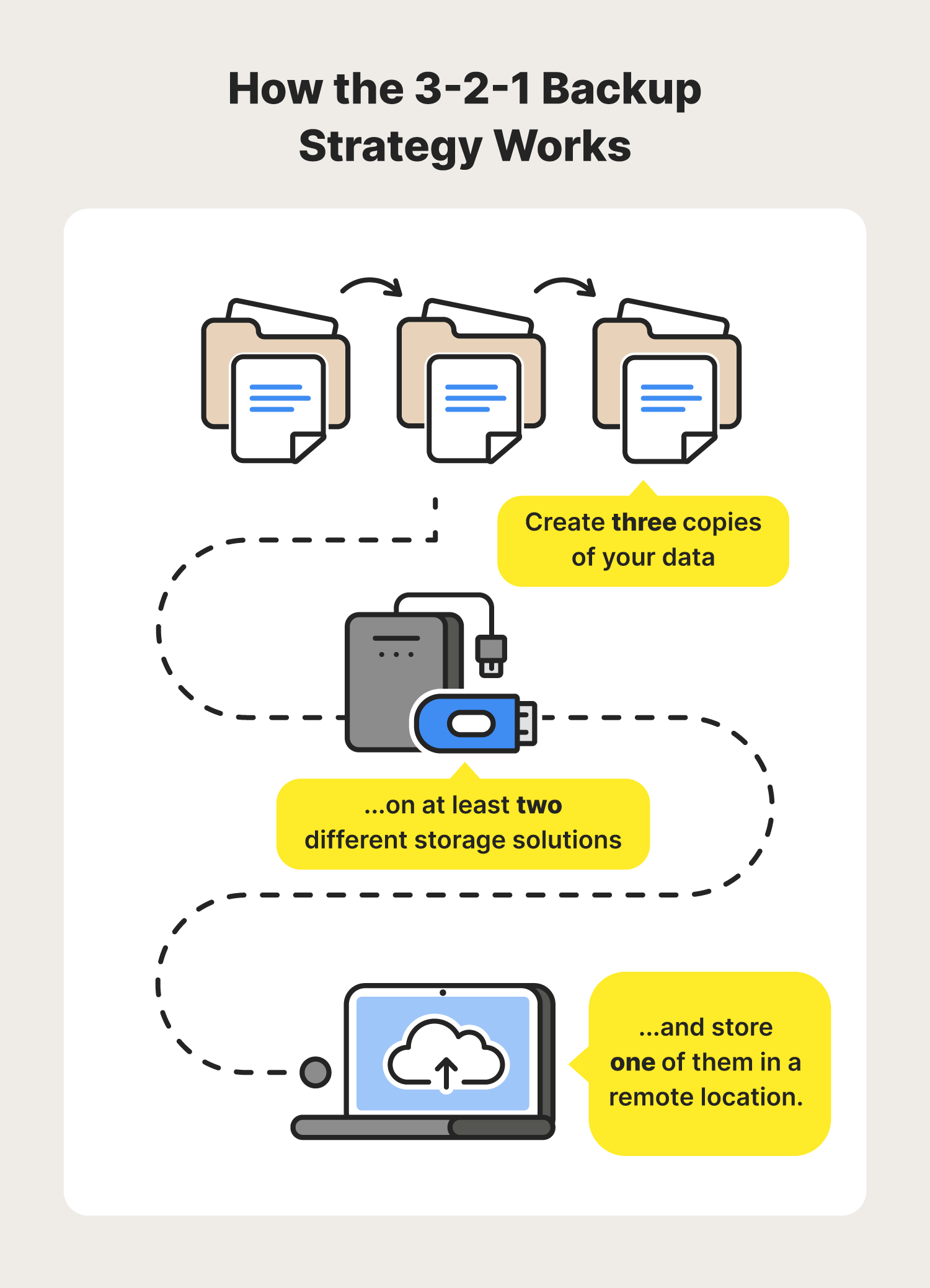
The 3-2-1 backup strategy is a method that ensures your data is appropriately copied and consistently recoverable. The concept: Create three copies of your data on at least two storage solutions, one of which is stored remotely.
- Three copies: This ensures that every individual piece of data has two duplicates to protect against corrupted files or lost data backups.
- Two different storage methods: By using two separate and different storage methods, you can protect yourself from losing everything if one storage method fails.
- One copy off-site: Additionally, utilizing a remote storage option can protect against risks associated with local outages or other unpredictable problems.
There are a lot of options when it comes to backing up your data, each with its own procedures and parameters. But no matter what data backup option you choose, there are best practices you should consider when creating your own data backup strategy.
1. Back up regularly
Remember your RPO? The longer the span of time you leave between your data backups, the more data you could lose. So, back up regularly and often.
For cell phones especially, application data is one of the more difficult things to back up because the data can change daily. If you rely a lot on apps, you might need a data backup solution that backs up regularly — daily or more often — without you having to take action, such as enabling auto-updates.
2. Always opt for more storage
You might save a few pennies by only storing what you absolutely can’t replace. But data storage can be cheap, so why not just back up everything?
In doing so, consider what data storage options make the most sense for what data. For instance, if your house is flooded, a physical data backup like removable media might be lost. But data that’s backed up on the cloud will not, so you might want to consider storing your irreplaceable information there.
In the end, you don’t have to pick between a physical data backup and backing up in the cloud. Choosing both is your safest bet because the more places your data is backed up, the better.
3. Don’t underestimate physical copies
Don’t underestimate the value of having physical copies of things like your bank statements and tax records or even your home title. It’s a good idea to keep a physical file of your most important documents in addition to any digital data backups you have.
Your documents are likely the most important part of your data backup, so take time to organize them. That way, you can be confident you’ve backed up everything you need.
As we evolve into a world filled with digital citizens, data backups shouldn’t feel like a chore. They should provide peace of mind that you’ve done all you can to safeguard your important information and treasured memories against life’s unknowns.


Try Norton 360 FREE 7-Day Trial* - Includes Norton VPN
7 days of FREE* comprehensive antivirus, device security and online privacy with Norton VPN.
Join today. Cancel anytime.
*Terms Apply
Editors’ note: Our articles offer educational information and are written to raise awareness about important topics in Cyber Safety. Norton products and services may not protect against every type of threat, fraud, or crime we write about. For more details about how we research, write, and review our articles, see our Editorial Policy.





Want more?
Follow us for all the latest news, tips, and updates.