


The most common threats children face online


Children are among the most active internet users, and are unfortunately subject to a number of threats. If you allow your children to spend considerable time surfing the web, it's important to know what threats they face. Here are some of the most common online threats to children to help you ensure yours stay safe.
Children are among the most active Internet users, and are unfortunately subject to a number of threats. If you allow your children to spend considerable time surfing the web, it’s important to know what threats they face so you may deal with them accordingly. Here are some of the most common online threats to children to help you ensure yours stay safe:

Try Norton 360 FREE 7-Day Trial* - Includes Norton Secure VPN
7 days of FREE* comprehensive antivirus, device security and online privacy with Norton Secure VPN.
Join today. Cancel anytime.
*Terms Apply
Inappropriate Content
The Internet is chock-full of “inappropriate content.” Your children may try searching for such content, or they may stumble upon it accidentally. Regardless, it’s very easy to find if the websites containing the content are not blocked. Invest in parental control software such as Norton Family to block websites you don’t want kids to browse. Another option is to use a child-friendly browser that automatically blocks websites unsuitable for kiddies. It also helps to keep a close eye on your kids while they’re online, or check their recent search histories so you have an idea of what sites they’re visiting. Placing your computer in a room the whole family uses regularly is also a good idea.
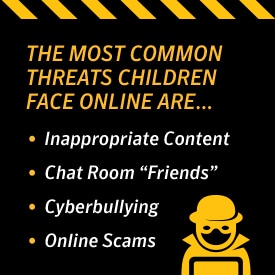
Chat Room “Friends”
Some predators enter chat rooms or use social media to find young children. They befriend them by pretending to be their age, and usually try to meet up at some point. Setting up fake profiles is quite simple, making it important for parents to emphasize this danger to your children. Go over the warning signs, and stress that they can always come to you if concerned. Encourage your kids to interact online only with those they know, such as friends and relatives. Also let them know that meeting anyone they met online presents very real, very scary dangers.
Cyberbullying
Just as predators no longer have to leave their homes to interact with children, bullies no longer have to be face to face with their victims. Cyberbullying through social media sites is unfortunately prevalent in today’s world, and causes just as much damage as any other form of bullying. This is arguably one of the most challenging threats to deal with, though a solution is to prevent your children from creating social media profiles in the first place. Let them know they can create theirs when they’re older. If you don’t want to do this, remind your children that they can always come to you if they’re being bullied, whether online or not. You won’t be able to do much unless you know it’s happening in the first place.
Online Scams
While older adults are often thought of as the main targets of online scams, children are very vulnerable to them as well. Common scams include emails claiming you’ve won large sums of money and requesting payments to receive said “winnings,” websites offering something for a low price but never explaining what it is exactly; and essentially anything that’s extremely cheap or free.
Education is key in preventing online scam issues, so be sure to let your children know what the signs are. Also emphasize that they should never, ever purchase something online without checking with you, and discourage them from clicking on suspect links. The more they know, the better—you don’t want them accidentally infecting the family computer with a virus or otherwise costing you a large chunk of change.
Remember, you’re the parent, and you control how much your kids use the Internet. They don’t have to have smartphones—flip phones for emergencies and calling their friends is more than enough. They don’t have to have social media profiles either—there are plenty of Internet-based activities that can wait until they’re older. Now’s the time for children to play outside and behave...as kids!
Editorial note: Our articles provide educational information for you. Our offerings may not cover or protect against every type of crime, fraud, or threat we write about. Our goal is to increase awareness about Cyber Safety. Please review complete Terms during enrollment or setup. Remember that no one can prevent all identity theft or cybercrime, and that LifeLock does not monitor all transactions at all businesses. The Norton and LifeLock brands are part of Gen Digital Inc.






Want more?
Follow us for all the latest news, tips and updates.