


Search the internet with greater peace of mind. Norton Safe Search will let you know if a site is unsafe — before you click through the search results.

Start typing to see suggestions.
-
Start typing to see suggestions.

Creating your recommendation

Did you know?
Around 30% of phishing emails are opened.
81 Phishing Attack Statistics 2023: The Ultimate Insight published by Astra, April 2023.
More than 130 million Americans have been affected by cybercrime.
Based on an online survey of 1,001 adults in the U.S. conducted by The Harris Poll on behalf of Gen™ (formerly NortonLifeLock), November–December 2022.
Your personalized matches

60-day money-back guarantee
*Important subscription, pricing, and offer details:
- By subscribing, you are purchasing a recurring subscription which will automatically renew.
- The price quoted today is valid for the offered introductory term. After that, your subscription will be billed at the applicable monthly or annual renewal price here. The price is subject to change, but we will always send you a notification email in advance.
2 Requires an automatically renewing subscription for a product containing antivirus features. For further terms and conditions, please see norton.com/virus-protection-promise.
4 Only available on Windows systems (but not in S mode or on ARM processors).
21 Utilities Ultimate, Driver Updater, Software Updater, and Cloud Backup features are only available on Windows (excluding Windows in S mode and Windows running on ARM processor).
‡ Monitoring available on Windows™ PC, iOS, and Android™ devices. Not all features available on all platforms.
§ Monitoring not available in all countries and varies based on region.


Norton Safe Search

See a website’s safety rating for your search results.γ

Avoid malware-infected sites on your search results.

Help safeguard your identity by avoiding phishing sites.
What is Norton Safe Search and how does it work?
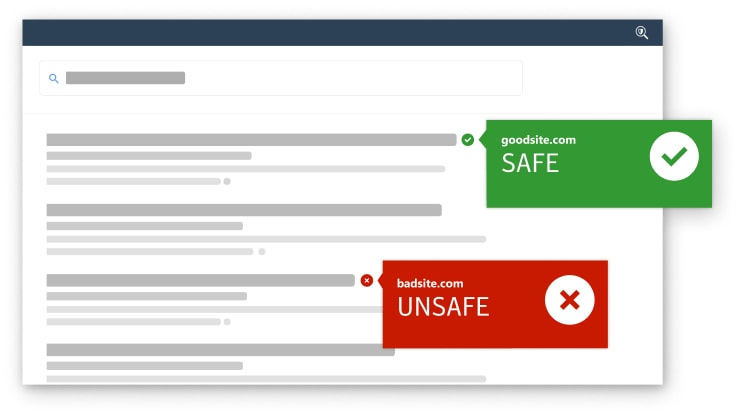
Norton Safe Search is a search engine focused on online security. The browser extension helps protect users from unwittingly visiting phishing sites and other risky pages that may appear in search results. It uses browser-based risk detection to evaluate websites based on their individual safety and security parameters, then flags potentially unsafe sites right in your search results page.
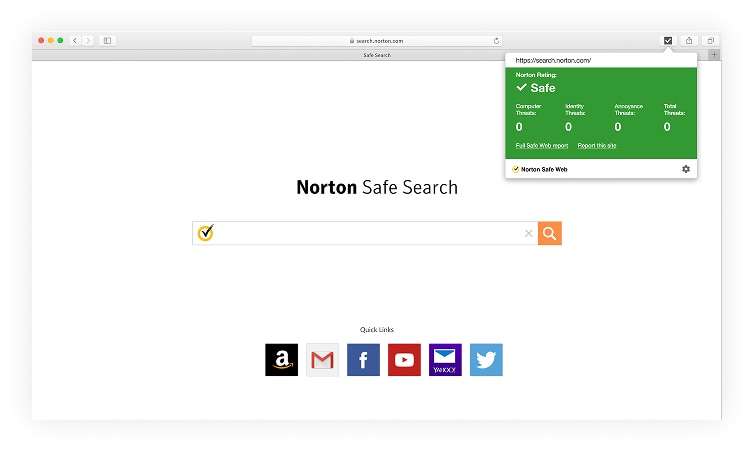
Safe Search also uses Norton Safe Web technology, which analyses and rates websites on their potential security risks, such as phishing, malicious downloads, and unsafe links.
Norton Safe Search is included in Norton protection plans that are offered online or in retail stores. It's also available as a free browser extension on Chrome, Edge, and Firefox.
Why Choose Safe Search?
Get advanced security features that help protect you against online threats.

Real-Time safety ratings
See instant safety ratings for every website in your
search results before you click.

Global coverage
Comprehensive protection across millions of
websites worldwide.

Malware protection
Avoid malware-infected sites with our advanced
threat-detection system.

Phishing & identity detection
Protect your personal and financial information by
ensuring you only visit legitimate, verified websites
Trusted by Milions
2M+
Users Protected
3M+
URLs Blocked Daily
100M+
Scam Attacks Blocked Monthly

Ready to Search Safely?
Join millions of users who trust Norton Safe Search to protect them online. Start searching more safely today.
Install our entire set of browser extensions for even more comprehensive, secure browsing:
Norton Safe Search, Norton Home Page, Norton Safe Web.
Frequently asked questions
Browse more tips on secure browsing and staying safe online
Related articles

Privacy
Public Wi-Fi: A guide to the risks and how to stay safe
Public Wi-Fi is used every day. But is it safe? To learn more about public Wi-Fi, its risks, and how you can safely use it, read this comprehensive guide.

How To
How to create a secure password
Learn tips to create unique and secure passwords that keep your accounts safer from snoops, hackers, and cybercriminals.

Privacy Tips
How to clear cookies and cache in
Learn how to clear cookies and cache to protect your privacy and discover software that automatically deletes tracking data.
System requirements
Browser Support:
- Google Chrome
- Microsoft Edge version 79 and later (Chromium-based)
- Mozilla Firefox
γ Norton Safe Search does not provide a security rating for sponsored links nor does it filter out potentially unsafe sponsored links from the search results. Not available on all browsers.
Enter a promocode and click "Apply"


