
Start typing to see suggestions.
-
Start typing to see suggestions.



Creating your recommendation

Did you know?
Around 30% of phishing emails are opened.
81 Phishing Attack Statistics 2023: The Ultimate Insight published by Astra, April 2023.
More than 130 million Americans have been affected by cybercrime.
Based on an online survey of 1,001 adults in the U.S. conducted by The Harris Poll on behalf of Gen™ (formerly NortonLifeLock), November–December 2022.
Your personalized matches

60-day money-back guarantee
*Important subscription, pricing, and offer details:
- By subscribing, you are purchasing a recurring subscription which will automatically renew.
- The price quoted today is valid for the offered introductory term. After that, your subscription will be billed at the applicable monthly or annual renewal price here. The price is subject to change, but we will always send you a notification email in advance.
2 Requires an automatically renewing subscription for a product containing antivirus features. For further terms and conditions, please see norton.com/virus-protection-promise.
4 Only available on Windows systems (but not in S mode or on ARM processors).
21 Utilities Ultimate, Driver Updater, Software Updater, and Cloud Backup features are only available on Windows (excluding Windows in S mode and Windows running on ARM processor).
‡ Monitoring available on Windows™ PC, iOS, and Android™ devices. Not all features available on all platforms.
§ Monitoring not available in all countries and varies based on region.

Creating your recommendation
Did you know?
Around 30% of phishing emails are opened.
81 Phishing Attack Statistics 2023: The Ultimate Insight published by Astra, April 2023.
More than 130 million Americans have been affected by cybercrime.
Based on an online survey of 1,001 adults in the U.S. conducted by The Harris Poll on behalf of Gen™ (formerly NortonLifeLock), November–December 2022.
Your personalized matches
60-day money-back guarantee
*Important subscription, pricing, and offer details:
- By subscribing, you are purchasing a recurring subscription which will automatically renew.
- The price quoted today is valid for the offered introductory term. After that, your subscription will be billed at the applicable monthly or annual renewal price here. The price is subject to change, but we will always send you a notification email in advance.
2 Requires an automatically renewing subscription for a product containing antivirus features. For further terms and conditions, please see norton.com/virus-protection-promise.
4 Only available on Windows systems (but not in S mode or on ARM processors).
21 Utilities Ultimate, Driver Updater, Software Updater, and Cloud Backup features are only available on Windows (excluding Windows in S mode and Windows running on ARM processor).
‡ Monitoring available on Windows™ PC, iOS, and Android™ devices. Not all features available on all platforms.
§ Monitoring not available in all countries and varies based on region.

Norton Family
Norton Family provides parents with the insights they need to help keep their child safer and focused when online. Parents can see their child’s search terms and viewed videos, monitor for age-appropriate content, set screen limits, and more.20,8
Help foster a healthy balance for your children and their devices, while providing tools to help them learn safe, smart, and healthy online habits.
$49.99/year
Price shown is for the first year. Then {msrp}/year.
See subscription details below.*
1Mac® and Windows™ 10 in S mode are not supported. Not all features available on all platforms.
See complete system requirements.
The purchase of Norton 360 Deluxe and Norton 360 Premium includes Norton Family (also known as Parental Control). Get its features and additional protection for your devices, online privacy, and personal information, all in a single solution.


Help balance your children’s time spent online.
Help your children set limits around their device usage and establish healthy habits that’ll serve them throughout their lives.
With Time Supervision you can help create balance:
- Be in the Know: See when children are online and what they’re doing. Sign up for email activity reports or visit the Parent Portal.
- Set Time Limits: Set time limits or schedule times or days of the week your children can use their Windows PC, Android, or iOS devices.

Let children explore the Internet more safely.
Make the Web safer for your children to explore – by keeping you informed of which sites your children are visiting, and letting you block harmful or inappropriate sites.‡
With Parental Supervision you can stay informed:
- Supervise Web Useφ: Stay in the know about which sites your children are visiting and help protect them by blocking unsuitable content.
- App Supervision: Helps keep you informed about the apps your child downloads or installs, so you can make choices about the apps they use.‡
- Gain Insight: See the terms your children are searching for on their devices to find out more about their interests.
Screen is for demonstration purposes and subject to change
Manage your child’s remote learning environment.
Norton Family provides parents with the information they need to help keep their child safer and focused when online.
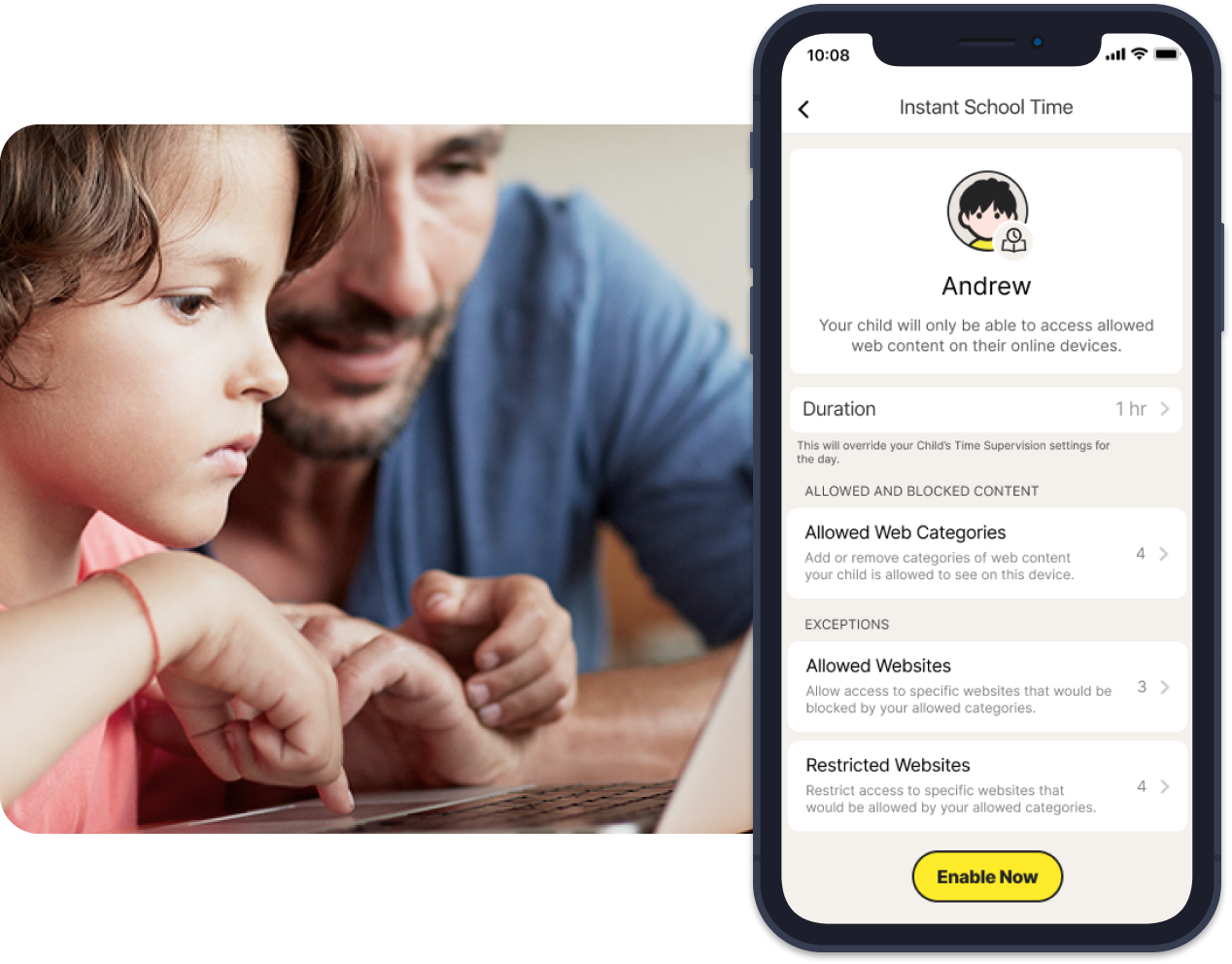
With School Time you can keep your children focused on schoolwork
Managing remote work and home schooling can be challenging. Access tools to help keep your child’s school day free of online distractions.
Parents can create a list of specific school-related, educational websites that can be accessed during the school day and can customize a block list for sites they know their child spends time on that may be a distraction.

Screen is for demonstration purposes and subject to change
Locate your children’s mobile devices6
Stay informed about where your children are with tools that map the location of their Android and iOS devices and provide a 30-day history to show where they’ve been.
With Location Supervision you can stay informed about your child’s location:
- Favorite Locations: Help establish approved boundaries for your children’s physical locations. When turned on, this feature will alert parents when a child arrives in, or goes beyond, the permissible area or location established by the parent.‡,6
- Alert Me: Stay informed of your child’s location automatically. Parents can set specific date and time to receive automatic alerts of the location of a child’s device.6
- Check In: Make it easy for your children to send you their device’s current location at any time. Children can report their location to their parents with a few taps on their mobile app.6

Teach your children healthy online habits.
Safe and healthy online habits start with honest conversations. Our helpful tools allow you to see children’s online activities at a glance or be notified by email alerts, so you know when it’s time to talk.
There are many features available in Norton Family that help parents protect their children’s devices in our easy-to-use web portal. Please note not all features are available across all devices.
Web Supervision
Let your children explore the web freely with tools that help you block unsuitable websites while keeping you in the know about which sites they’re visiting.
Available on Windows, Android, and iOS.
Time Supervision
Stay on top of how much time your children spend on their devices. Foster healthier habits by scheduling specific times of the day or week each device can be used and how many hours a day can be spent on each device.
Available on Windows, Android, and iOS.
Search Supervision
See the words, terms, and phrases your children are searching for to gain insights into their interests and help protect them from inappropriate content.
Available on Windows, Android, and iOS.
Parent Mobile App‡
Stay in the loop about your children's online activities from your Android or iOS mobile device and adjust settings when you’re on the go.
Available on Android and iOS.
Access Request
Open the lines of communication by enabling your children to send you a note from within Norton Family if they disagree with a blocked site or a house rule.
Available on Windows and iOS.
Video Supervision8
See a list of the YouTube videos your children watch on their PCs or iOS devices and even view a snippet of each video, so you know when you need to talk.
Available on Windows, Android, and iOS.
App Supervision
Helps keep you informed about the apps your child downloads or installs so you can make choices about the apps they use.
Available on Windows and Android.
Monthly/Weekly Reports
Opt to receive detailed reports of what your children are doing online, right in your inbox.
Available on Windows, Android, and iOS.
Parent Portal
Helps you manage protection for all your devices with an easy-to-use web portal.
Available on Windows, Android, and iOS.
Instant Lock
Parents can help children take a break by locking the device so they can refocus or join the family at dinner. Individual devices can be unlocked with a PIN. Parents and children can still contact each other while the device is in lock mode.
Available on Windows, Android, and iOS.
Email Alerts
Find out when your children attempt to visit a blocked site so that you can start a conversation about appropriate content.
Available on Windows, Android, and iOS.
Location Supervision‡‡
Stay informed about where your children are with tools that map the location of their Android and iOS devices and provide a 30-day history to show where they’ve been.
Available on Android and iOS.
School Time
Remote learning requires the internet, so pausing the internet on your child’s device is not an option. Manage your child’s remote learning environment and keep your child focused while school is in session.
Available on Windows, Android, and iOS.
Favorite Locations1,6
Favorite Locations helps parents establish approved boundaries for their child’s physical locations. When turned on, this feature will alert parents when a child arrives in, or goes beyond, the permissible area or location established by the parent.
Available on Android and iOS.
Alert Me6
Stay informed about your child’s location automatically. Parents can set specific dates and times to receive automatic alerts of the location of a child’s device.
Available on Android and iOS.
Norton Family helps parents keep an eye on what their children do with their devices on the internet. It makes it easier to set limits and help protect them from visiting unsuitable websites. Norton Family enables you to set online rules for your child and communicate with them within the app.‡
Norton Family provides online safety tools for filtering content and setting healthier limits for children. It helps parents keep children safe from inappropriate content so they can visit websites, watch videos, and use mobile apps on their devices with healthy boundaries.‡,ϕ,8
Features included with Norton Family are:
App Supervision: View and manage the apps your kids downloaded on their Android or Windows devices.
Web Browsing: Set rules that block content you don’t want your child to view online.ϕ
Video Supervision: Review the videos your child is watching on YouTube.com.8
Web Searching: Learn more about what your child searches for and block unsuitable sites.ϕ
Location Supervision: View a map of your child’s Android or iOS device location history for a period of 30 days.6
Installing Norton Family to your child's Android or Windows device lets you monitor which apps are downloaded and how often they’re used. If your child downloads apps they're not quite ready for yet, you can put restrictions in place to help enforce healthier boundaries with mobile apps.
Norton Family allows you to see which videos your children have watched on YouTube.com in their browser for Windows, Android, and iOS devices.
Norton Family gives parents tools to block websites and content topics while allowing children to browse the rest of the web more safely. With Norton Family, you can choose to block sites completely, or give your child a warning when they try to visit certain sites, but still enable them to browse after the warning.
Norton Family lets parents set a regular schedule for their child's devices. They can instantly lock a device if a child needs to take a break, or carve out chunks of time a child is allowed to use their devices and go online.
You'll begin by installing Norton Family on your child's Windows, Android, or iOS devices.
Parents can supervise their children with any device—Windows PC (excluding Windows in S mode), Mac, iOS, and Android—through the Norton Family parental control mobile app, or by signing in to their account at my.Norton.com and selecting Parental Control via any browser.
For more help setting up Norton Family, visit Member Services & Support.
Featured articles
Related articles

9 online safety tips for kids, teens, and parents
Help your children navigate the internet safely with these online safety tips for kids and teens.

Mobile phone safety for kids
Do we take the right measures to protect our children against the most common mobile risks? Review these tips to find out how you can help your kids stay safe on their mobile devices.
System requirements

Windows™ operating systems
Windows 7 all versions with Service Pack 1 (SP 1 with SHA-2 support) or later.
Windows 8, 8.1, 10, and 11 (all versions) except Windows in S Mode.

Android™ operating systems
Android 8 or later required for Norton Family Android app.

iOS operating systems
Current and previous two versions of Apple iOS.

Mac® operating systems
Norton Family and Norton Parental Control features are not supported.
- Details: Subscription contracts begin when the transaction is complete and are subject to our Terms of Sale and License & Services Agreement. For trials, a payment method is required at sign-up and will be charged at the end of the trial period, unless canceled first.
- Renewal: Subscriptions automatically renew unless the renewal is canceled before billing. Renewal payments are billed annually (up to 35 days before renewal) or monthly depending on your billing cycle. Annual subscribers will receive an email with the renewal price beforehand. Renewal prices may be higher than the initial price and are subject to change. You can cancel the renewal as described here in your account or by contacting us here or at 844-488-4540.
- Cancellation and refund: You can cancel your contracts and get a full refund within 14 days of initial purchase for monthly subscriptions, and within 60 days of payments for annual subscriptions. For details, visit our Cancellation and Refund Policy. To cancel your contract or request a refund, click here.
‡ Norton Family/Parental Control can only be installed and used on a child’s Windows™ PC, iOS, and Android™ device, but not all features are available on all platforms. Parents can monitor and manage their child’s activities from any device—Windows PC (excluding Windows in S mode), Mac, iOS, and Android—via our mobile apps, or by signing in to their account at my.Norton.com and selecting Parental Control via any browser. Mobile app must be downloaded separately. The iOS app is available in all except these countries.
φ Web Supervision requires a supported browser extension on Windows for full functionality.
6 Location Supervision features are NOT available in all countries. Click here for details. To work, the child’s device must have the Norton Family app installed and be turned on.
8 Video Supervision requires a browser extension on Windows and the in-app Norton Browser on iOS and Android. It monitors videos viewed on YouTube.com (but not YouTube videos embedded in other websites or blogs) and on Hulu.com (but only on Windows). It does not work with the YouTube or Hulu apps.
20 Search Supervision requires a supported browser extension on Windows and the in-app Norton Browser on iOS and Android.
Enter a promocode and click "Apply"


