
Start typing to see suggestions.
-
Start typing to see suggestions.



Creating your recommendation

Did you know?
Around 30% of phishing emails are opened.
81 Phishing Attack Statistics 2023: The Ultimate Insight published by Astra, April 2023.
More than 130 million Americans have been affected by cybercrime.
Based on an online survey of 1,001 adults in the U.S. conducted by The Harris Poll on behalf of Gen™ (formerly NortonLifeLock), November–December 2022.
Your personalized matches

60-day money-back guarantee
*Important subscription, pricing, and offer details:
- By subscribing, you are purchasing a recurring subscription which will automatically renew.
- The price quoted today is valid for the offered introductory term. After that, your subscription will be billed at the applicable monthly or annual renewal price here. The price is subject to change, but we will always send you a notification email in advance.
2 Requires an automatically renewing subscription for a product containing antivirus features. For further terms and conditions, please see norton.com/virus-protection-promise.
4 Only available on Windows systems (but not in S mode or on ARM processors).
21 Utilities Ultimate, Driver Updater, Software Updater, and Cloud Backup features are only available on Windows (excluding Windows in S mode and Windows running on ARM processor).
‡ Monitoring available on Windows™ PC, iOS, and Android™ devices. Not all features available on all platforms.
§ Monitoring not available in all countries and varies based on region.


Smart Firewall:
A shield for your online safety
Norton 360 includes a smart firewall that monitors and controls your network traffic to help stop malware, unauthorized access, and risky connections before they reach your device.

Smart Firewall is only available on Windows and Mac
Block threats at network level
Smart Firewall and Intrusion Prevention System (IPS) work together to help stop threats before they reach your devices, forming a powerful, layered defense.

What is Smart Firewall?
Think of it as a security guard for your internet connection, watching every incoming and outgoing connection, stopping suspicious activity before it can cause harm. It works quietly in the background, helping to protect your devices without slowing you down.
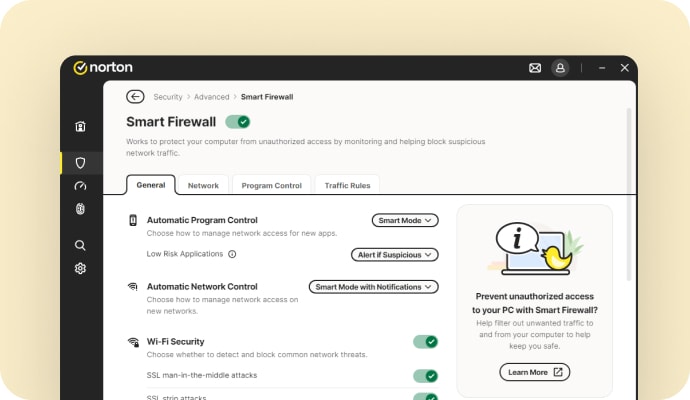
Our Smart Firewall and IPS work together to stop threats
Built into Norton 360, Smart Firewall and IPS help block hackers, intrusion attempts, and other online threats before they reach your device. Working with the rest of Norton 360’s protection, this technology creates a multi-layered defense to help keep you safer online.
Why do you need a firewall?
A firewall acts as a barrier between your device and potential online threats. While antivirus removes threats already on your device, a firewall blocks suspicious connections before they get in, and stops malicious programs from sending your data out.

Blocks unauthorised users
Monitors network traffic to prevent hackers or harmful software from getting into your device.

Warns you about connection attempts
Alerts you to suspicious or unexpected network activity so you can choose whether to allow it.

Protects your data
Helps stop cybercriminals from stealing sensitive details like passwords, banking information, or personal files.

Adds Wi-Fi protection
Provides extra security on public or unsecured Wi-Fi by blocking risky activity.

Norton™ 360 plans
Smart Firewall is part of your Norton 360 protection
Smart Firewall is just one layer of protection. With Norton 360, you get a full suite of security tools designed to safeguard your devices, privacy, and identity. Find a plan to fit your digital life.
Related articles

15 types of malware: real-world examples and protection tips
Learn about all the different types of malware, including spyware, adware, trojans, worms, viruses, ransomware, botnets, and more.

What is a firewall? What it does and why you need it
A firewall is a network security tool that monitors incoming and outgoing traffic to protect against unauthorized access. Learn more.
How to secure your Wi-Fi with 9 simple tips
Small vulnerabilities in your home Wi-Fi network could cause big problems. Learn how to secure your Wi-Fi connection here.
System requirements

Windows™ Operating Systems
Microsoft Windows 11 (all versions).
Microsoft Windows 10 (all versions).
Microsoft Windows 8/8.1 (all versions). Some protection features are not available in Windows 8 Start screen browsers.
Microsoft Windows 7 (all versions) with Service Pack 1 (SP 1) or later.

Mac® Operating Systems
MacOS 10.13 or later.
Enter a promocode and click "Apply"


