






New scam alert: Scammers using calendar invites to push fake Norton subscriptions


A new wave of scams is sweeping across the US, and this time criminals are exploiting something most people never think to question: their email calendars and their Norton security. Instead of sending suspicious emails that are easy to ignore, scammers are slipping fake Norton subscription notices directly into users’ calendars, complete with reminders and looming “charges” designed to spark panic. During a subsequent phone call, a support agent takes over the person’s machine to execute any type of attack they wish – from stealing passwords to bank information and more.
Norton has already blocked tens of thousands of these attacks, but the surge highlights a simple truth. If scammers can reach your calendar, they can reach your attention. We want consumers to stay alert, recognize the signs of this emerging tactic, and keep safe from these deceptive schemes.
The rise of sneaky scam tactics
Scammers have been on the prowl, coming up with new ways to target victims with ever-evolving techniques and ways to deliver scams, as evidenced in our recent Q3 Threat Report. We also know that scammers like to pose as trusted brands to get people to engage quickly without asking questions. We recently saw this in action with a wave of innovative scams that use calendar invites to push fake Norton subscription notices on victims across the US, with tens of thousands of attacks already blocked in the last month.
People are generally resilient when it comes to email spam and scams; after all, who wouldn’t be after years of bombardment by typical scam emails that usually land in the spam folder. Yet scammers have found another way to try and outwit unsuspecting victims. By sending out calendar invites instead of just spam emails, they can invade victim’s systems, potentially catching them off guard.
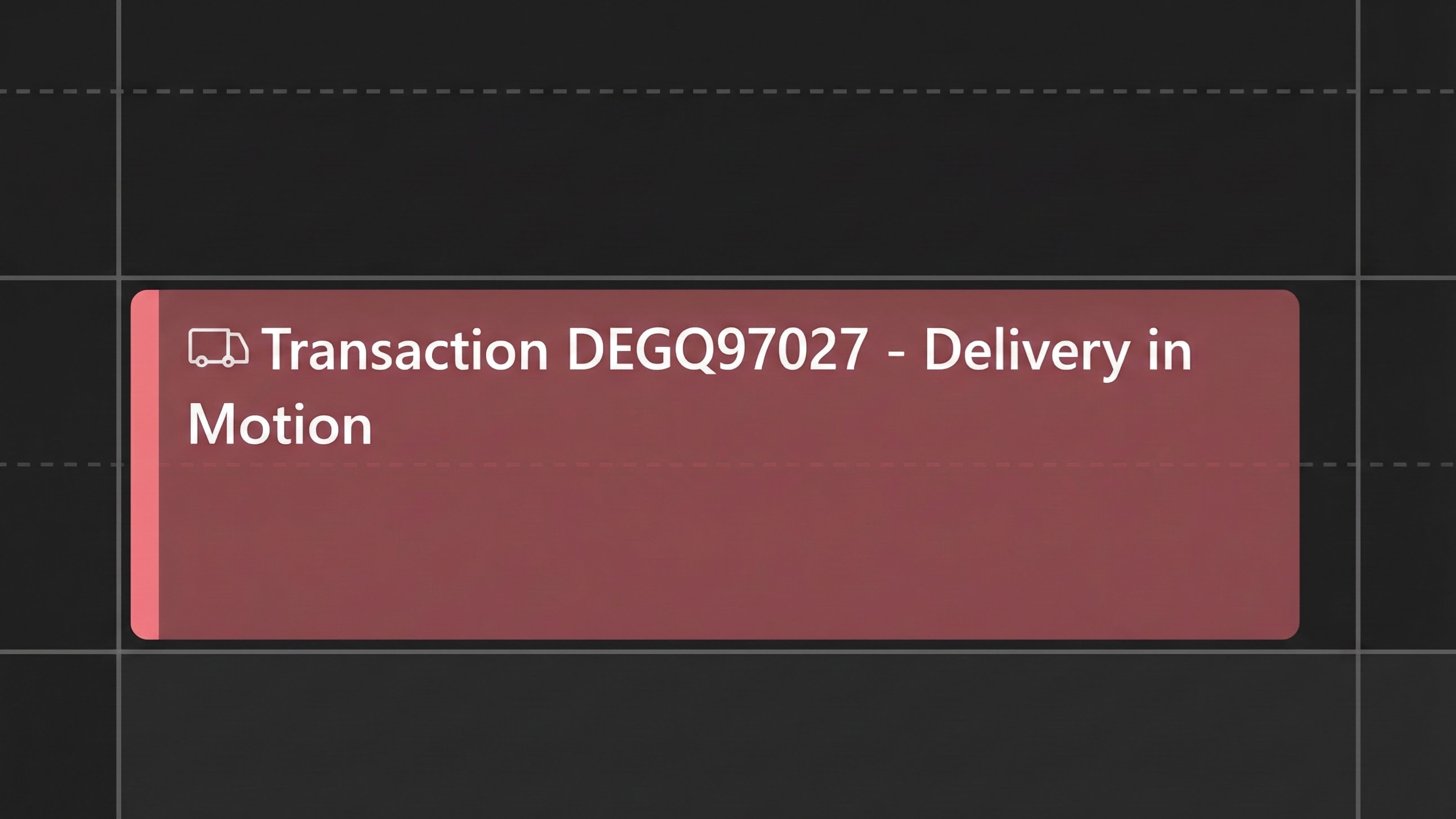
How the Norton calendar scam works
To begin the scam, victims notice a new calendar invite, often with an ambiguous name that refers to a transaction or subscription. What makes the attack vector more effective is that the user may not be alerted via email at all; instead, the invite suddenly shows up in their calendar, or they may even get a reminder about the supposed transaction taking place. This “something is happening soon” approach pressures the person into engaging with the scammers before said event takes place. It’s the perfect example of psychologically manipulating people into action.
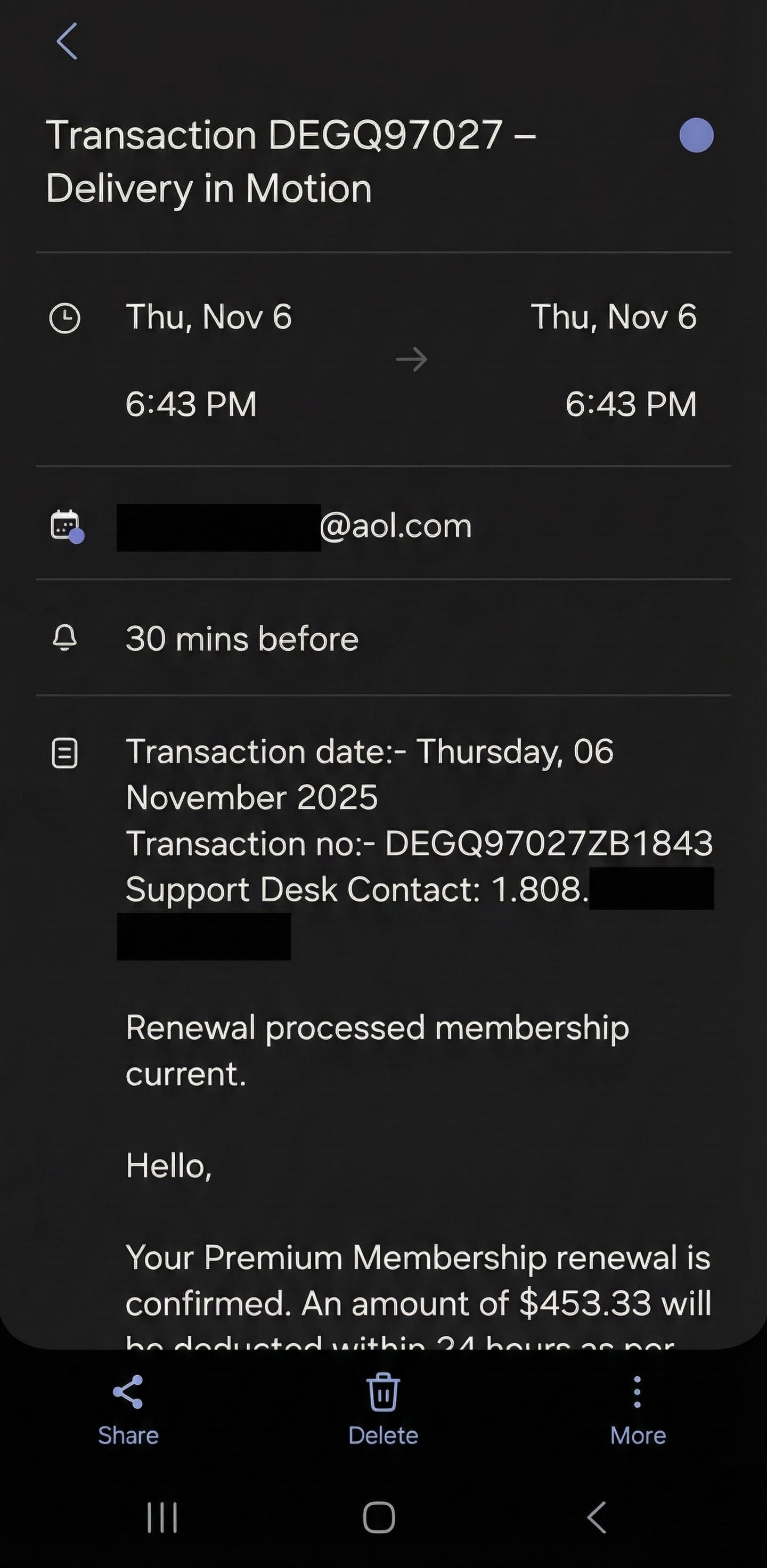
The scam then follows a more familiar path in which the scammers attach a phone number as the only way to deal with the upcoming charge which is a large transaction, often in the range of $400-700. If the victim falls for the scam, they call the attached number presented as a fake support helpline. They are greeted by a fake support agent acting as an employee of the impersonated brand, in this case Norton, though our test calls also had agents posing as McAfee.
We called the number, but the scammer had not read his own calendar
To understand what victims hear on the other side, one of our researchers called a phone number listed in a fake Norton calendar invite.
We expected the agent to pretend to be from Norton. Instead, the person who picked up confidently claimed to be support for a different security brand. The calendar event on the screen shouted Norton. The scammer on the phone talked about “your McAfee subscription”.
That mismatch is an obvious clue, and it strongly suggests we are not looking at a one-off incident but rather at a call center that runs the same script across multiple brands and lures. One day it is a Norton invoice in a calendar invite, the next day it might be a McAfee email or a generic “firewall security” pop up. The story on the surface changes. Underneath, the conversation is almost identical.
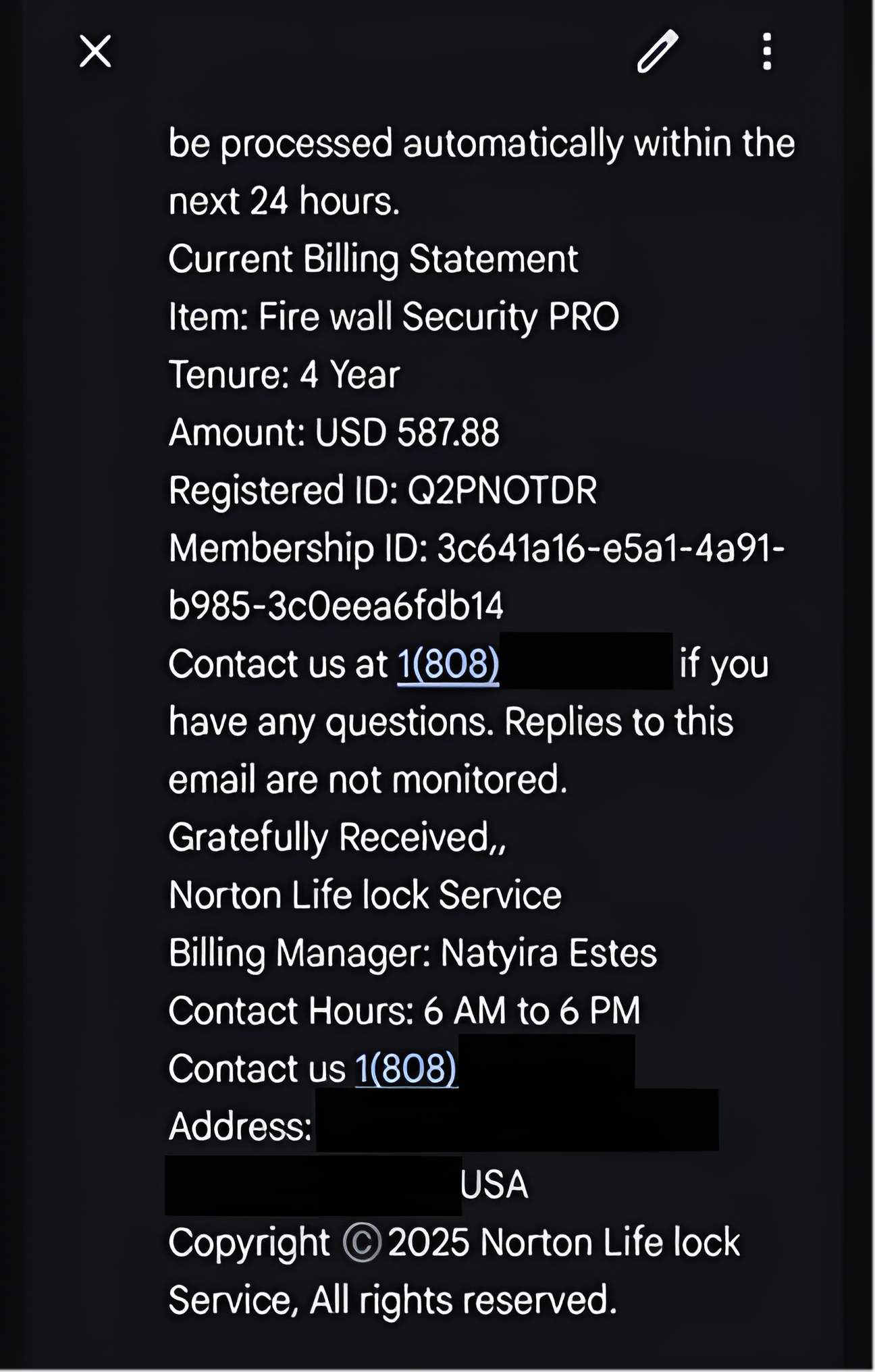
Once the caller confirmed she had seen a “subscription” charge, the scammer treated it as completely real and anchored the amount:
“Ma’am, it says your subscription has been renewed successfully. The order amount is 587 dollars and 88 cents.”
Then he shifted straight into getting the device involved:
“Do you have a computer or a laptop, ma’am? Can you please take your time and turn the computer on.”
Once our tester confirmed that the computer was “on”, the instructions became very specific and very technical sounding:
“At the very top where it says ‘search Google or type the URL’, you need to type all in lowercase: www.anydesk.com. Now click one time on ‘Download now’.”

When asked what exactly this was for, he wrapped it in refund and cancellation language:
“After opening the cancellation file there will be a number, a cancellation ID number. I need that number from your end. Then you will get to see the cancellation form on your computer screen.”
When pressed again on whether this was about connecting to the device, he dodged:
“No, no, you will get to see the cancellation ID number.”
At that point our researcher ended the call. In a real scam, the next steps would be to run the remote access tool, give the scammer the ID (which will give him control of the device) and from there possibly fill in a “refund form” that asks for banking details.
Important: We ran this call in a controlled environment and did not share real personal or payment data. If you receive an unexpected invoice, email, pop up or calendar invite, do not call the number it gives you. Go to the company’s official website or app and use their verified support options instead.
How to avoid calendar scams
While novel, the calendar invite scams are preventable. Often it is just a case of having your email or calendar setup properly, so that email users outside your contact list cannot send you invites that get added to your calendar. Below are some tips on how to avoid this type of scam:
- Change calendar permissions so that only users from your contact list can add invites to your calendar. This should help prevent this type of scam from appearing in your calendar.
- Disable automatic processing of invites. Invites will instead land in your email inbox, where they are much easier to recognize as spam.
- Don’t engage with unsolicited invites or events. If you suddenly notice an unknown invite or event in your calendar, be on the safe side and delete it.
- Be very cautious if anyone asks you to install a remote access tool as part of “cancelling” a charge or “verifying” a subscription.
- Use a trusted anti-scam solution. Norton flags the calendar invites and protects you from the scam in its entirety.
Scammers will continue to invent new tactics, but staying alert to unusual activity in your calendar and inbox goes a long way. If something feels off, such as an unexpected invite, a surprise subscription notice, or a request to install remote access software, trust your instincts and verify directly through the company’s official channels. Being alert is the first defence, and products such as Norton 360 with AI-Powered Scam Protection can help you stay safe.
Editors’ note: Our articles offer educational information and are written to raise awareness about important topics in Cyber Safety. Norton products and services may not protect against every type of threat, fraud, or crime we write about. For more details about how we research, write, and review our articles, see our Editorial Policy.




Want more?
Follow us for all the latest news, tips, and updates.