






VPN security: How safe are VPNs actually?
VPNs all promise privacy, but not all deliver the same level of protection. While a trustworthy VPN can shield your online activity with ironclad encryption, weaker services may leave gaps that put your privacy at risk. Learn what sets secure VPNs apart and how reputable providers put safeguards into practice.

2025
Consumer
Security Innovator





How safe and secure are VPNs?
VPNs are generally very safe and secure when you use one from a reputable provider. They encrypt your internet traffic and mask your IP address, making it harder for third parties such as advertisers, your internet service provider (ISP), or other network observers to monitor your online activity.
However, not every VPN offers the same level of protection. Some services, particularly sketchy free VPNs, may log your activity, use weak or outdated security protocols, or suffer from IP and DNS leaks. These weaknesses can undermine the privacy and security a VPN is supposed to provide.
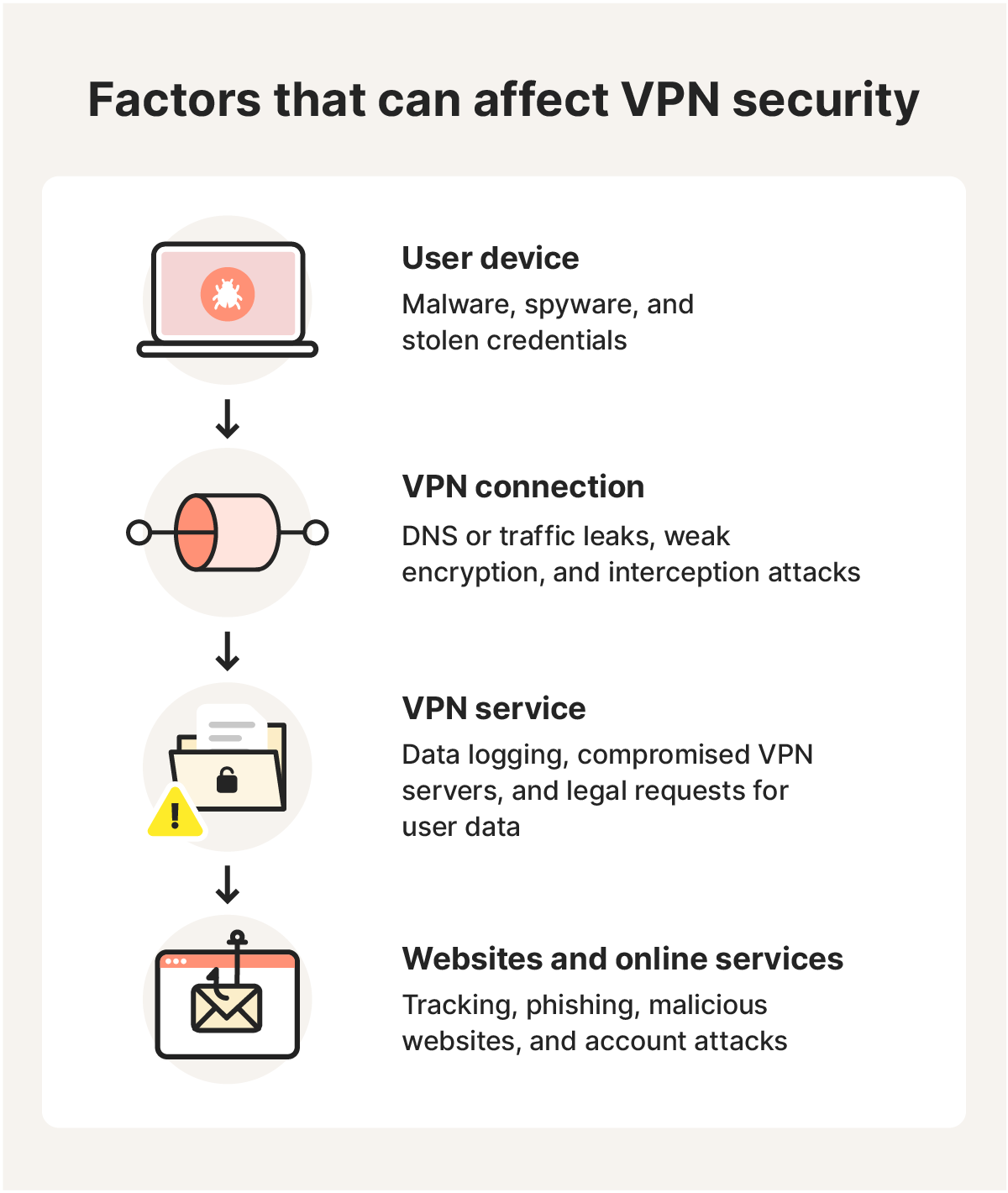
It’s also important to acknowledge that all VPNs have limits. No VPN can completely hide your online identity or activities, nor can they protect you from threats such as malware, phishing, or drive-by downloads. That’s because they secure your internet connection — not your device itself.
What makes a VPN secure?
A secure VPN works by combining strong encryption with IP masking, secure tunneling, and other safeguards to protect your internet traffic and privacy. Without these protections, your data may be more vulnerable to interception, and your real IP address could be exposed to the websites and online services you visit.
Here’s how the most important VPN security features help protect your connection:
- Encryption: By scrambling your internet data, encryption helps ensure anyone who intercepts it can’t read it. Strong, modern standards such as AES-256 provide robust protection, while outdated cryptography may leave your data more vulnerable.
- IP address masking: A VPN hides your real IP address by routing your traffic through a VPN server. This makes it harder for websites, advertisers, and other online services to determine your approximate location or track you using your IP address.
- Secure tunneling: A VPN tunnel creates a protected connection between your device and the VPN server, shielding your traffic from interception as it travels between them.
- VPN protocols: VPN protocols determine how your VPN connection is established and how data travels through the encrypted tunnel. Modern protocols such as WireGuard and OpenVPN offer strong security, while different options may prioritize speed, stability, or compatibility.
- Kill switches: A VPN kill switch blocks your internet traffic if the VPN unexpectedly disconnects, helping prevent your real IP address and unprotected traffic from being exposed until the VPN reconnects.
- No-log policies: A no-log VPN doesn’t record your browsing activity, reducing the amount of sensitive information the provider holds about what you do online. However, some providers may still collect limited connection or account data, so check what the policy actually covers.
What attacks can VPNs protect against?
VPNs are excellent internet privacy tools. They can help prevent tracking by hiding your location, identity, and online activities. But they can also help defend against certain network-based attacks, particularly those that rely on intercepting, monitoring, or manipulating data as it travels between your device and the internet.
Here are some common online threats and attacks that VPNs can help protect against:
- Packet sniffing: If attackers capture data traveling across a network in a packet sniffing attack, VPN encryption makes intercepted data practically impossible to read.
- Man-in-the-middle (MITM) attacks: In a MITM attack, a cybercriminal intercepts traffic between your device and the internet. VPN encryption helps prevent anyone snooping on the local network from reading or altering your data.
- DDoS attacks: A DDoS attack can overwhelm your IP address with traffic and disrupt your connection. By concealing your real IP, a VPN makes it harder for attackers to target you directly. This is particularly useful when gaming online.
- Evil twin attacks: By tricking people into connecting to convincing fake Wi-Fi hotspots, evil twin attacks can intercept unencrypted internet traffic and inject malicious code into data packets.
What attacks can’t VPNs protect against?
A VPN protects your internet connection, but it isn’t a complete cybersecurity solution. Encrypting the data you send and receive and masking your IP address can help protect your privacy and help prevent certain network-based risks, but it won’t stop threats that target your device or accounts directly.
Here are some common threats a VPN can’t protect against on its own:
- Malware: A VPN can encrypt the connection used to download a file, but it doesn’t make that file safe. If malware reaches your device, you need security software capable of detecting and blocking it.
- Phishing: VPNs can’t determine whether an email, text, or website is trying to deceive you. A convincing phishing attack can still trick you into revealing passwords, payment information, or other sensitive data.
- Software vulnerabilities: VPNs are not device security tools and can’t help defend against security flaws in your operating system, browser, or apps. Attackers may exploit known or zero-day vulnerabilities to compromise vulnerable devices.
- Account attacks: Masking your IP address doesn’t prevent attackers from stealing or guessing your passwords, reusing leaked credentials, or taking over poorly secured online accounts.
For broader protection than a VPN alone can provide, consider a premium-tier subscription like Norton VPN Plus. It combines advanced VPN privacy with antivirus and cutting-edge AI-powered scam protection to help defend against malware, ransomware, viruses, and sophisticated emerging online threats.
How to supplement VPN coverage for max security
A VPN fortifies your internet connection, but it’s not a comprehensive cybersecurity solution and can’t defend against every threat you encounter online. Malware, phishing scams, malicious websites, and attacks targeting your device or accounts require additional layers of protection.
Consider combining your VPN with tools such as:
- Antivirus: Antivirus software detects, blocks, and removes malware that VPN encryption can’t stop, including viruses, spyware, and ransomware delivered through malicious downloads, attachments, or other sources.
- Phishing protection: Some consumer Cyber Safety software contains scam protection tools that help detect and block fraudulent websites, links, emails, and messages designed to steal passwords, payment details, and other sensitive information.
- Firewall: Firewalls monitor incoming and outgoing network traffic, and help block unauthorized connections to your device. More advanced smart firewalls can automatically manage traffic rules and help identify suspicious network activity.
Choose Norton’s security-first VPN
Your security shouldn’t be an afterthought when choosing a VPN. That’s why Norton VPN combines bank-grade encryption with Kill Switch leak protection and a strict no-log policy to triple-lock your online privacy. Choose trusted security-first VPN protection from the #1 top-of-mind consumer Cyber Safety brand.
FAQs
Can you be tracked with a VPN?
Yes, you can still be tracked if you use a VPN. A VPN hides your real IP address and encrypts your connection, but websites can still identify you through cookies, browser fingerprinting, or accounts you’re signed into. Your VPN provider may also collect connection metadata, depending on its logging policy.
Who should use a secure VPN?
Anyone who wants more privacy and security online can benefit from a VPN. They’re particularly useful for people who regularly use public Wi-Fi, travel frequently, or work remotely, where connecting to unfamiliar or unsecured networks can increase the risk of data interception.
Editors’ note: Our articles offer educational information and are written to raise awareness about important topics in Cyber Safety. Norton products and services may not protect against every type of threat, fraud, or crime we write about. For more details about how we research, write, and review our articles, see our Editorial Policy.








Want more?
Follow us for all the latest news, tips, and updates.