







Can you be tracked with a VPN?
A VPN enhances your privacy, but it doesn’t make you totally untrackable online. It hides your location and online activity from your ISP, hackers, and other snoops, but advertisers have other ways to follow you around the internet. Learn more about VPN limitations and how you can use Norton VPN in combination with other tools to maximize your privacy.

2025
Consumer
Security Innovator





With just the flip of a switch, a virtual private network (VPN) can substantially bolster your privacy, but you can still be tracked with technologies like cookies, fingerprinting, and device-level trackers. That’s why it’s important to understand what VPNs can and can’t do, so you can cover any privacy gaps with additional tools, like a private browser or ad-blocker.
Keep scrolling to learn more about the capabilities and limitations of a VPN and the steps you can take to protect yourself.
What can a VPN hide?
A VPN hides your real IP address, masks your general location, and encrypts your internet traffic. This helps prevent your internet service provider (ISP), governments, hackers, and other snoops from seeing what websites you visit. VPNs can also help protect your privacy on P2P file-sharing networks.
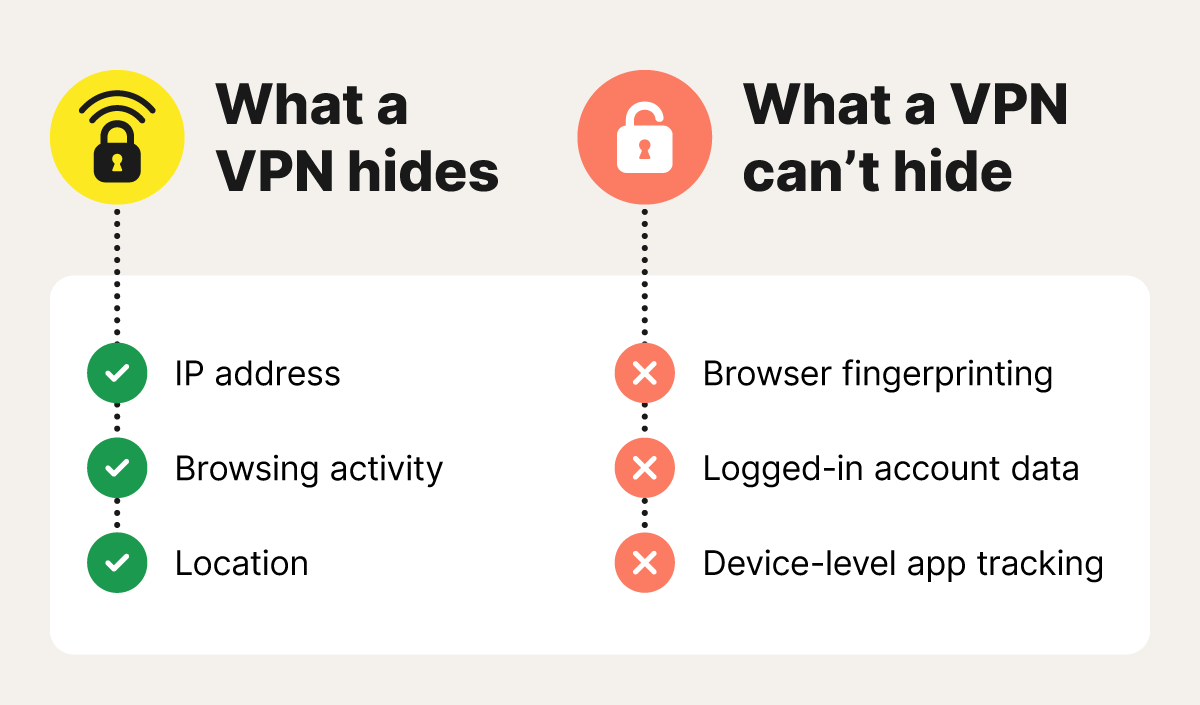
How tracking still happens even with VPN encryption
A VPN effectively hides your IP address and encrypts your connection, but it doesn’t make you invisible online. Many tracking methods don’t rely on IP addresses at all. Instead, websites and advertisers use cookies, browser fingerprinting, and device-level identifiers to monitor your activity. And if you’re logged in to a site, that site can still track your activity — regardless of whether you’re using a VPN.
Below are several ways tracking still happens even with VPN encryption.
Browser fingerprinting
Browser fingerprinting is a tracking method that builds a profile based on details about your system and browser, such as screen size, operating system, language preferences, time zone, and browser version. Taken together, these signals create a fairly unique digital signature, allowing websites and advertisers to follow your activity across multiple sites to infer your interests and behavior.
Browser fingerprinting still works even if you use a VPN. A virtual private network hides your IP address and location, but it doesn’t change the underlying hardware and software characteristics that make your device recognizable. Privacy tools like Norton Private Browser can help obscure those signals and reduce online tracking.
Cookies
Cookies are small files that websites store in your browser to log information about your visit. They power useful features like keeping you logged in or saving items in your shopping cart. Unfortunately, they’re also used for less user-friendly purposes, such as targeted advertising.
Some cookies contain unique identifiers that allow third-party trackers and ad pixels to follow your activity across multiple websites. These identifiers can persist even when you use a different IP address, such as one provided by a VPN.
This is because the identifier is stored directly in your browser. As long as it remains in place, changing locations or enabling a VPN won’t prevent sites from recognizing your browser and linking new activity to an existing profile.
Account logins
When you log into an account, whether it’s Google, a social media platform, or your bank, a VPN cannot hide your identity because you’ve voluntarily identified yourself.
Once signed in, these companies can link your activity across different connected apps, devices, and even other websites that use their integrated tools, such as “Sign in with…” buttons or embedded tracking pixels.
Because this tracking is tied to your personal profile rather than your network connection, your IP address becomes largely irrelevant, and a VPN no longer masks your identity.
Device-level trackers
Device-level trackers identify and follow your digital activity using identifiers built into your operating system. On mobile devices, this often includes unique advertising IDs like Apple’s Identifier for Advertisers (IDFA) and Google’s Advertising ID (AAID), which are designed to support ad targeting and measurement across apps.
Because these identifiers are tied to your device, advertisers can recognize your activity across different apps and services, even if you clear cookies or switch browsers. While a VPN hides your IP address, it doesn’t change or remove these built-in identifiers. As a result, apps and ad networks can continue associating your activity with the same device-level profile unless you limit ad tracking in your device settings.
DNS leaks and IP leaks
DNS leaks occur when your device sends website lookup requests outside of the VPN tunnel, allowing them to reach your ISP instead of being routed through the VPN. This can happen due to misconfigured network or browser settings, or when features like split tunneling are enabled.
When a DNS or IP leak occurs, your real IP address may be exposed to the websites you visit or the apps you use. As a result, your actual location and online activity can be linked to your physical internet connection rather than the VPN server you’re connected to.
VPN logging
Some VPN providers, especially free services, may keep logs of user activity or connection data, which can be shared with others or used for advertising. Besides undermining the purpose of a VPN, this practice also increases your privacy risk if the VPN provider experiences a data breach.
This is why a strict, independently audited no-log policy, like Norton’s, should be non-negotiable when selecting a VPN. A true no-log policy means the VPN provider does not record or store your browsing activity, helping ensure your online activity remains private — even from the VPN provider itself.
VPN disconnection
If your VPN connection drops unexpectedly, your device will revert to your regular internet connection and expose your real IP address.
During that window, your activity becomes visible to your ISP and the websites you visit. To reduce this risk, some VPNs like Norton VPN include a kill switch that automatically blocks all internet traffic the moment the secure connection fails, helping prevent unencrypted data from leaking before a secure tunnel is re-established.
Malware
Malware can track you even when a VPN is running because it operates directly on your device. Spyware, keyloggers, and infostealers can monitor activity or steal sensitive information in real time. Malware often spreads through phishing attempts, malicious downloads, or fake websites. Once it’s installed, the strength of your VPN no longer matters — your data is already compromised at the source.
Who can still track you even with a VPN?
While a VPN can conceal much of your information, some networks, services, and other third parties can still identify you based on the accounts you’re logged into or the devices you’re using. Here’s who can still see parts of your online activity.
Who can track you with a VPN |
What they see |
How they see it |
|---|---|---|
VPN providers that log user activity |
Connection timestamps, VPN server used, data volume, and some metadata |
By operating the VPN servers your traffic passes through and storing connection or activity logs |
Your internet service provider (ISP) |
Your real IP address, the fact that you’re connected to a VPN, connection times, and bandwidth consumption |
By managing your physical internet connection and seeing where your encrypted VPN tunnel begins |
Websites and apps |
Account IDs, browser fingerprints, advertising identifiers, and on-site behavior |
Through cookies, browser storage, fingerprinting signals, or device advertising IDs like IDFA or AAID |
Network administrators |
VPN usage, connection times, and bandwidth consumption |
By monitoring traffic on the local Wi-Fi or Ethernet network |
Device administrators |
Screen activity, keystrokes, installed software, and local file access |
Through device management (MDM) or monitoring software installed on the device |
Government agencies |
ISP metadata or VPN records, if available |
By using legal authority to compel ISPs, VPN providers, or online services to hand over records |
Hackers with malware or spyware |
Passwords, messages, financial data, and other sensitive information |
By installing spyware or keyloggers directly on a compromised device |
Can Google track you if you’re using a VPN?
Yes, Google can still track you even if you’re using a VPN because your identity is tied to your account. If you’re signed into Gmail, Chrome, Maps, YouTube, or any other Google service, your activity is linked to your profile. So, Google can still see certain information, even with a VPN.
Google also gathers data through cookies, saved search history, device activity, and cross-site tools such as Google Analytics. Using incognito mode or logging out of your account can help temporarily limit some of the data collected, as can clearing your website’s cookies, but it doesn’t eliminate Google’s ability to track behavior tied to your profile or device.
According to Google, collected data is used to develop, maintain, and improve services, as well as to provide personalized content and ads.
Can websites and advertisers track you if you’re using a VPN?
Even when a VPN hides your IP address, websites and advertisers can still track you by using cookies, analytics pixels, and browser fingerprinting to recognize your device across sessions and sites. Because these methods don’t depend on your IP address, changing locations with a VPN doesn’t stop them.
To reduce your digital footprint, consider pairing your VPN with a privacy-focused browser such as Norton Private Browser, which can help block ads and third-party cookies.
Can internet providers track you if you’re using a VPN?
Your ISP can see that you’re connected to a VPN, but it can’t see what you’re doing while it’s active. The VPN’s encrypted tunnel obscures your traffic, so your ISP only sees encrypted data traveling to a VPN server — not the websites you visit or the content you access.
Can employers track you if you’re using a VPN?
Employers can monitor activity on company-managed networks or devices, even if you’re using a VPN. Many organizations deploy monitoring tools that log device activity, track app usage, or inspect traffic within their systems.
A personal VPN on your own device offers more privacy, but only if you’re not connected to company networks or work accounts. Once you join a corporate Wi-Fi network or use a company laptop, your employer may see VPN usage, connection times, data volume, or activity captured by built-in monitoring software.
Can governments or law enforcement track you if you’re using a VPN?
Governments and law enforcement agencies can legally request user data from VPN providers. What they receive depends on the provider’s logging practices. If a VPN stores connection or activity logs, that information may be turned over in response to a lawful request. With a verified no-log VPN, there’s no stored browsing activity data to provide.
Can VPN providers track you?
VVPN providers have the ability to track you, but it depends on what they log. Some services only keep connection logs, such as when you connected, how long the session lasted, and how much data you used. These logs are relatively limited and don’t reveal browsing activity.
Other VPNs keep usage logs, which can include the websites you visit and your search history. Providers that store usage logs can see much of what your ISP would normally see. These logs are the most privacy-invasive and are sometimes sold by free VPNs to data brokers, which is why it’s critical to understand how safe a VPN actually is before using it.
How to reduce online tracking
Besides using a VPN, there’s a lot you can do to reduce internet tracking, like using a private browser and turning off device-level trackers. These tips go a long way towards closing the gaps that trackers, websites, and apps rely on to monitor your activity. Use the checklist below to strengthen your privacy and reduce the digital breadcrumbs your device leaves behind:
- Use a verified no-log VPN: A no-log VPN ensures your browsing history isn’t stored anywhere, so there’s nothing to share with third parties.
- Enable the kill switch: A kill switch instantly stops your internet traffic if your VPN disconnects, so your real IP address isn’t revealed.
- Disable device-level trackers: Turn off or limit advertising identifiers like Apple’s IDFA and Google’s AAID in your device settings to reduce cross-app tracking that a VPN can’t block.
- Log out of personal accounts: Staying signed in ties your activity to your identity, even if your IP address is hidden.
- Use private browsers and tracker blockers: Tools like private browsers and extensions that reduce internet tracking, such as fingerprinting and third-party scripts, can help you enhance your online privacy.
- Check your VPN is actually working: Run a VPN test by checking your IP address while it’s turned on, then checking again after you turn it off. You can also run a DNS leak test to confirm your real IP address isn’t being exposed if you’re concerned your VPN isn’t connecting properly.
Keep your connection private with Norton VPN
A VPN remains one of the most effective tools for reducing online tracking — but protection varies by provider.
Norton VPN uses bank-grade encryption to secure your connection — even on public Wi-Fi — and includes a kill switch to help prevent accidental IP leaks if your connection drops. You also benefit from a strict, independently audited no-log policy, so your browsing activity isn’t recorded or tracked while your VPN is turned on.
FAQs
Does a VPN track me when using P2P file sharing?
A trustworthy, no-log VPN won’t track your activity during P2P file sharing. Because it doesn’t record browsing or usage data, there’s no activity history to monitor or store, regardless of how you’re using the connection.
Does using a VPN slow down my internet speed?
Using a VPN can slightly reduce your internet speed because your traffic has to pass through extra layers of encryption and be routed via an additional server. That said, with a high-quality VPN and a nearby server, the slowdown is usually minimal and often unnoticeable.
Is it safer to use a VPN or incognito mode?
A VPN is safer than incognito mode. A VPN hides your IP address and encrypts your internet traffic, protecting your activity from your ISP and other network observers. Incognito mode only prevents your browser from saving history, cookies, and form data on your device — it doesn’t hide your activity from websites, networks, or service providers.
What’s the difference between a free VPN and a paid VPN?
Paid VPNs generally offer faster speeds, stronger security, and clearer privacy protections than free VPNs. Because paid services rely on subscriptions, they’re less likely to monetize user data through tracking, resale, or serving ads — practices that are common among free VPNs.
Is there any danger in using a VPN?
Using a VPN is generally safe, but risks exist — especially with low-quality or free services. Some may log or sell user data, undermining your privacy. There’s also a risk of exposing your real IP address if a VPN disconnects and doesn’t include a kill switch to block traffic during outages.
Editors’ note: Our articles offer educational information and are written to raise awareness about important topics in Cyber Safety. Norton products and services may not protect against every type of threat, fraud, or crime we write about. For more details about how we research, write, and review our articles, see our Editorial Policy.







Want more?
Follow us for all the latest news, tips, and updates.