







6 email security practices your small business can’t skip
One malicious email is all it takes to put your business at risk. Learn email security best practices and how Norton Small Business can help protect your devices and network from cybercriminals.

2025
Consumer
Security Innovator





- 1. Turn your team into your first line of defense
- 2. Make strong passwords non-negotiable
- 3. Double up with two-factor authentication
- 4. Lock it down with email encryption
- 5. Let email filters do the heavy lifting
- 6. Don't let coffee shop WiFi cost you everything
- Keep your inbox safe with cybersecurity built for small businesses
- FAQs
Email is one of the most critical communication tools for businesses, yet one of the most vulnerable. Packed with sensitive financial and personal data, it's a prime target for cybercriminals.
And if you think being a small business makes you less of a target, think again. In fact, Forbes reported that small businesses are actually targeted more frequently than larger companies.
A 2025 global Mastercard survey also revealed that a whopping 46% of the SMB owners interviewed have experienced a cyberattack, and nearly 1 in 5 of those targeted had to close their doors or file for bankruptcy.
Luckily, you don’t need a giant IT budget to help protect your inbox and business. With the right knowledge, tools, and practices, you can significantly reduce your risk.
Let’s dive into six email security practices your small business can’t skip with easy, realistic steps you can start using today.
1. Turn your team into your first line of defense
Your employees are your best (or worst) cybersecurity asset.
Many cybercriminals rely on tricking humans, not breaking tech. A misplaced click or downloaded attachment is all it takes to give hackers a foot in the door.
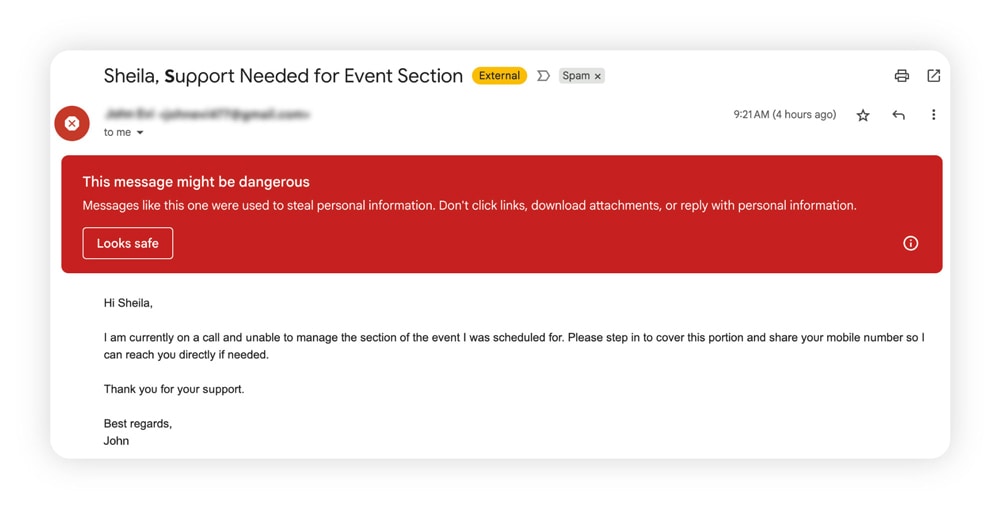
Phishing remains scammers’ favorite weapon. They use social engineering tactics to impersonate banks, vendors, or even company executives, leveraging urgent language and fake requests to steal credentials or money.
Train your team to recognize these red flags:
- Typos or unusual formatting
- Suspicious links or attachments
- Urgent requests (especially involving money or gift cards)
- Mismatched sender addresses (like a CEO email with a sketchy reply-to address)
- AI-generated messages that look polished but contain subtle inconsistencies
Make security training ongoing, not a one-time event. Use real phishing examples, run simulated attacks, and create a culture where employees feel comfortable reporting suspicious emails. The Cybersecurity & Infrastructure Security Agency (CISA) guide is a helpful resource to share with your team.
For any request involving money or sensitive information, implement a verification policy: employees should confirm via phone or in person before taking action.
2. Make strong passwords non-negotiable
Strong passwords are crucial because weak ones are like digital paper locks: practically useless. And if your business uses “admin123” anywhere, you’re in real danger of getting hacked. To boost small business email security, enforce strong password policies.
A secure password should:
- Be at least 15 characters long
- Include a mix of letters, numbers, and symbols
- Be completely unique and not reused across accounts
- Not include anything personal (no birthdays, pet names, etc.)
Better yet, require the use of a password manager. It’s safer and easier than relying on memory or sticky notes.
3. Double up with two-factor authentication
Even the strongest password won’t stop a hacker if it’s leaked or stolen. That’s where 2FA (two-factor authentication) comes in.
2FA adds a second obstacle to your inbox, typically a code sent to your phone or generated by an app. So even if a hacker grabs your login, they can’t get in without that second step.
Most email platforms, such as Gmail and Outlook, offer easy 2FA setup. Make it mandatory for every team member and every app that touches your email ecosystem.
4. Lock it down with email encryption
Email encryption scrambles messages so only the intended recipient can read them. It protects client data, financial info, contracts — basically, anything a cybercriminal would love to steal.
Some platforms, such as Microsoft 365 and Gmail, have built-in encryption. You can also explore additional tools for added layers of protection and learn how to encrypt email securely.
Email encryption also has the added benefit of helping you stay compliant with industry regulations, especially if you’re handling client data.
5. Let email filters do the heavy lifting
You don’t have to fight off phishing emails alone. Spam filters and malware scanners are your inbox’s secret bouncers.
Modern filters can:
- Block suspicious senders
- Flag spoofed domains
- Scan attachments for malware
- Quarantine suspicious messages for review
To improve your phishing protection, make sure your email client’s filtering features are turned on and tuned up.
6. Don't let coffee shop WiFi cost you everything
Many prefer remote work now, but public WiFi networks pose serious security risks.
Attackers frequently target coffee shops, airports, and other public hotspots to intercept unencrypted data. When you log into your business email over an unsecured network, you're potentially exposing sensitive credentials and company information.
If you’re using the public WiFi, always use a virtual private network (VPN). A VPN encrypts your internet connection, keeping your business communications secure no matter where you are.
Keep your inbox safe with cybersecurity built for small businesses
Every tip in this list is easier when you have integrated security tools working together.
Norton Small Business offers a comprehensive security suite designed for small teams, including device protection, VPN services, and a password manager. These essential tools help secure your communications and protect your business, wherever your team works.
FAQs
Why does email security matter for small businesses?
Good email security protects sensitive data, maintains trust, and keeps operations running smoothly.
What are the most common email threats for small businesses?
The biggest email threats for small businesses include: phishing attacks, ransomware, malware-laden attachments, business email compromise, and account hijacking. Each of these can lead to data theft, financial loss, or reputation damage.
Do small businesses need cybersecurity tools?
Yes, even the smallest teams need layered protection. Free tools aren’t always enough. Investing in cybersecurity tools is investing in your business’s survival and longevity.
What should I do if my business email gets hacked?
If your business email gets hacked, take immediate action. Change all passwords, enable 2FA, scan devices for malware, and review your sent folder for suspicious activity. Notify your team and any affected clients as soon as possible.
Editors’ note: Our articles offer educational information and are written to raise awareness about important topics in Cyber Safety. Norton products and services may not protect against every type of threat, fraud, or crime we write about. For more details about how we research, write, and review our articles, see our Editorial Policy.







Want more?
Follow us for all the latest news, tips, and updates.