







What are tracking cookies and how do they work?
Tracking cookies store data about your clicks, searches, and scrolls — often for longer than you might expect. Learn what information they track and whether they’re dangerous. And if that constant tracking feels too invasive, get Norton AntiTrack to help regain control of your browsing with protection designed to limit trackers before they accumulate.

2025
Consumer
Security Innovator





Most websites track your online activity via cookies. They note the pages you visit, the links you follow, and the ads you click. And for most peopthird-party-cookiesle, that tracking happens quietly in the background — only 1 in 10 adults in the United States usually refuse cookies on their own devices.
That makes tracking cookies a near-universal part of browsing, whether you notice them or not. Let's break down what tracking cookies are, so that you can understand their impact on your privacy.
What are tracking cookies?
Web tracking cookies are small files that record data about your online activity, so websites and advertisers can recognize you and build a profile of your behavior over time. They log things like the pages you view, links you click, and how long you stay on a site. That information helps sites personalize content and helps advertisers decide which ads to show you next.
First vs. third-party cookies
When people ask what a cookie is, they’re often trying to understand who’s tracking them and how. Tracking cookies fall into two groups:
- First-party cookies: These are set by the site you’re visiting. They track your activity only on that site, and can remember things like your username, language, and site preferences.
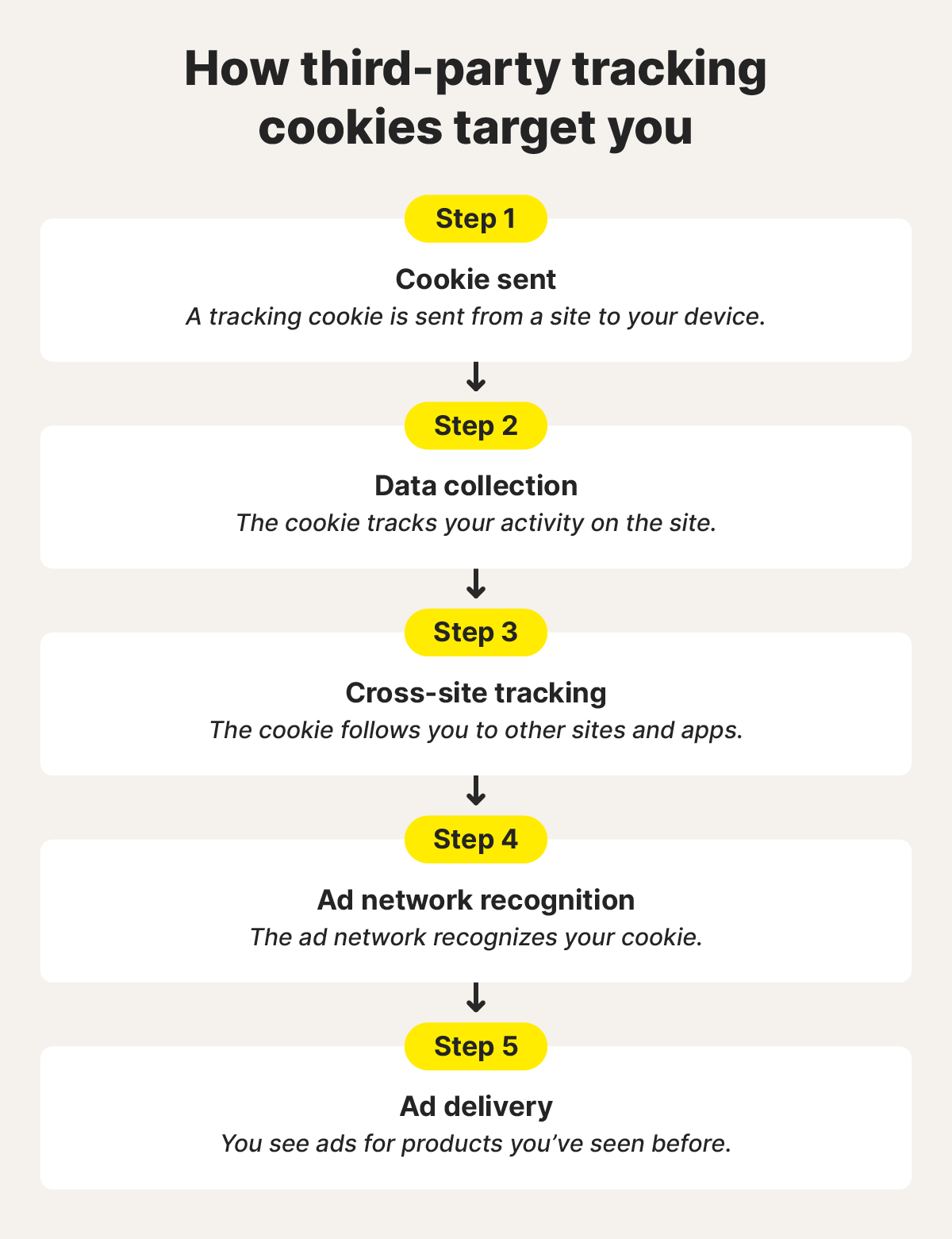
- Third-party cookies: These are set by outside domains. They track you across multiple sites, which allows advertisers to follow your browsing activity beyond a single website.
What information do tracking cookies collect?
Tracking cookies collect broad categories of data about how you browse, what device you use, and where you’re connecting from. The goal is to build a clearer picture of your habits, so sites and advertisers can tailor content, offers, and ads to you over time.
Here are some more details on what cookies track:
- Browsing activity: Records the sites and pages you visit, your search history, links you click, ads you’ve already seen, and purchases or items you viewed but didn’t buy.
- Device and browser information: Identifies and stores information about your device type, operating system, browser, and screen size so pages and ads display correctly.
- Network and location data: Captures technical details, such as your IP address, internet service provider, and general location, including your city or state.
How do tracking cookies work?
Tracking cookies work by placing a small identifier in your browser that lets sites recognize you as you move around online. That identifier connects your activity across visits, which is how cookies track you without needing your name or email.
Here’s what goes on behind the scenes:
- Unique ID creation: A site drops a cookie with a unique ID into your browser the first time you visit. That ID acts like a claim ticket your browser hands back on future visits.
- Data collection: As you browse, the cookie logs actions, such as pages viewed, clicks, and items added to a cart, and ties them to your ID.
- Site tracking: First-party cookies track activity on a single site, while third-party cookies can follow you between different sites.
- Profile building and targeting: With third-party cookies, collected data is combined to predict interests and decide which ads are most relevant to you.
Imagine shopping for noise-canceling headphones. You read reviews, compare prices, then leave without buying. Later, while checking the weather or scrolling a news site, you see ads for the same headphones. That trail is carried by tracking cookies moving between sites, which is why understanding whether you should accept cookies matters when you browse.
Are tracking cookies dangerous?
While tracking cookies won’t harm your device, they could be considered a danger to your privacy if they collect more information than you realize or share it more widely than you expect. They can quietly build a detailed record of your browsing habits over time, giving advertisers more information than you want them to have.
In other words, the risk presented by cookies concerns privacy rather than security. Tracking cookies are designed to track your online activities, including where you go, what you interact with, and how frequently you return. That data being shared across sites or sold to third parties may impact your privacy — a concern which might be amplified if you lack visibility or control over how your information is handled.
Even when cookies are blocked, some sites turn to browser fingerprinting, which uses device and browser details to continue tracking you in less obvious ways. This is why blocking cookies alone doesn’t always stop tracking — and why modern privacy tools like Norton AntiTrack focus on disrupting tracking methods beyond cookies.
Do any laws regulate tracking cookies?
Yes, several internet data security laws regulate tracking cookies, but the United States doesn’t have a single federal law that governs them across the board. Instead, regulation comes from a mix of state laws and sector-specific rules, with different standards depending on where you live and the type of data involved.
Here’s how the main laws apply:
- California Privacy Rights Act: The CPRA gives California residents the right to know what data is collected, opt out of data sharing or selling, and request data deletion. Cookies fall under this law when they identify or profile users.
- Other state privacy laws: States such as Virginia, Colorado, Connecticut, and Utah have enacted privacy laws that require transparency and grant users more control over how their data, including cookie data, is collected and shared.
- Health Insurance Portability and Accountability Act: HIPAA restricts how cookies and other tracking tools can be used on healthcare websites when they could reveal or be linked to protected health information, with recent guidance emphasizing stricter oversight of third-party trackers.
- General Data Protection Regulation (Europe): GDPR requires clear consent before using most tracking cookies, and gives users strong rights to access, delete, or limit how their data is used. While it’s an EU law, it also applies to U.S. websites that collect data from people in Europe.
On the browser side, Google has officially reversed its plan to phase out third-party cookies in Chrome. Instead, Chrome will maintain its current approach and allow users to manage third-party cookies through the “Privacy and security” settings. Google also states it will continue to enhance tracking protections in Chrome’s Incognito mode.
How to block tracking cookies
You can block tracking cookies by using built-in browser controls or privacy-focused tools designed to reduce or stop tracking at the source. Norton Private Browser blocks many tracking cookies automatically, for example, while Norton AntiTrack actively disrupts tracking techniques that try to follow you across sites, even when cookies are blocked.
Websites
Most websites show a cookie pop-up when you visit for the first time. This gives you options to accept, reject, or customize tracking. Some of these pop-ups let you disable third-party cookies while keeping essential ones active. Taking a moment to adjust those settings can limit tracking before it starts.
Google Chrome
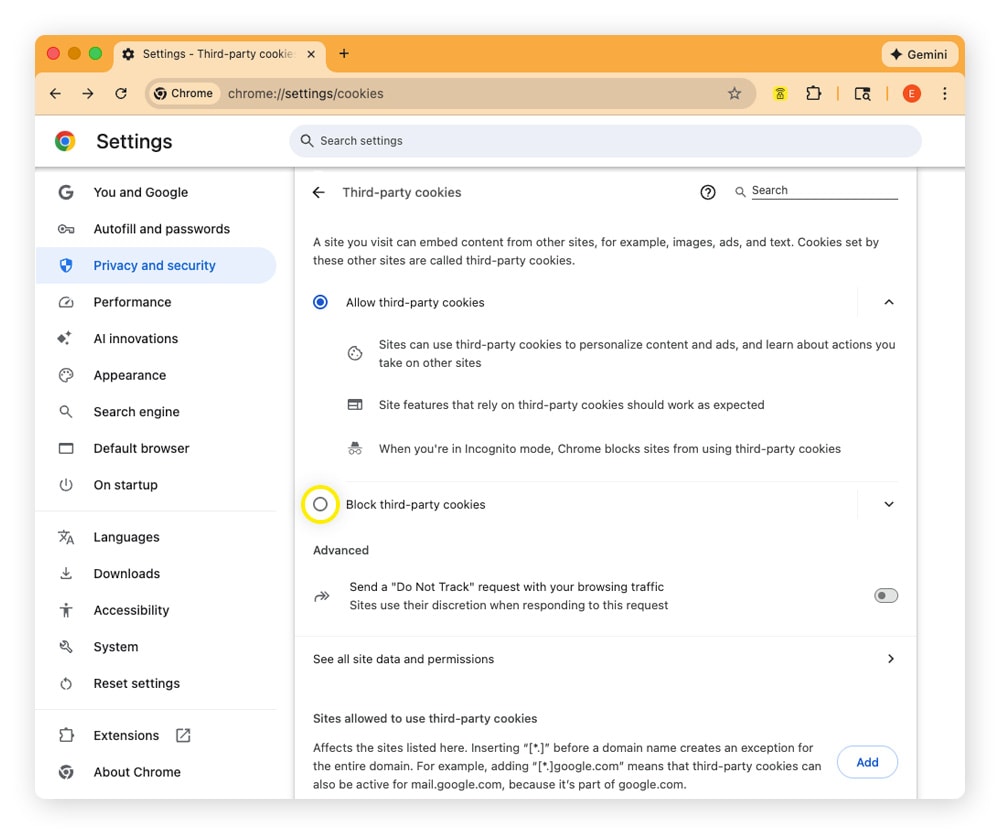
Google Chrome lets you block tracking cookies directly from its privacy settings, and it only takes a few clicks.
Here's how to block tracking cookies on Chrome:
- Open Google Chrome.
- Click the three-dot icon at the top right of your screen and select Settings.
- Choose Privacy and security from the menu on the left-hand side.
- Click Third-party cookies.
- Turn on Block third-party cookies.
Safari
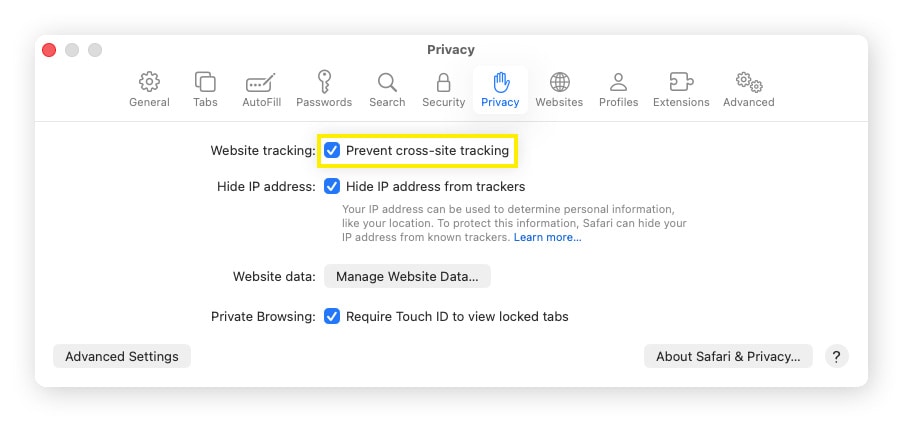
Safari includes built-in tools to block tracking cookies, all located in the Privacy settings. You can manage cookie behavior and tighten tracking limits in one place.
To block tracking cookies on Safari:
- Open Safari.
- Select Safari from the menu bar and click Settings.
- Choose the Advanced tab, then check Block all cookies.
- Choose the Privacy tab, then check Prevent cross-site tracking.
It can also help to clear your cache on Macs to start fresh, and to delete cookies on iPhones to clear previously stored tracking information.
Microsoft Edge
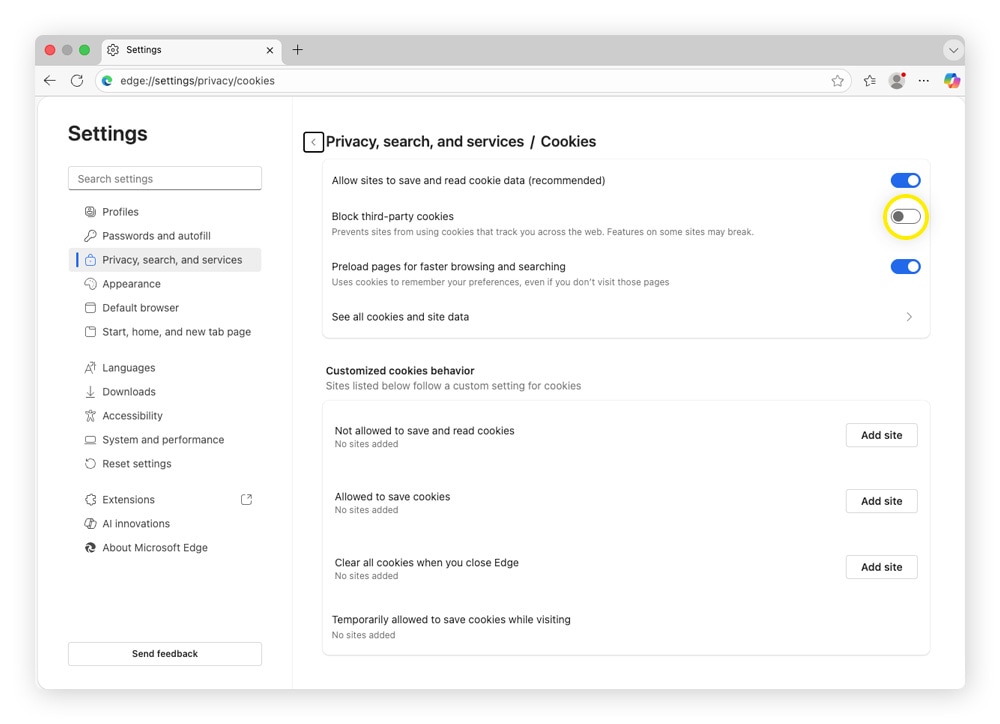
Microsoft Edge allows you to block tracking cookies through its cookie and site permission settings. The option is easy to find and works across all sites you visit.
Here’s how to do it:
- Open Microsoft Edge.
- Select the three-dot icon in the upper-right corner, and choose Settings.
- Choose Privacy, search, and services, then Cookies.
- Toggle on Block third-party cookies.
Firefox
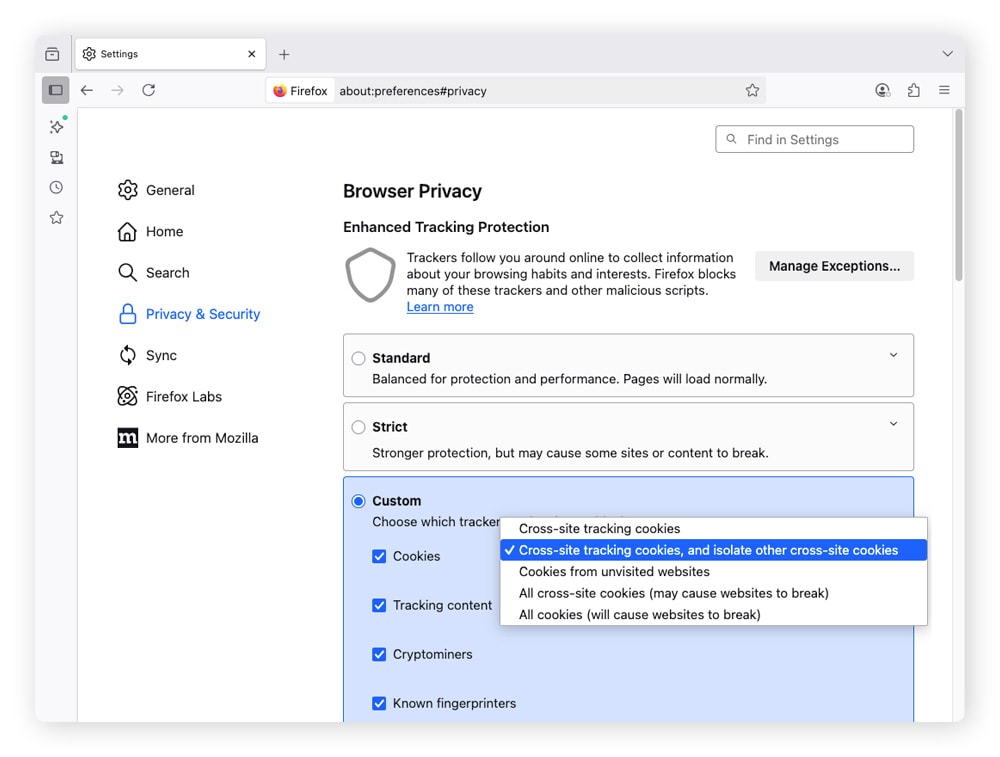
Firefox lets you fine-tune how cookies behave across sites. The options are grouped under Enhanced Tracking Protection.
Follow these steps to block tracking cookies in Firefox:
- Open Firefox.
- Click Firefox in the menu bar and select Settings.
- Select Privacy & Security.
- Under Enhanced Tracking Protection, choose Custom.
- Check Cookies, then use the drop-down menu to choose an option with Cross-site tracking cookies.
Norton Private Browser
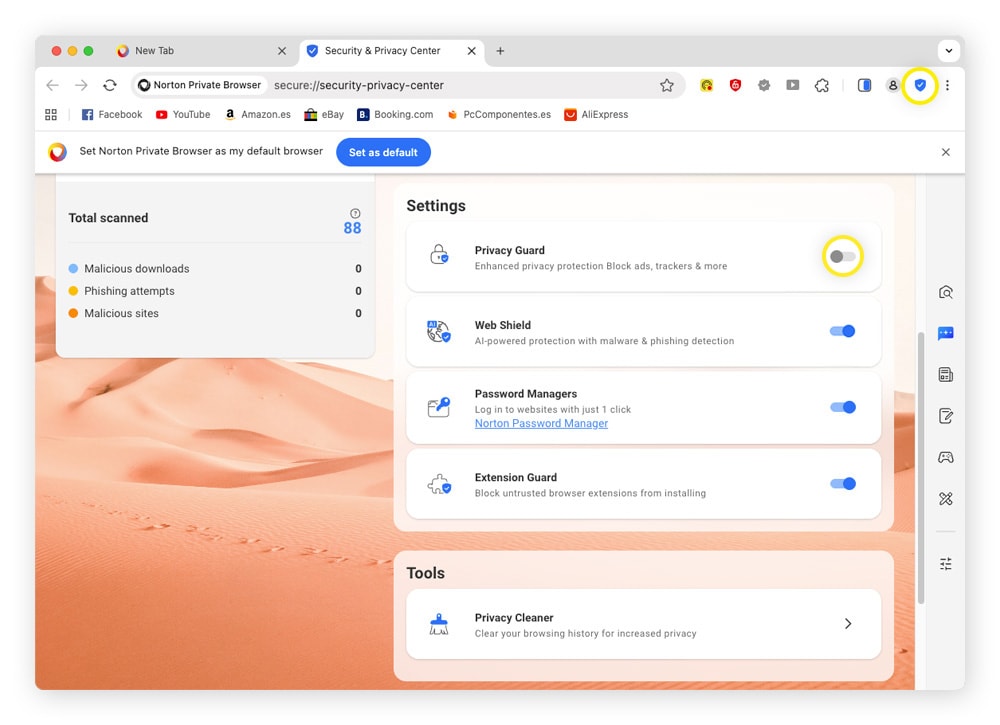
Norton Private Browser includes built-in privacy controls that limit tracking cookies by default, so there’s less to manage manually. You can review and adjust cookie settings directly from the browser’s privacy menu.
To block tracking cookies on Norton Private Browser:
- Open Norton Private Browser.
- Click the shield icon in the top-right corner.
- Scroll down to Settings and toggle on Privacy Guard.
How to remove tracking cookies
You can remove tracking cookies by clearing stored site data in your browser settings. This wipes out saved identifiers tied to ads and browsing behavior, so websites set new cookies the next time you visit. To clear cookies, head to your browser’s privacy menu.
Here’s how to delete tracking cookies on some popular browsers:
How to delete tracking cookies |
|
|---|---|
Chrome |
|
Safari |
|
Edge |
|
Firefox |
|
Norton Private Browser |
|
Browse with fewer tracking cookies and more control
Each website you visit can store its own cookies. Over time, those cookies link your visits, searches, and clicks into a neat trail that becomes part of your digital footprint.
If you’d like to go beyond tracking cookie removal by disguising your digital fingerprint and footprint to browse the web more anonymously, Norton AntiTrack can help. It integrates seamlessly with your existing browser, so you can browse with more control, without sacrificing speed.
FAQs
Can cookies track you without consent?
Yes, cookies can sometimes track you without consent. Essential cookies may load automatically, and consent rules vary by region. However, many sites are required to obtain consent or allow users to opt out before using tracking cookies tied to advertising or profiling.
What does “Do Not Track” mean?
Do Not Track (DNT) is a browser setting that sends a signal to websites indicating that you don’t want your online activity tracked. It’s a request, not a rule, and sites can choose whether or not to honor it.
Are tracking cookies illegal?
No, tracking cookies are not illegal, but their use is regulated in many areas. Sites must clearly explain what cookies they use, show a consent notice, and give users the option to accept, reject, or withdraw permission.
Are tracking cookies spyware?
No, tracking cookies aren’t spyware because they don’t secretly install themselves on, or damage, your device. Spyware is a type of malware designed to collect personal data without your knowledge or consent.
What happens if I block all cookies?
Blocking all cookies can make browsing less convenient. You may need to sign in every time you visit a site, and location-based or personalized content may stop working.
Editors’ note: Our articles offer educational information and are written to raise awareness about important topics in Cyber Safety. Norton products and services may not protect against every type of threat, fraud, or crime we write about. For more details about how we research, write, and review our articles, see our Editorial Policy.







Want more?
Follow us for all the latest news, tips, and updates.