







Ransomware decryption tools
Using ransomware, hackers can lock up your important files, threatening to destroy them or leak your sensitive information if you don’t pay a fee. Fortunately, some strains of ransomware can be cracked. Peruse this list of free ransomware decryption tools, then get Cyber Safety software to get proactive protection against future ransomware infections.







- Akira
- Atom Silo & LockFile
- BianLian
- Conti
- DoNex
- Fonix
- FunkSec
- HermeticRansom
- HomuWitch
- Jigsaw
- MafiaWare666
- Mallox
- Midnight
- Prometheus
- Rhysida
- TargetCompany
- TaRRaK
- How to use ransomware decryption tools
- What not to do when decrypting your files
- What if no ransomware decryptor works?
- Get proactive ransomware protection
- FAQs
Free ransomware decryption tools can help you recover your hostage files without paying a ransom. But, success depends on the specific ransomware involved, because not all ransomware strains can be decrypted. Browse this list of free ransomware decryption tools to see the signs of infection for common strains and download a free decryptor.
To use the ransomware decryption tools provided on this page, first scan your device for malware to help neutralize lingering threats. Then, determine which kind of ransomware encrypted your files using the information in this article, and download the corresponding decryptor, carefully following the on-screen instructions in the decryptor wizard. You can find more detailed instructions below. Read on for more information about common decryptable (or partially decryptable) ransomware strains.
Akira
Akira ransomware first appeared in March 2023. A ransomware decryptor for it was published by cyberthreat researchers at Gen Digital (the company behind Norton) in June of the same year, prompting the group behind Akira to fix the bug that made this ransomware decryptable. As such, newer strains of Akira may not be decryptable. If the decryptor provided below doesn’t work, you can reach out to Norton.
Filename changes
Files encrypted by Akira ransomware typically have one of the following filename extensions:
- .akira
- ._akira_.
- .nmh
Ransom note
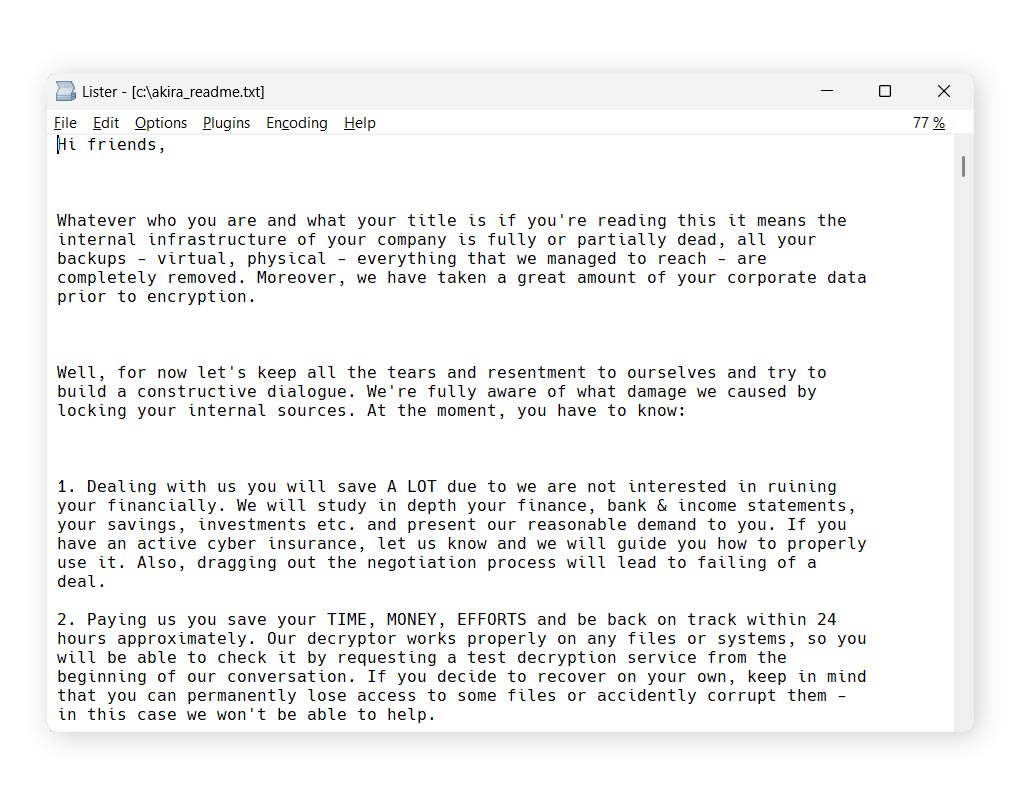
If your files have been encrypted using Akira, you should be able to find a ransom note file named akira_readme.txt in each encrypted folder. You can see an example below.
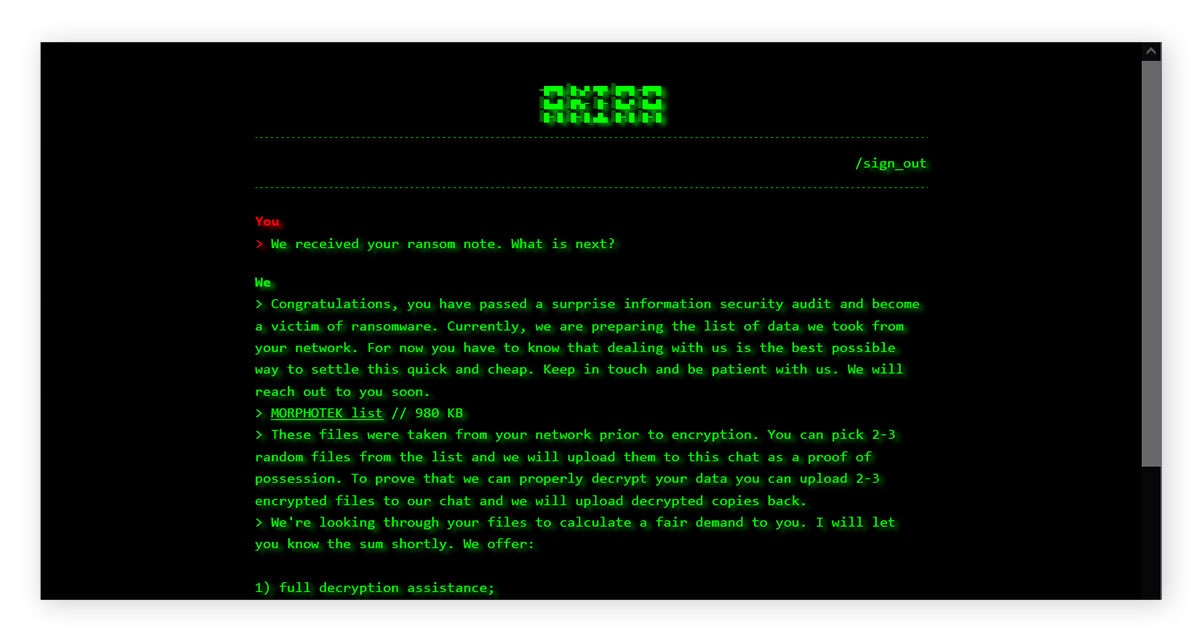
This note typically contains an onion link to a Tor server that may contain more information about the encrypted data. To access this Tor server, enter the password contained in the ransom note.
Click the link below to download an Akira ransomware decryptor.
Atom Silo & LockFile
Atom Silo and LockFile are two ransomware strains with very similar encryption schemes. As such, the decryptor provided here covers both variants. These ransomware strains were first observed in the wild in 2021. Now, both strains are presumed dead, and all variants are decryptable.
Filename changes
Files encrypted by Atom Silo or LockFile have one of the following extensions:
- .ATOMSILO
- .lockfile
Ransom note
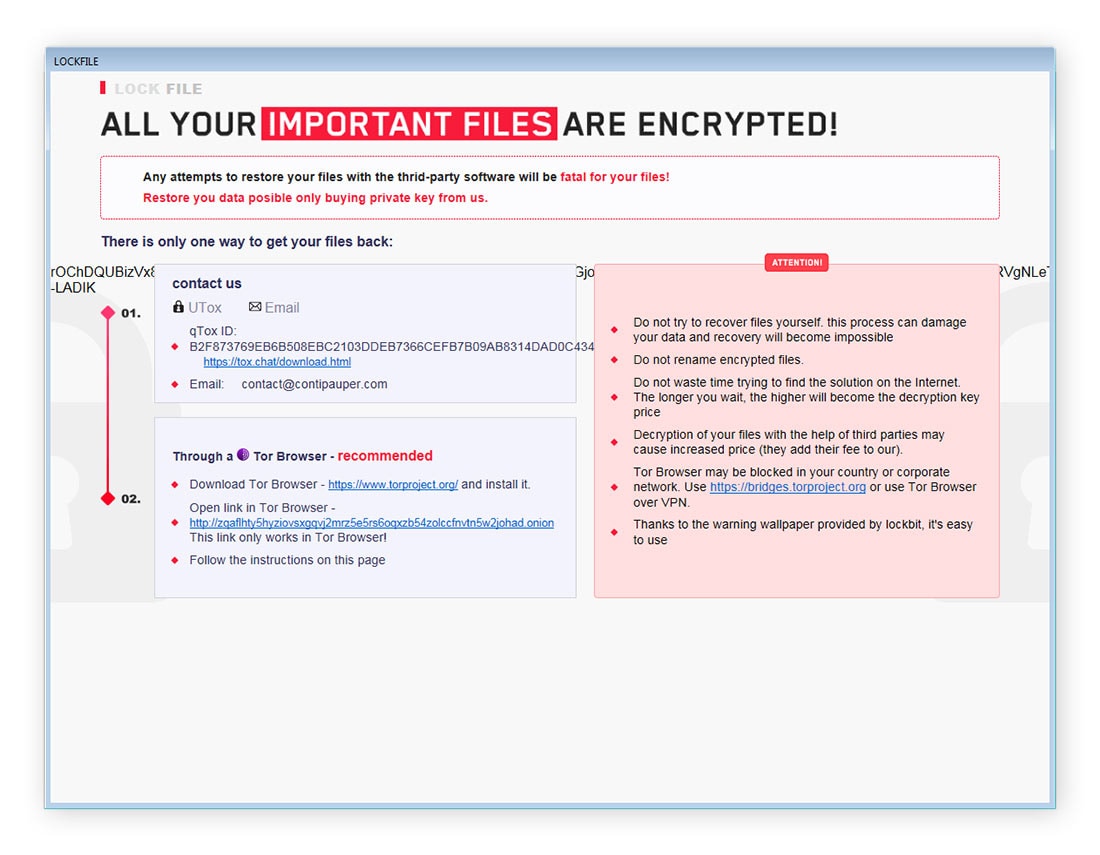
Each folder containing a file encrypted by AtomSilo or LockFile will contain a ransom note entitled README-FILE-%ComputerName%-%Number%.hta or LOCKFILE-README-%ComputerName%-%Number%.hta. The sections of the filename between the percentage symbols contain a computer name and number unique to the victim, such as README-FILE-HOME_PC-1634717562.hta. You can see an example of an AtomSilo ransom note below.

Click the link below to download the Atom Silo/LockFile ransomware decryptor.
BianLian
BianLian ransomware, which emerged in 2022, encrypts files at high speeds. The strain has targeted businesses in the media and entertainment, manufacturing, and healthcare sectors. BianLian deletes itself once file encryption is completed.
Cyberthreat researchers at Gen Digital published a decryptor for BianLian in January 2023. All variants of BianLian ransomware are currently decryptable; however, the cybercriminal group behind it has shifted its focus to data extortion attacks, threatening to breach victims’ sensitive data to the dark web, rather than lock it up or destroy it.
Filename changes
Files encrypted by BianLian ransomware typically have the .bianlian extension.
Ransom note
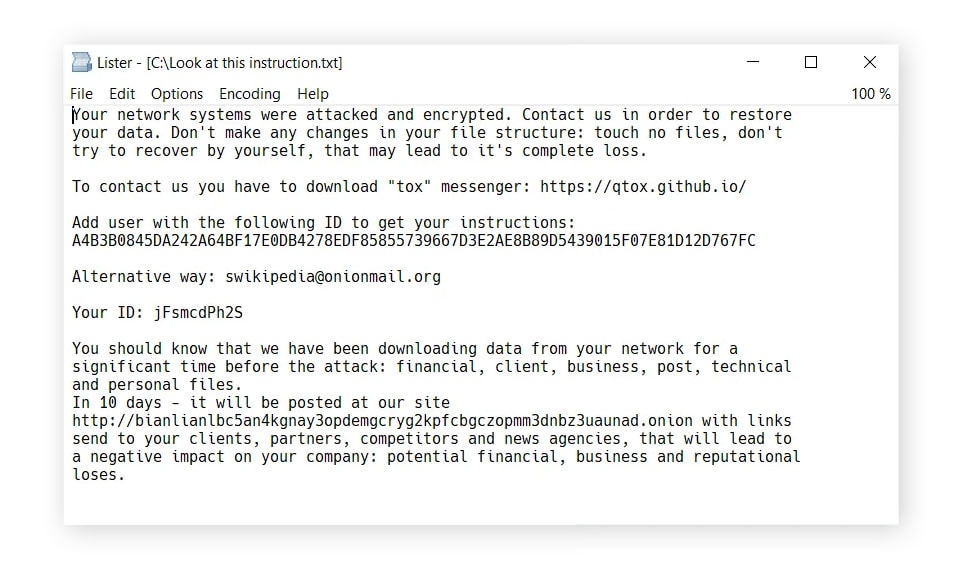
BianLian drops a ransom note called Look at this instruction.txt into each folder on the infected PC. You can see an example below.
Click the link below to download the BianLian ransomware decryptor.
Conti
Conti, also called Conti Locker, appeared around June 2020 and is believed to be a successor of an earlier ransomware strain called Ryuk 2.0. Shortly after the beginning of the full-scale Russian invasion of Ukraine in 2022, the threat actors behind Conti sided with Russia and targeted actors threatening Russian interests. In retaliation, actors aligned with Ukraine hacked the Conti gang, stealing conversations, emails, and sources for the encryptor, which they then used to create ransomware to use against Russian targets.
Our decryptor only works for Conti variants featuring the filename changes listed below.
Filename changes
The following file extensions are typical of the decryptable variants of Conti:
- .KREMLIN
- .PUTIN
- .RUSSIA
Ransom note
Early versions of Conti left ransom notes in a file called CONTI_README.txt. Later versions often use the name README.txt or readme.txt. The text of the ransom note is usually short. You can see some examples below.
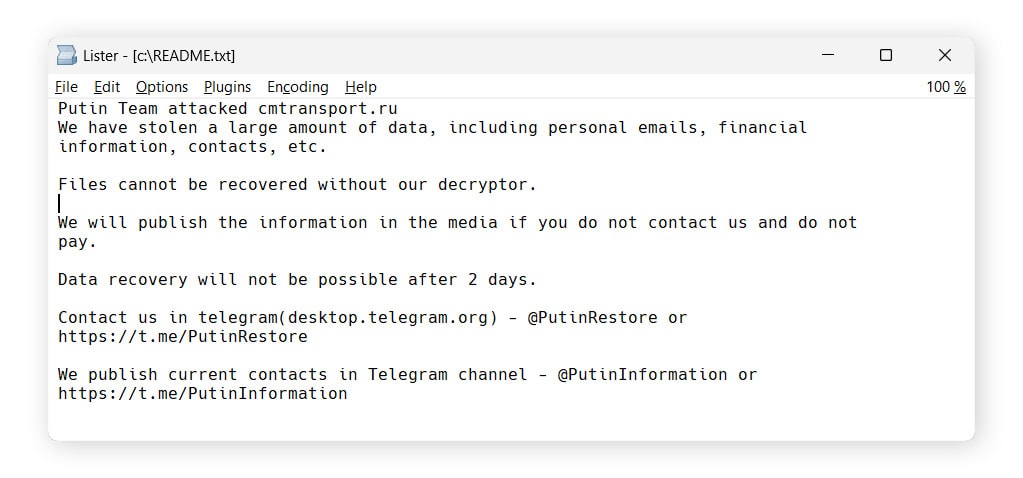
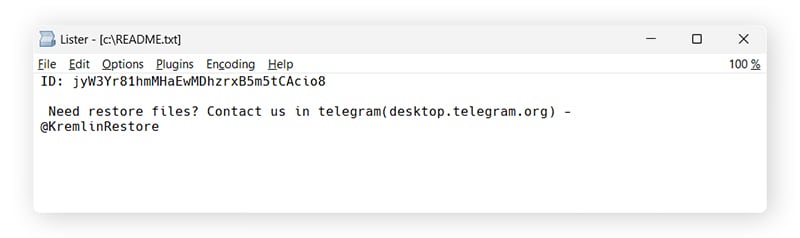
Click the link below to download a Conti ransomware decryptor.
DoNex
Previously known as Muse or DarkRace, this strain of ransomware has been circulating as “DoNex” since March 2024. The group behind DoNex ransomware also operates a data leak site on Tor. All known DoNex variants are decryptable.
Filename changes
Files encrypted by DoNex ransomware have the following extensions:
- .mu5e
- Nine random alphanumeric characters
Ransom note
The DoNex ransom note will typically be in a file named Readme or ReadMe.[nine random alphanumeric characters].txt (e.g. Readme.1as4jc89S.txt) or Recovery.html. You can see an example below.
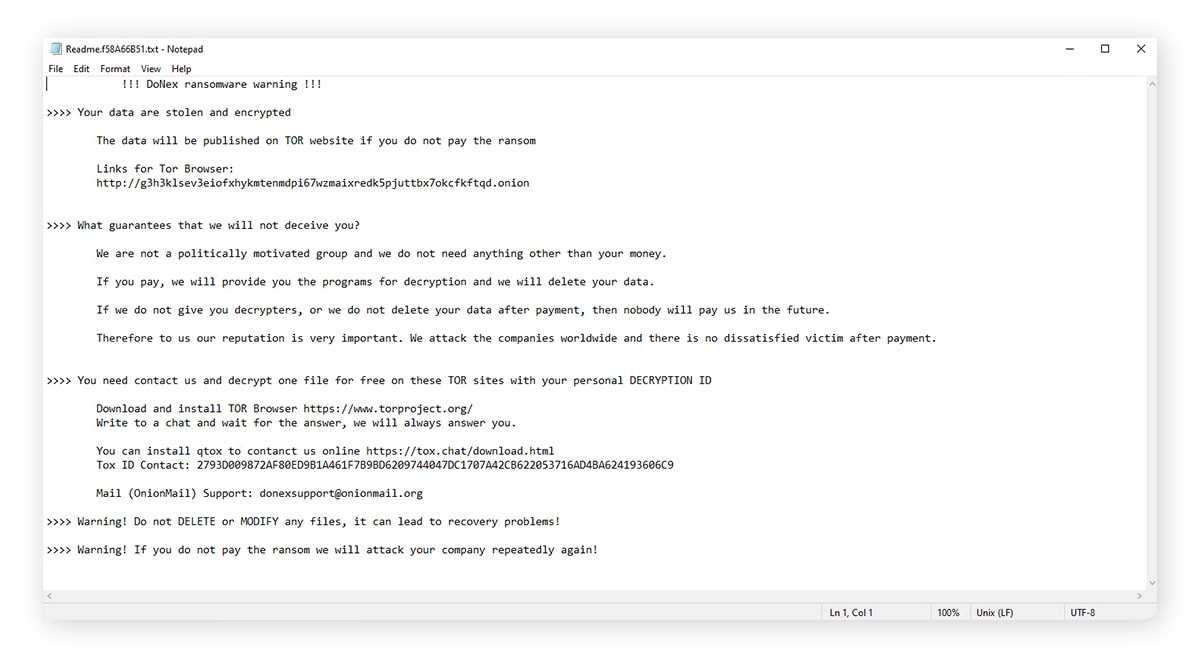
Get a DoNex ransomware decryptor by downloading the file in the link below.
Fonix
Fonix ransomware was active from June 2020 until early 2021. After shutting down, threat actors released a key that allows victims to decrypt their files for free. Since 2023, new, undecryptable variants of Fonix have appeared, but these are rare.
Filename changes
If your files were encrypted by Fonix ransomware, you will see one of these extensions added to your filenames:
- .FONIX
- .XINOF
Ransom note
After Fonix finishes encrypting files, victims will see the ransom note shown below.

If you see these signs of infection, there’s a good chance your files can be recovered using the free Fonix ransomware decryptor.
FunkSec
FunkSec is a strain of malware that first appeared in 2024. According to ransomware researchers at Gen (Norton’s parent company), the group behind FunkSec is notable for its use of AI to create malicious tools and phishing templates. Perhaps unsurprisingly for “AI slop,” many samples of this ransomware failed to work at all. All known variants of this ransomware strain, which was only active for three months, are decryptable.
Filename changes
Files encrypted by FunkSec ransomware have the .funksec extension.
Ransom note
A ransom note called README-{random}.md with a random string of numbers and letters will be dropped into every folder. You can see examples of encrypted files and the FunkSec ransom note below.
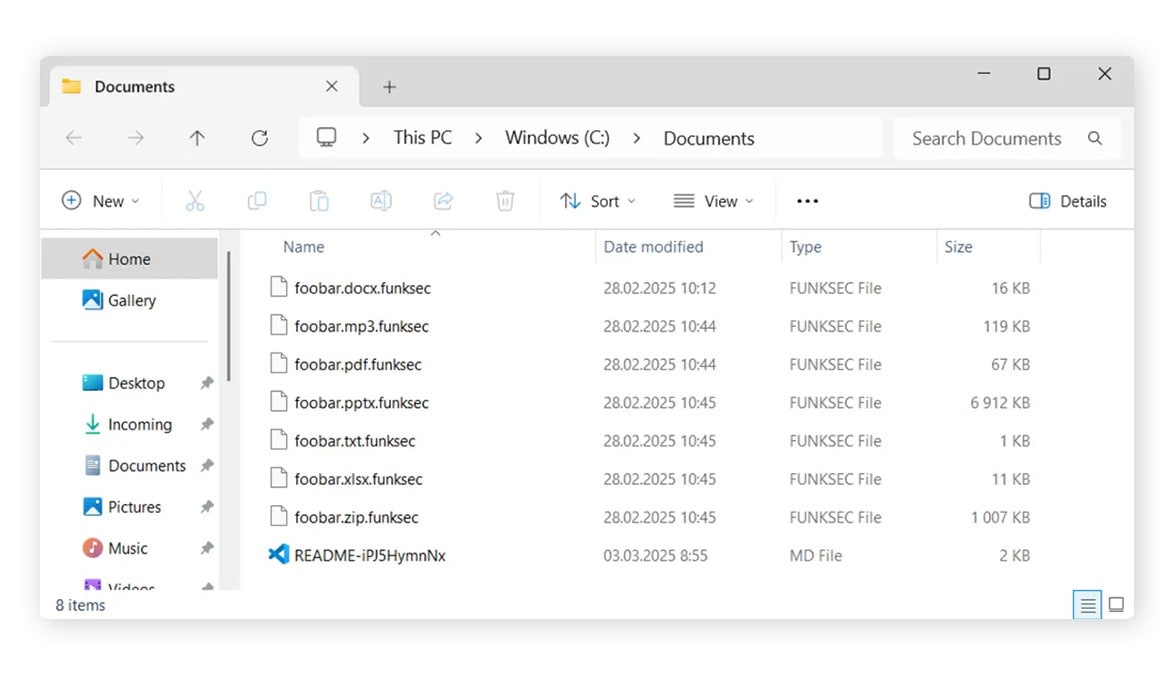

Click the link below to download the FunkSec ransomware decryptor.
HermeticRansom
According to research from Gen, HermeticRansom is a ransomware strain that was particularly prominent in Ukraine following Russia’s invasion. Gen published a free decryptor for HermeticRansom in March 2022. All known variants are decryptable.
Filename changes
Files encrypted by HermeticRansom typically have the following extension:
- .[vote2024forjb@protonmail.com].encryptedJB
Ransom note
A file named read_me.html containing a ransom note is left on the user’s desktop. You can see an example below.

Click the link below to download the HermeticRansom ransomware decryptor.
HomuWitch
A relatively rare strain, HomuWitch ransomware first appeared in July 2023, according to research by Gen. HomuWitch primarily targets individuals, rather than companies or institutions. The ransom demand, which is requested in Monero cryptocurrency, is small: usually between $25 and $70. All known variants of HomuWitch are decryptable.
Filename changes
HomuWitch appends the .homuencrypted file extension to the files it encrypts.
Ransom note
You can see an example of a HomuWitch ransom note below.

Click the link to download a HomuWitch ransomware decryptor.
Jigsaw
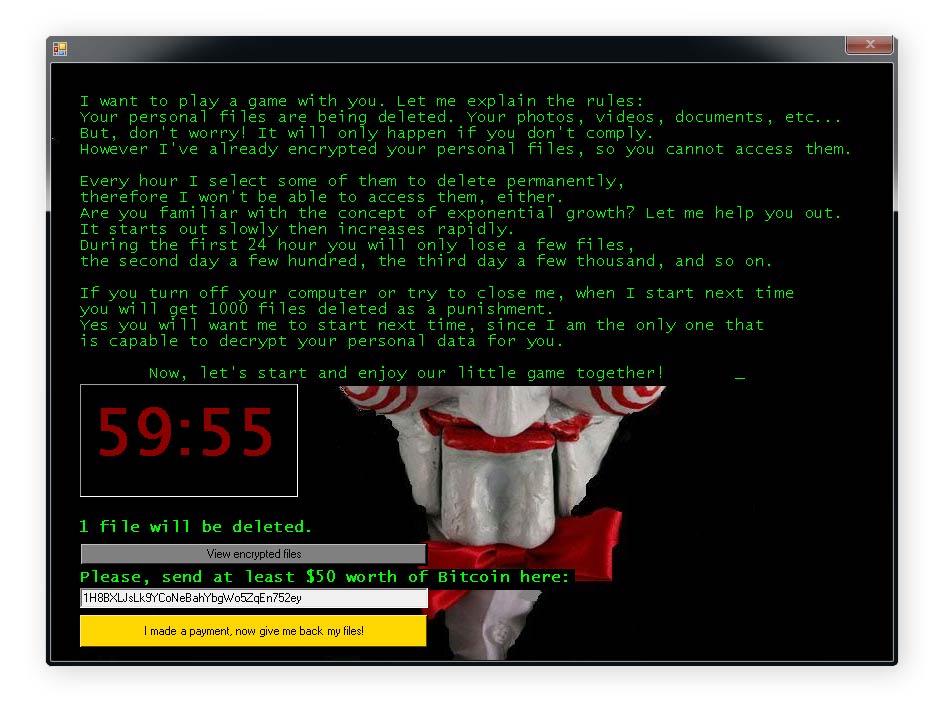
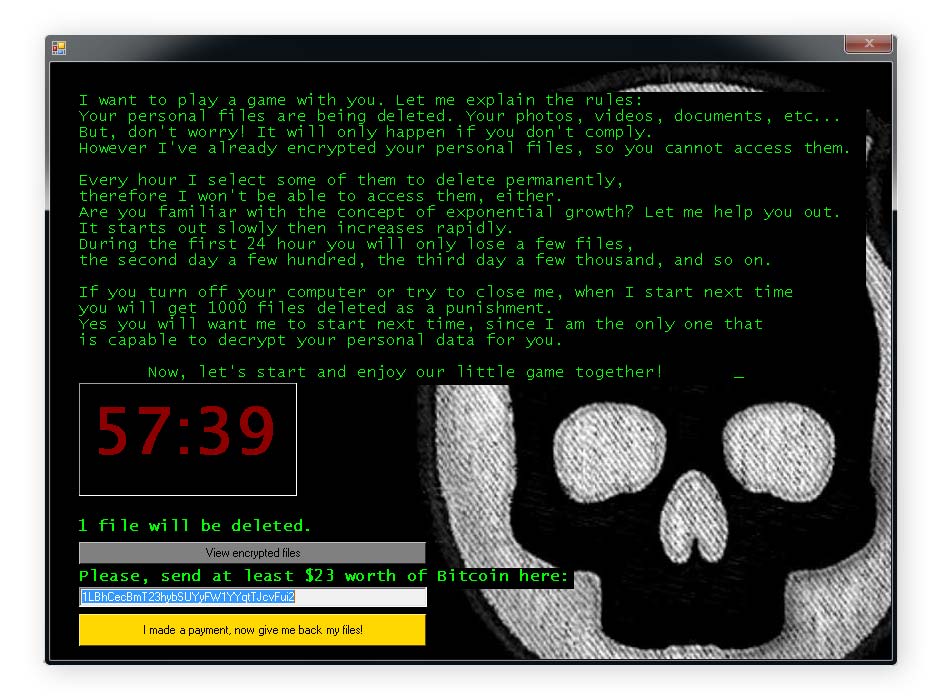
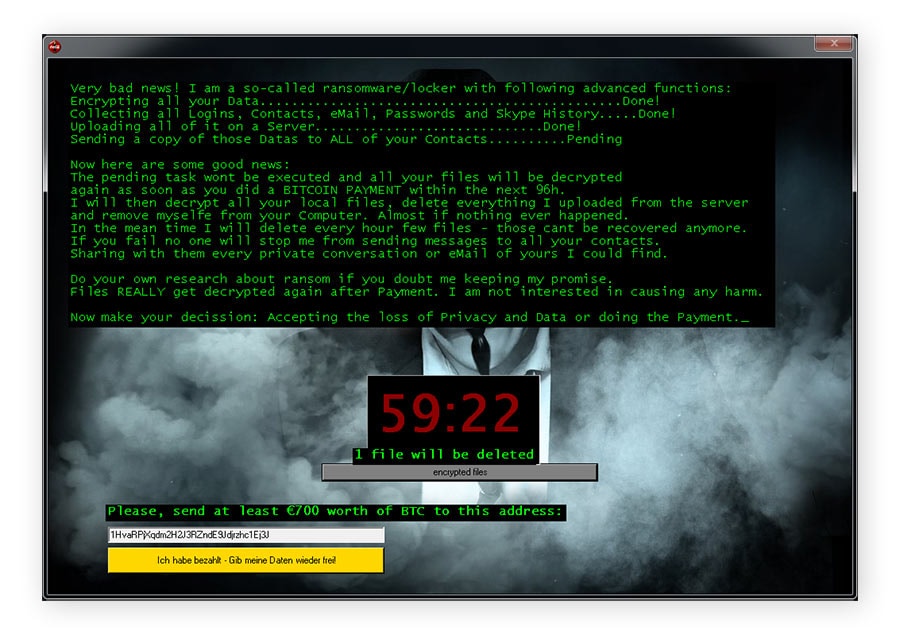
Jigsaw ransomware has been around since March 2016. Named after the “Jigsaw Killer,” a character in the Saw movie franchise, this strain gradually deletes victims’ files, with the number of files deleted increasing exponentially until the ransome is paid. All known variants of Jigsaw are decryptable.
Filename changes
Files encrypted by Jigsaw ransomware typically feature the following filename extensions:
|
|
|
Ransom note
Jigsaw ransomware victims will see a screen similar to the ones below after their files have been encrypted.



Get a fix for Jigsaw ransomware by clicking the link below.
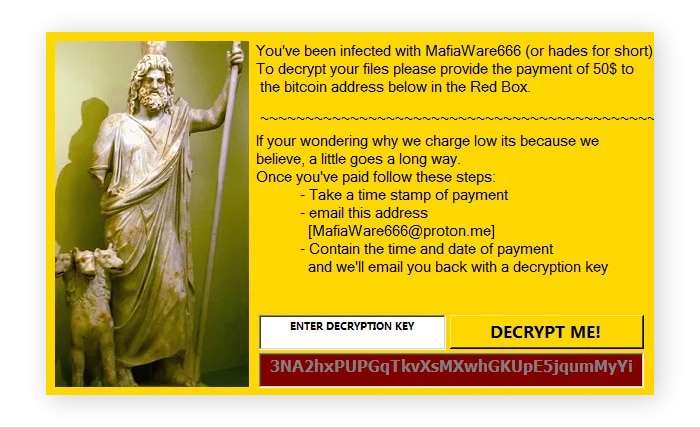
MafiaWare666
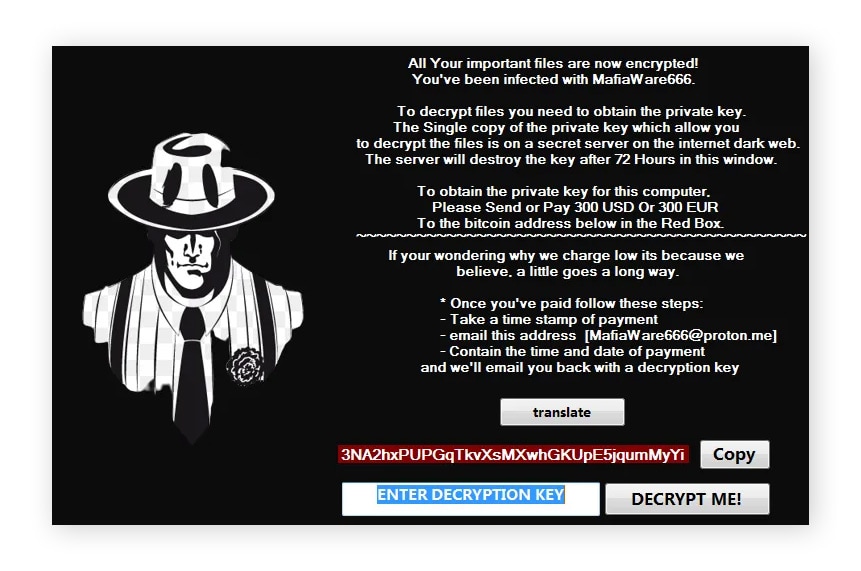
MafiaWare666 is also known as JCrypt, RIP Lmao, BrutusptCrypt, and Hades. The ransom price for the decryption key is generally between $50 and $300, although some older samples demanded much larger sums. Threat researchers at Gen, published a decryptor for MafiaWare666 in October 2022. All known variants of this ransomware strain are decryptable, and it is presumed dead.
Filename changes
Files encrypted by MafiaWare666 typically feature the following extensions:
- .MafiaWare666
- .jcrypt
- .brutusptCrypt
- .bmcrypt
- .cyberone
- .l33ch
Ransom note
Victims will typically see a window containing instructions on how to pay the ransom. You can see some examples of MafiWare666 ransom notes below.


Click the link below to download the MafiaWare666 ransomware decryptor.
Mallox
Mallox ransomware, which appeared around 2022, is a successor of the TargetCompany ransomware. Its other aliases include Fargo and Tohnichi. Two subvariants of Mallox ransomware are decryptable, but new variants that emerged after March of 2024 are not.
Mallox filename changes
Files encrypted by Mallox ransomware usually have the following extensions:
- .bitenc
- .ma1x0
- .mallab
- .mallox
- .malox
- .xollam
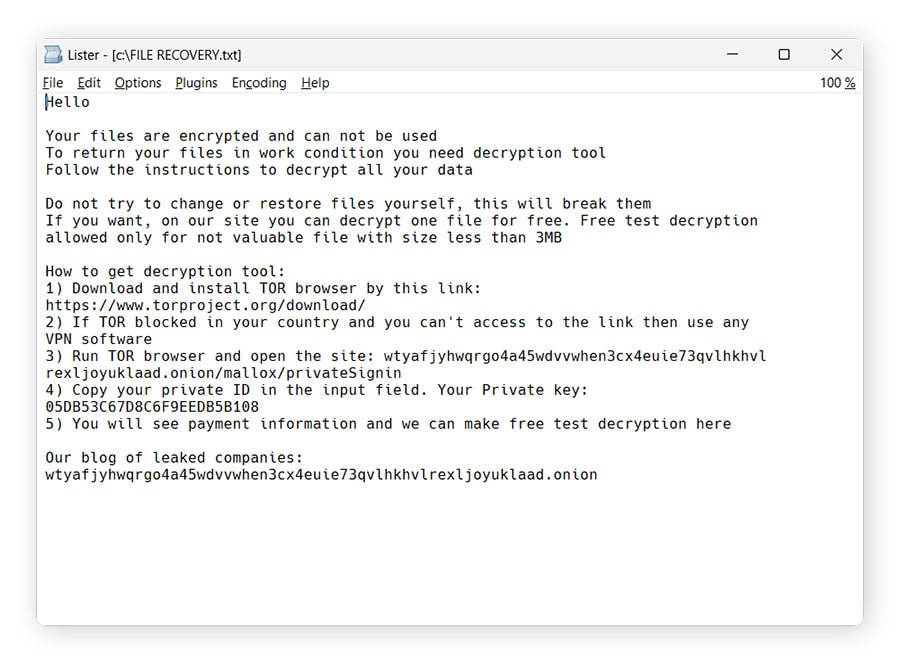
Mallox ransom note
Mallox ransom notes may be found in files named FILE RECOVERY.txt, HOW TO RESTORE FILES.txt, or HOW TO BACK FILES.txt. However, Mallox ransom notes often bear different file names, too. You can see some examples of Mallox ransom notes below.


Click the link below to download a Mallox ransomware decryptor.
Midnight
Midnight ransomware, also called Endpoint, is a relatively recent malware variant, first appearing in 2025. It normally spreads through phishing. Midnight ransomware is based on the source code of Babuk, an older Russian ransomware strain active since 2021. All known variants of Midnight ransomware can be decrypted.
Filename changes
Files encrypted by Midnight ransomware typically have the following filename extensions:
- .endpoint
- .Midnight
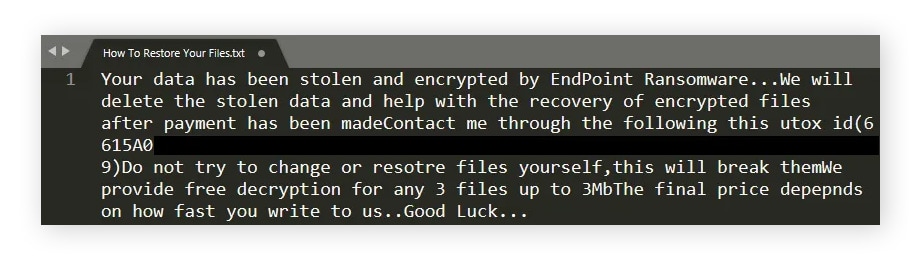
Ransom note
The ransom note can be found in a file named How To Restore Your Files.txt. You can see several examples of Midnight and Endpoint ransom notes below.

You can download a free Midnight ransomware decryptor by clicking the link below.
Prometheus
According to research published by Gen, Prometheus is a ransomware strain that encrypts available local drives. It shares a lot of code with an older strain called Thanos. Gen published a decryptor tool for Prometheus in 2022. While not all Prometheus variants can be decrypted for free, if your files have one of the extensions listed in the table below, there’s a good chance they’re decryptable.
Filename changes
Files encrypted by Prometheus ransomware typically have the extensions listed below. However, note that .locked is a fairly generic extension that may indicate a different ransomware strain, too.
- .locked
- .secure
- .secure[milleni5000@qq.com]
- .[cmd_bad@keemail.me].CRYSTAL
- .[cmd_bad@keemail.me].crypt
- .iml
- .[black_privat@tuta.io].CRYSTAL
- .BRINKS_PWNED
- .[cmd_bad@keemail.me].VIPxxx
- .[KingKong2@tuta.io].crypt
- .hard
- .harditem
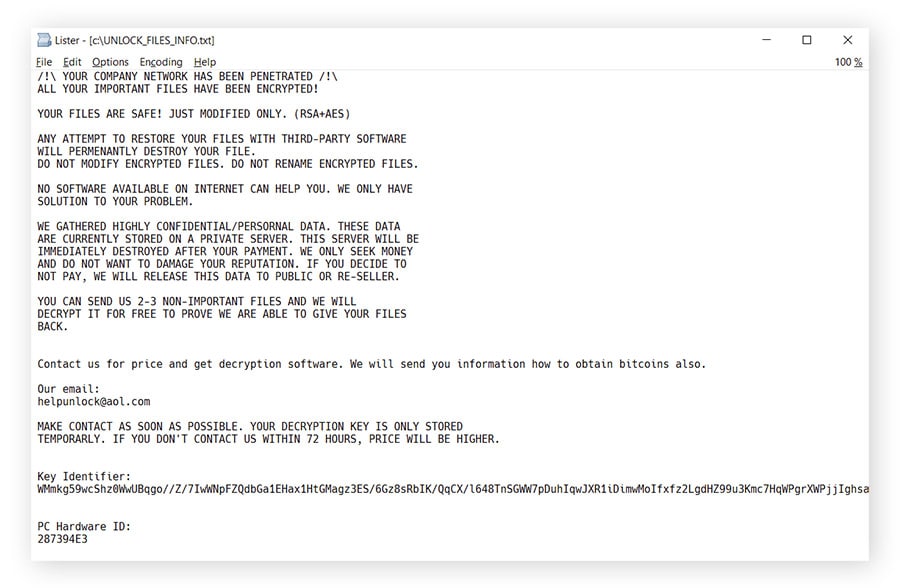
Ransom note
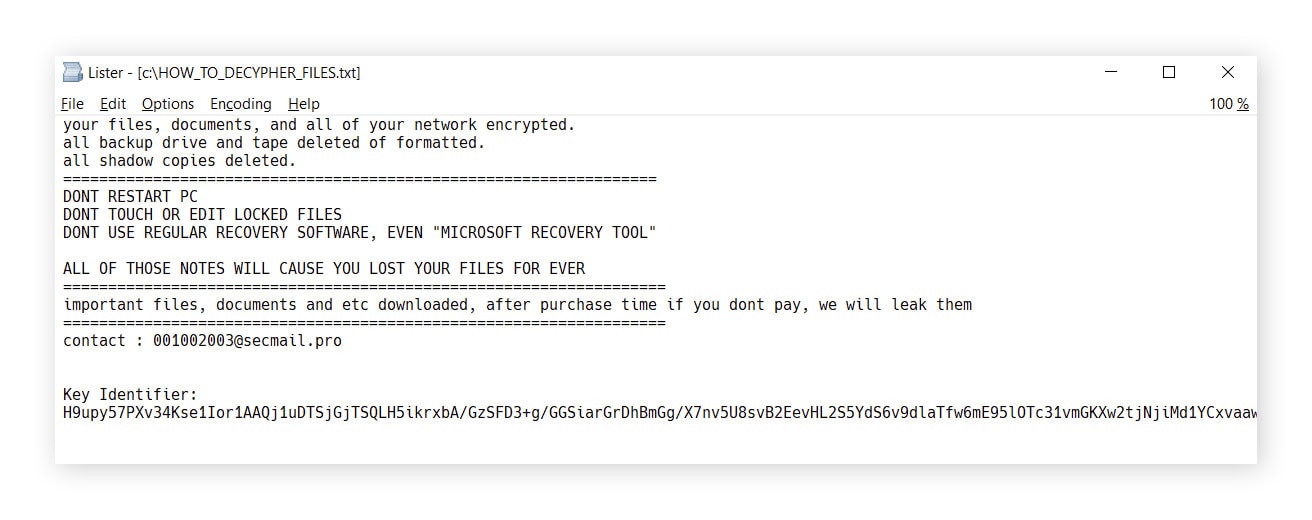
Threat researchers at Gen observed several ransome note files, which were called HOW_TO_DECYPHER_FILES.txt, UNLOCK_FILES_INFO.txt, or Инструкция.txt. You can see some examples of Prometheus ransom notes below.
Click the link below to download the Prometheus ransomware decryptor.
Rhysida
Rhysida is a ransomware strain that appeared in 2023. It operates a leak site on the Tor network, where it claims to have attacked many organizations across different sectors, including government, education, healthcare, and IT. Ransomware researchers at Gen published a free Rhysida decryption tool in February 2024.
Filename changes
Files encrypted by Rhysida ransomware feature the .rhysida extension.
Ransom note
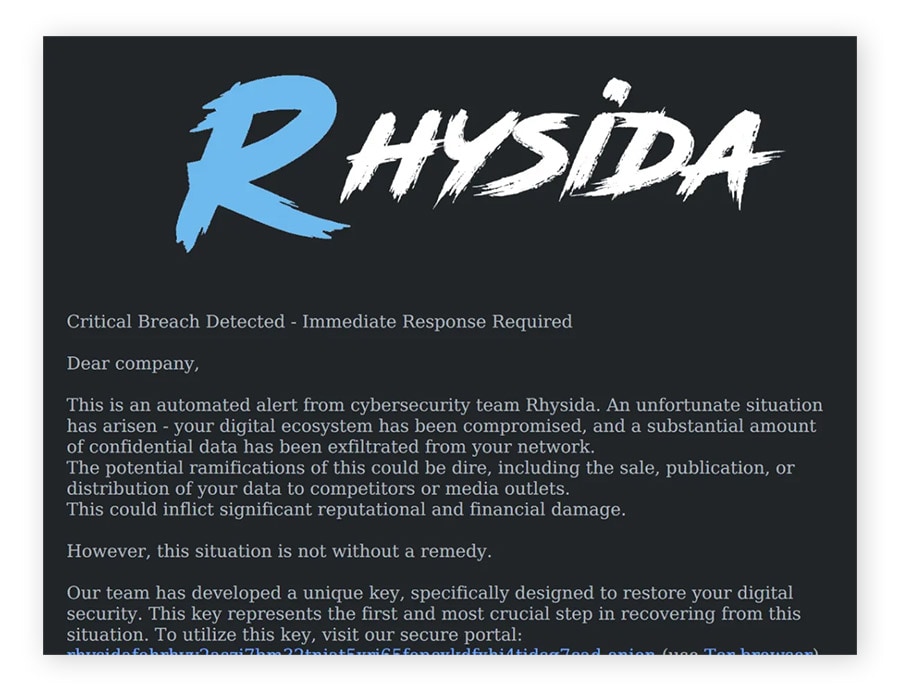
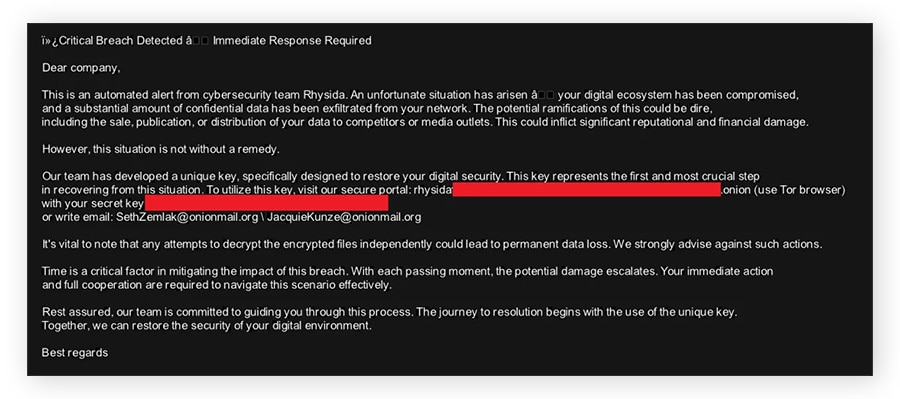
The Rhysida ransom note file is usually named CriticalBreachDetected.pdf and is dropped into each folder. Additionally, Rhysida generates a JPEG picture, which becomes the desktop background, and stores it in C:/Users/Public/bg.jpg. You can see examples of these ransom notes below.
For this decryptor to work, the tool must be executed on the same machine where the files were encrypted, and no files from another machine can be copied to the machine where the decryption process is performed. Text files must have a certain minimal size to be decryptable.
Click the link below to download the Rhysida ransomware decryptor.
TargetCompany
TargetCompany is a ransomware variant that first appeared around 2021. A free decryptor was published by Gen (the company behind Norton) in 2022. This ransomware is presumed dead, and all known versions are decryptable. Its successor is the Mallox ransomware strain.
Filename changes
Files encrypted by TargetCompany typically have the following extensions:
- .mallox
- .exploit
- .architek
- .brg
- .carone
Ransom note
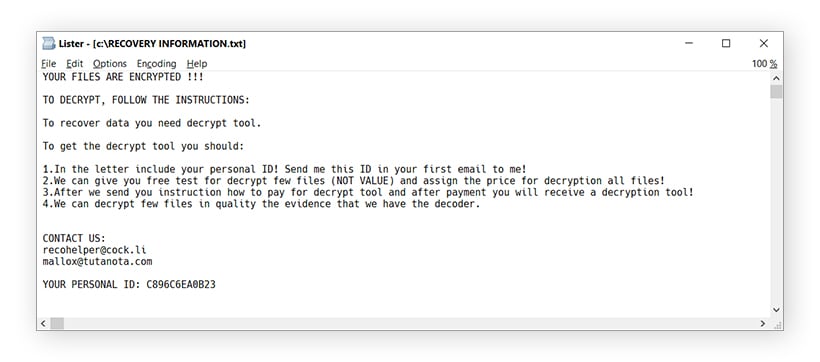
Each folder that contains an encrypted file contains a ransom note named RECOVERY INFORMATION.txt. You can see an example below.
Click the link to download the TargetCompany ransomware decryptor.
TaRRaK
According to Gen threat researchers, TaRRaK ransomware first appeared in June 2022. TaRRaK encryption features buggy code, so certain processes cause it to get stuck in an infinite loop. As of April 2026, all TaRRak variants are decryptable.
Filename changes
This ransomware strain adds the .TaRRaK extension to encrypted files.
Ransom note
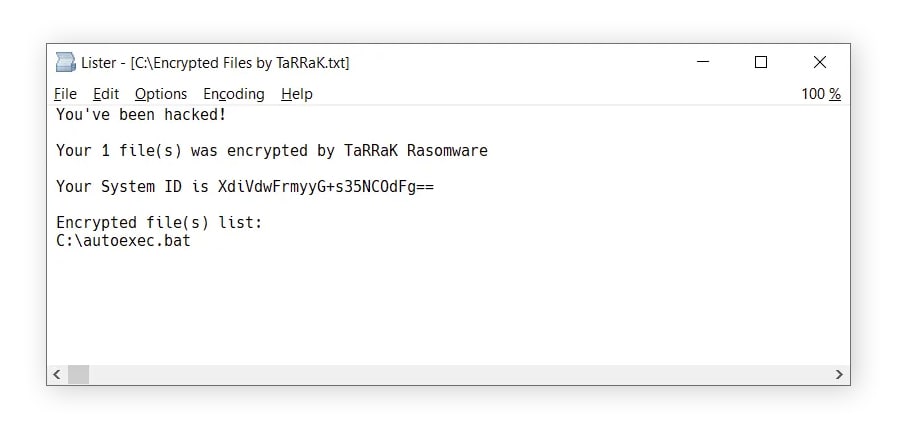
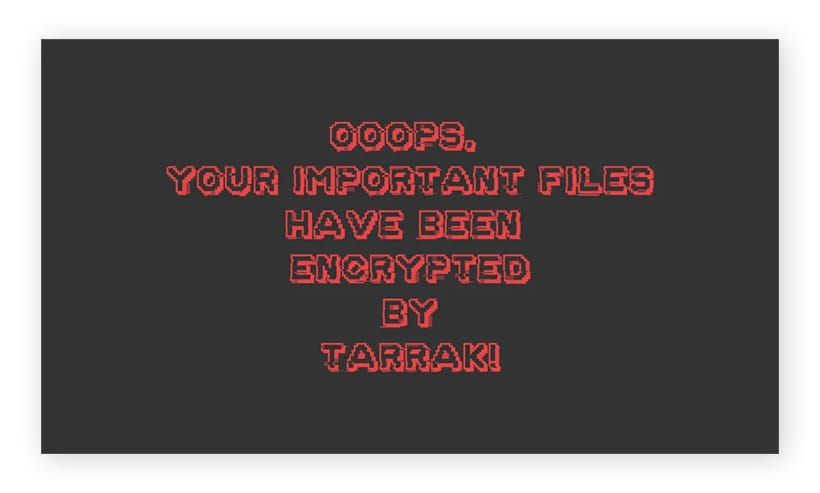
If the encryption process finishes, victims will find a ransom note named Encrypted Files by TaRRaK.txt in the root folder of each drive, and the victim’s desktop background will change. Files with the .TaRRaK extension are associated with a comb icon. You can see examples of the ransom note, new desktop background, and comb icon below.

Click the link below to download the TaRRaK ransomware decryptor.
How to use ransomware decryption tools
To decrypt your files with one of our ransomware decryptor tools, start by running a malware scan to help secure your device. Then, try to identify the ransomware strain (as you need to download the correct decryptor for it to work), run the decryptor file, and follow the on-screen instructions in the decryptor wizard.
Run a malware scan
Before starting the decryption process, run a malware scan using reputable Cyber Safety software to help neutralize ransomware on your device. While some ransomware strains delete themselves after encrypting your files, others can stay active and re-encrypt recovered data. Disconnect from the internet before scanning to help prevent the malware from communicating with its servers.
Note that malware protection software can help remove ransomware from your machine and protect you going forward, but it won’t decrypt your files, nor will it tell you which type of ransomware infected your machine.
Identify the ransomware
To decrypt your files, you first need to determine which kind of ransomware the attackers used. Reading the ransom note and looking at the names of encrypted files can help you do this, since different ransomware strains are associated with unique filename extensions, ransom notes, and, in some cases, imagery. If you’re not sure about which ransomware strain you’re dealing with, reach out to Norton for help.
Compare the ransom note and file name changes on your computer with the examples listed on this page.
Here’s how to identity which type of ransomware is on your computer:
- Use a ransomware identifier: First, try using a free tool like ID Ransomware or General Ransomware Lookup to help identify the strain. Note that these services won’t help you decrypt your files.
- Read the ransom note: Cybercriminals generally drop a ransom note with instructions on how to pay the ransom and get your files back somewhere on your computer. This may be a .txt file in folders with encrypted files or a ransom message set as your desktop background.
- Look for contact information: Google any email addresses in the ransom note. The search results may clue you in about the ransomware variety.
- Google .onion sites in the ransom note: Some ransomware groups run .onion sites (dark web websites that aren’t indexed by normal search engines) that list instructions on how to get your files back, and sometimes the leaked data of victims who didn’t pay up. Googling the .onion site, which looks like a long, complicated URL ending in .onion, can help you determine what ransomware you’re dealing with.
- Look at the names of your encrypted files: Find an encrypted file and check its filename for the new extension. For example, files encrypted by BianLian ransomware will have .bianlian added to the end of the filename. Note that this isn’t a guaranteed way to tell, as some ransomware strains may have generic filename extensions, like .locked, new extensions that aren’t on this page, or totally random extensions.
Download a decryptor
Once you have determined what kind of ransomware has encrypted your files, download a relevant decryptor from the list on this page and run the file on the infected computer, preferably as the administrator. This will launch a decryptor wizard.
Follow the instructions
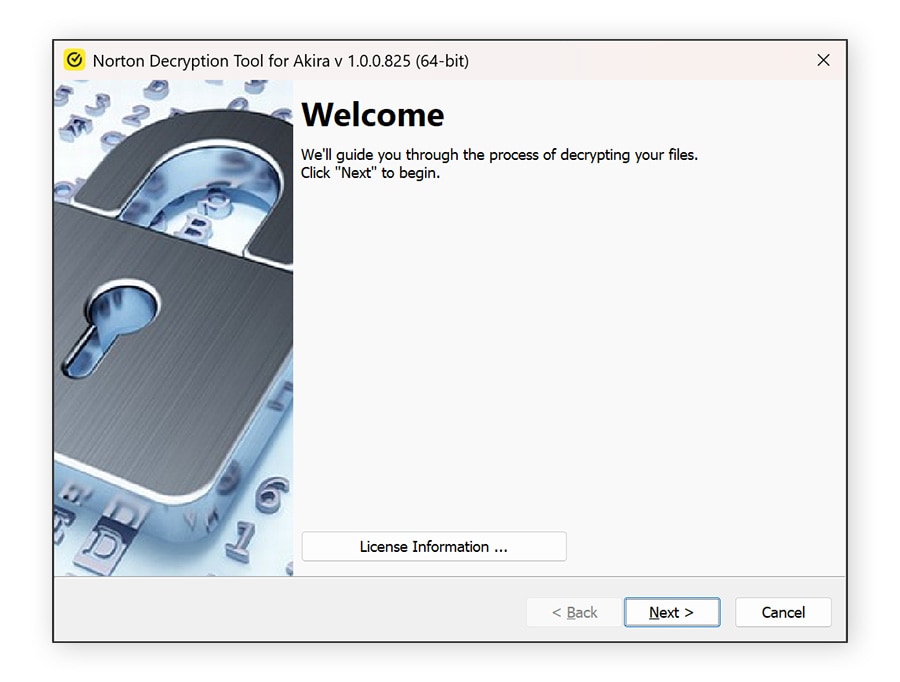
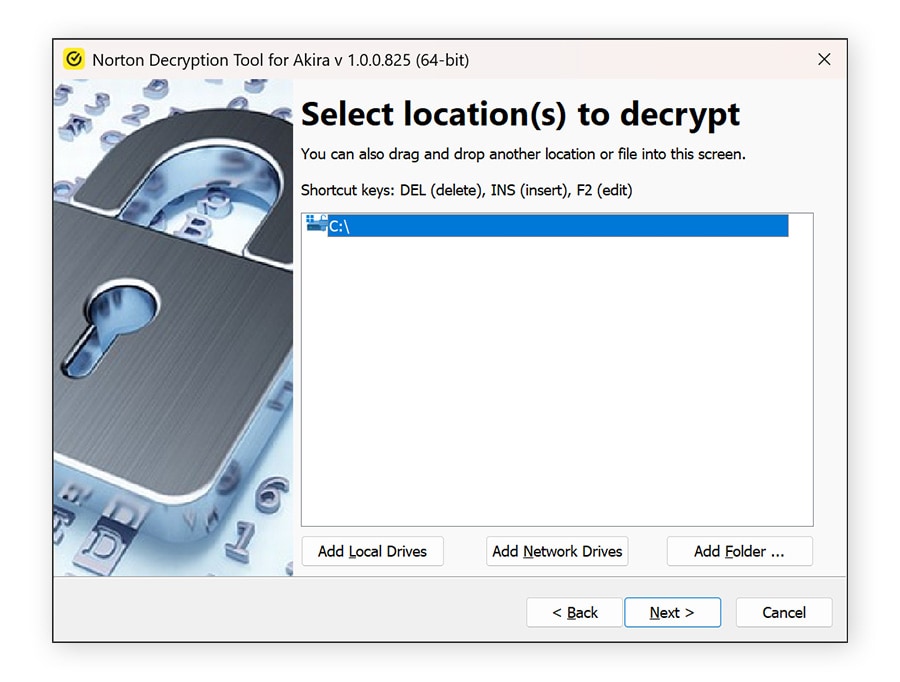
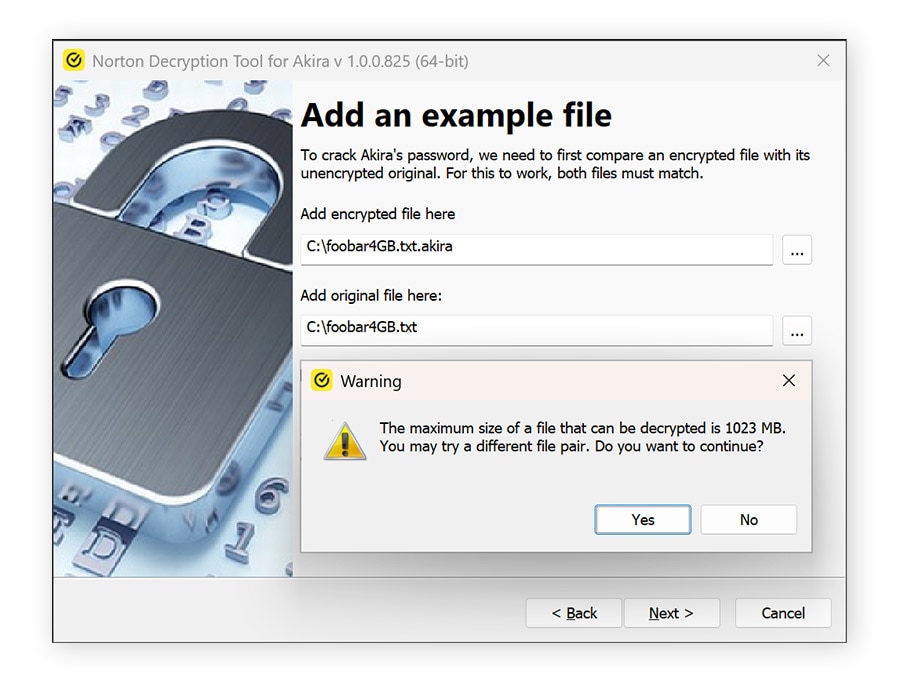
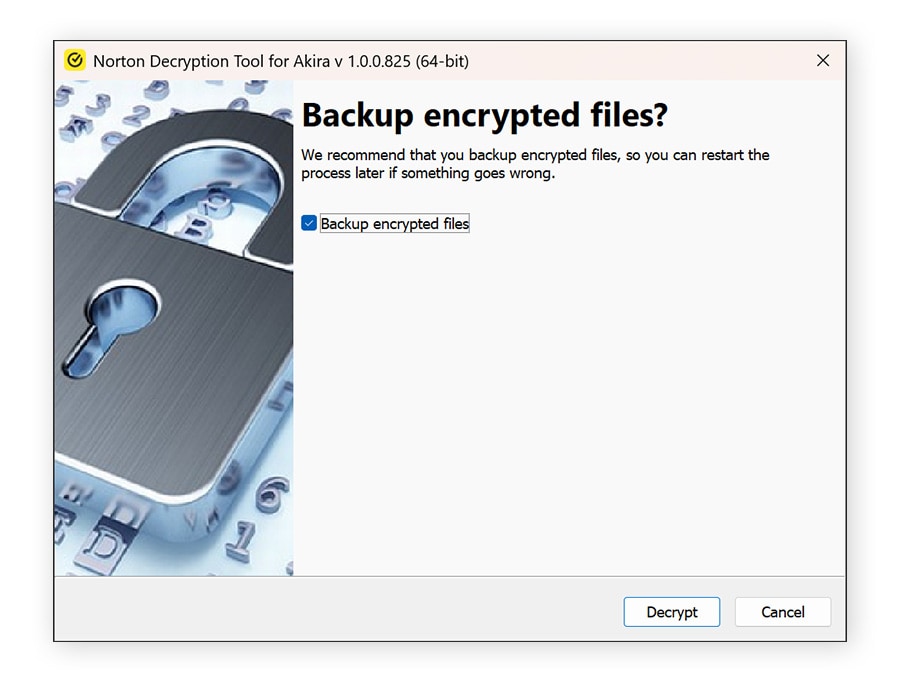
The decryptor wizard will guide you through the decryption process. For some ransomware strains, you’ll need to upload both an encrypted file and a matching unencrypted version. But don’t worry, you only need one matching file pair, you don’t need to find an unencrypted version of every file you want back. Try checking your email outbox or cloud storage for an original copy of an encrypted file.
An example of a ransomware wizard (for Akira) is shown below.
What not to do when decrypting your files
Before attempting to decrypt your files, it’s important to avoid mistakes that can make recovery harder or even impossible. Acting too quickly can lead to permanent data loss or further spread the infection. Keep the following precautions in mind to protect your files and improve your chances of successful recovery.
- Don’t pay the ransom: Paying doesn’t guarantee you’ll get your files back, and it encourages cybercriminals to continue their attacks — even the FBI warns against paying a ransom. Whenever possible, explore safer recovery options like backups or trusted decryption tools.
- Don’t delete encrypted files: Encrypted files may still be recoverable. Deleting them removes any chance of restoring your data later using decryption tools.
- Don’t modify or rename encrypted files: Changing file names or formats can interfere with decryption tools, making it harder or impossible to recover your data.
- Don’t connect infected devices to other devices or networks: Ransomware can spread across connected systems. Keep infected devices isolated and offline to prevent further damage.
What if no ransomware decryptor works?
If no ransomware decryptor works, recovery options may be limited, but you still have a few paths to explore. Start by checking if you have a recent backup stored on an external drive or cloud service, and restore your files from there once the infection is fully removed. You can also look for system restore points or previous file versions, depending on your operating system.
Keep in mind that new decryption tools are released by ransomware researchers over time, so it may be worth checking back periodically.
If you’re unsure what to do next or need expert guidance, contact the Norton team at decryptors@norton.com. Provide as much detail as possible about the ransomware (such as the file extensions and ransom note) to help them assess your situation and suggest potential next steps.
Get proactive ransomware protection
Free ransomware decryptor tools are great, but not needing one in the first place is even better.
Norton 360 Deluxe provides real-time protection against digital threats, including ransomware, spyware, viruses, and even online scams. This proactive layer of security helps protect your devices, sensitive data, and digital identity before a threat can take hold and cause damage. That way, you’re not left scrambling for a solution after a cybercriminal locks up your files or infects your device with malware.
FAQs
What is ransomware?
Ransomware is a type of malware that encrypts your files or device and demands payment to restore access. Attackers typically threaten to delete, leak, or permanently block your data unless you pay a ransom fee.
Can ransomware be decrypted?
Some ransomware can be decrypted using free tools, but many strains use strong encryption that makes recovery without a key unlikely. Success depends on the specific ransomware variant and whether a decryption tool exists.
How do you recover ransomware-encrypted files?
You can recover files by restoring from a secure backup, using a trusted decryption tool if available, or recovering previous system versions. Paying the ransom is risky and not guaranteed to work.
How do you protect against ransomware?
You can help reduce the chances of a ransomware infection by avoiding clicking suspicious links or attachments, keeping your software updated, using reliable Cyber Safety software, and regularly backing up your data to a secure location.
How does ransomware spread?
Ransomware commonly spreads through phishing emails, malicious downloads, compromised websites, software vulnerabilities, or infected USB drives. Ransomware operators may also exploit vulnerable systems used by a company as an entry point to start an attack.
Editors’ note: Our articles offer educational information and are written to raise awareness about important topics in Cyber Safety. Norton products and services may not protect against every type of threat, fraud, or crime we write about. For more details about how we research, write, and review our articles, see our Editorial Policy.








Want more?
Follow us for all the latest news, tips, and updates.