







Web browsers vs. search engines: What’s the difference?
Browsers and search engines are often confused, but they play very different roles in how your data is handled online. That’s why understanding the difference matters, especially when privacy is a concern. In this guide, we’ll break down how each works and explain how Norton Private Browser can help keep your online activity more private.

2025
Consumer
Security Innovator





Web browser vs. search engine mix-ups are common because the two tools are closely connected, and they’re often referred to interchangeably by everyday users.
Most browsers open with a built-in search bar set by default to a specific search engine, and may even share branding — like Chrome and Google — which can make them feel like a single tool. And, some companies, like Brave and DuckDuckGo, offer both search engines and browsers — with both tools sharing almost exactly the same name.
But in reality, they serve different purposes: a browser is the app you use to access and view websites, while a search engine is a service within that browser that helps you find information on the web.
Below are some clear differences between web browsers and search engines, along with examples, to help clarify the distinction.
Web browser |
Search engine |
|
|---|---|---|
What it is |
A software application you install to open and view websites. |
A website or online tool you visit to search for information on the web. |
How it works |
Loads web pages by processing code, managing tabs, and connecting to sites through DNS lookups and IP addresses. |
Crawls, indexes, and ranks web pages, then displays results that match your search query. |
What it’s used for |
Visiting sites directly, running web apps, managing bookmarks, and controlling privacy settings. |
Finding websites, answers, images, and resources when you don’t know the exact URL. |
Data storage |
Stores browsing history, cookies, cached files, and saved passwords, depending on your settings. |
Stores search queries and usage data to improve results and ads, depending on the service. |
Examples |
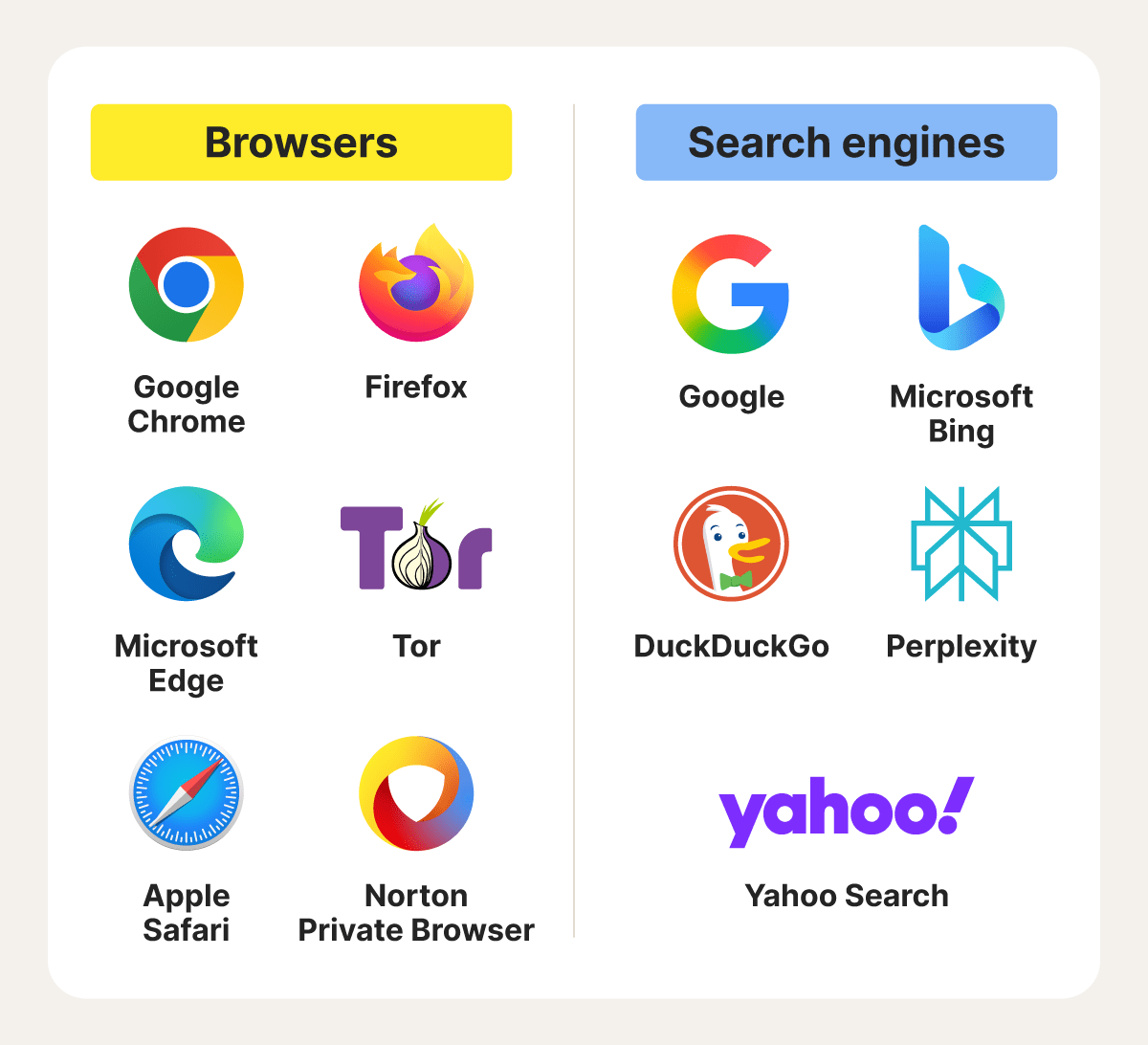
Chrome, Safari, Edge, Firefox, Norton Private Browser, Tor, Norton Neo, Brave, DuckDuckGo browser. |
Google, Bing, Yahoo, Perplexity, Brave Search, DuckDuckGo. |
What is a web browser?
A web browser is software that lets you access, view, and interact with websites on the internet. Whenever you enter a URL, the browser performs what’s known as a DNS lookup to translate the site name into the exact server address where the page is located.
As well as connecting to web servers and translating web code into readable pages, browsers handle downloads and manage features like tabs, bookmarks, and extensions.
Here’s a breakdown of a web browser’s core functions:
- Displaying web pages: Turning raw website code into the text, images, and videos you see on your screen.
- Running web applications: Letting you use interactive tools like email, maps, games, and online editors directly within a tab.
- Managing bookmarks: Allowing you to save shortcuts to favorite sites and return to them with a single click.
- Storing cache: Storing temporary files from previously visited sites to help pages load faster on future visits.
Browser examples
The most widely used browsers are Google Chrome, Mozilla Firefox, and Apple Safari. With an estimated 3.5 billion users worldwide, Chrome leads the market, and the fact many people conflate the Google Chrome browser with the Google search engine adds to the browser vs. search engine confusion.
Here’s a closer look at what each of the major browsers are best known for and how they differ:
- Chrome: The most widely used browser, known for broad website compatibility and the largest extension ecosystem. It’s a popular choice for everyday browsing and work tools.
- Firefox: Known for strong privacy controls, open-source development, and flexible customization, giving users more control over how the browser behaves.
- Edge: Built on Chromium (a Chrome-based browser “skeleton”), Edge offers tight integration with Windows, built-in security features, and productivity tools tailored to the Microsoft ecosystem.
- Tor: Routes traffic through multiple layers of encryption and volunteer-run relays on the Tor Network to protect privacy. It’s often used for stronger anonymity in restrictive environments and to access dark web sites standard browsers can’t reach.
- Safari: Apple’s default browser, optimized for macOS and iOS with a focus on energy efficiency and built-in privacy protections.
- Norton Private Browser: Developed by security experts, Norton Private Browser blocks tracking cookies and helps mask your digital fingerprint to keep browsing activity private.
- Norton Neo: Another browser developed by experts at Norton, Neo focuses on AI features and frictionless browsing.
What is a search engine?
A search engine is an online service that helps you find websites, images, videos, and other information on the internet. It works by indexing web content and returning relevant results based on your search terms. You access search engines through a web browser, which displays the results and lets you visit selected pages.
A search engine performs several key processes to deliver results:
- Crawling: Scanning the web to discover new pages, updates, and links so it knows what content exists.
- Indexing: Storing web pages in a large, organized database, making pages easy to retrieve when you search.
- Ranking: Ordering indexed pages based on relevance to your query, showing what it believes will be most useful first.
Search engines don’t just go by your search terms. They also use data from your browser — like tracking cookies, approximate location, browsing history, and other signals — to predict what you’re looking for. This can make search results and ads more relevant, but it also raises important privacy concerns.
Search engine examples
Google dominates the search engine market, handling over 90% of global search traffic. That’s why “googling” has become synonymous with performing a web search. But it’s far from the only — or most private — option available.
Here are the main players in the search engine landscape and what sets each apart:
- Google: Known for speed and accuracy, Google excels at finding specific pages, even for detailed or complex searches.
- Bing: Offers strong image and news results, though it can be less precise for highly specific queries.
- DuckDuckGo: A privacy-focused search engine, DuckDuckGo doesn’t track searches or build user profiles.
- Yahoo: A long-standing web portal that combines search with news, email, and other services.
- Brave Search: A privacy-focused search engine built into the Brave browser.
- Torch: A search engine designed for the dark web, helping users find sites on the Tor network and other hidden services.
- Perplexity: Uses AI to generate concise, source-backed summaries that are easy to read and explore further.
How do browsers and search engines differ?
Browsers and search engines work closely together but serve different purposes. A browser is the application you use to access and view websites, while a search engine helps you find those sites by searching the web. In short, browsers display content and manage your sessions, while search engines index information and return results based on your queries.
Here’s a quick comparison of web browsers and search engines:
- Installation: Browsers must be installed on your device. Search engines don’t require installation and can be accessed through any browser.
- Usage: You use a browser to visit a site directly by entering a URL. You use a search engine when you don’t know the URL and need help finding the right page.
- Dependency: Browsers can function without search engines if you already know exactly where you need to go. Search engines rely on browsers to display results.
- Data storage: Browsers store items like browsing history, saved passwords, and tracking cookies. Search engines store search queries and usage data to improve results.
- Privacy: Browsers control how much data is shared and may offer privacy-focused settings to limit internet tracking. Search engines often build user profiles to personalize results and ads, which raises additional privacy concerns.
Both tools allow customization. You can change your default search engine in your browser’s settings, or switch browsers entirely by changing your default browser or installing a different option.
How do search engines and browsers work together?
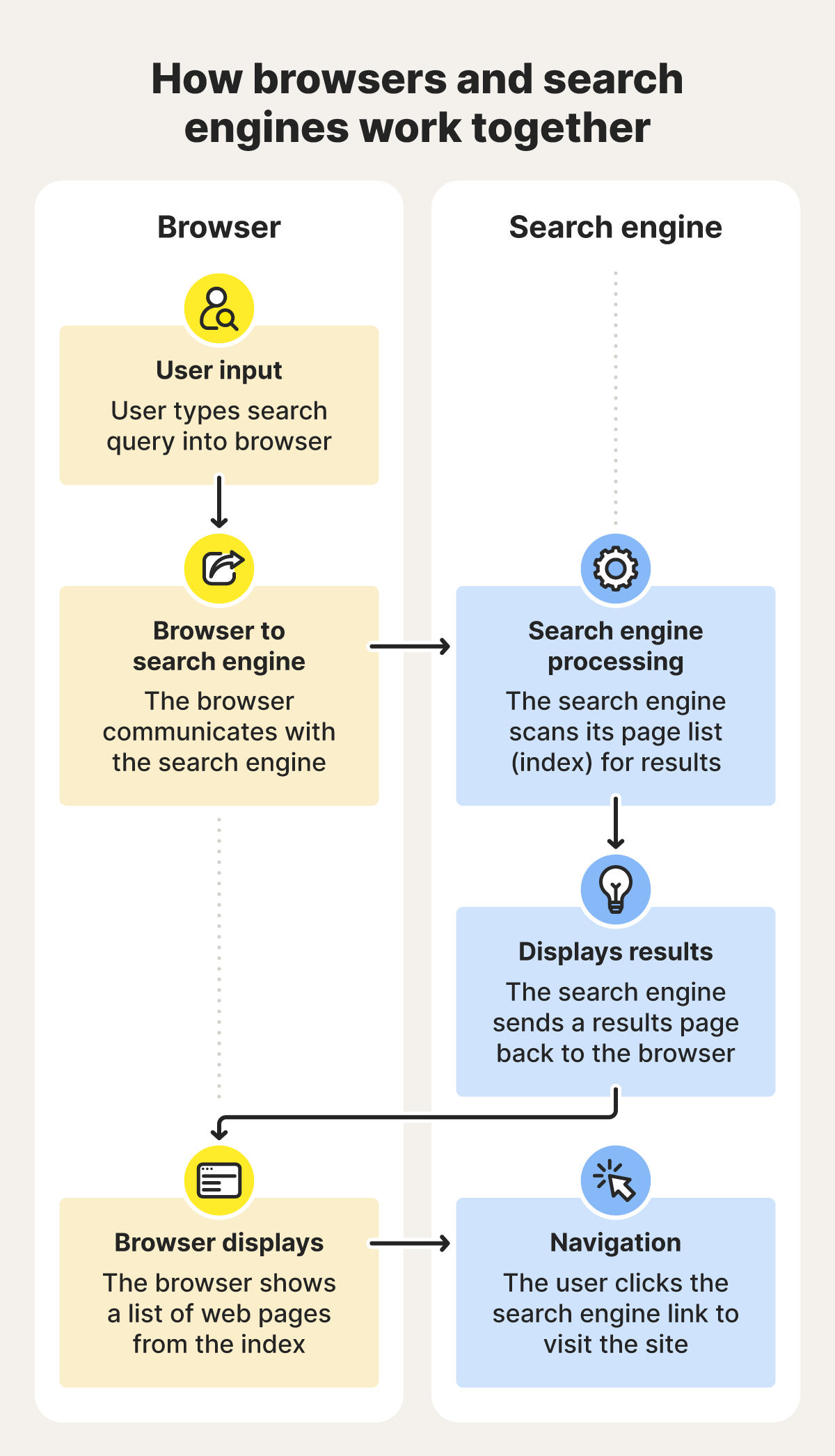
Search engines and browsers work in tandem: the browser loads the search engine, and the search engine helps you find the website or information you’re looking for.
Here’s what happens behind the scenes:
- You open a search engine: Typing a search engine URL (such as google.com) into your browser address bar triggers a DNS lookup to find the site’s IP address so the browser can load the page.
- You enter a query: When you type a query and hit enter, your browser sends a new request to the search engine. Many browsers also allow you to search directly from the address bar, using your default search engine.
- The search engine selects and ranks results: The search engine’s algorithms analyze your query, compare it against billions of indexed pages, and rank results based on factors like relevance, freshness, and predicted user engagement.
Understanding this relationship also clarifies differences between a search engine and a browser regarding data collection. For example, using a privacy-focused search engine like DuckDuckGo inside a data-heavy browser such as Chrome can still leave a trail. Even if the search engine limits tracking, the browser may store history, cookies, and other activity.
What are the latest trends in web browsers and search engines?
The browser-versus–search engine conversation is evolving quickly as AI reshapes how people explore the web. New tools, such as agentic browsers, are blurring the line between searching and browsing while pushing everyday tasks toward automation.
Here are some of the key trends shaping the space:
- Conversational web browsers: Some modern browsers now include built-in AI assistants that answer questions and help with tasks. For example, Norton Neo is an AI-native browser that can respond to queries or assist with things like drafting emails.
- AI page summaries: Features such as Chrome’s Help me read and Neo’s instant highlights extract key points from articles, reducing the need to skim long pages.
- Progressive web apps (PWAs): Services like Spotify, X, and Starbucks use PWAs to turn websites into app-like experiences, with fast loading, offline access, and home-screen shortcuts, directly through your browser.
- Continued dominance of Chrome: Chrome maintains over 70% of browser market share, driven by its massive extension ecosystem, deep Google integration, and ongoing performance improvements.
- Productivity browsers: Browsers like Sidekick and Arc emphasize calmer, more focused workflows with better tab management, distraction blocking, and automation features.
- Zero-click searches: These deliver answers directly on the results page, eliminating extra clicks. Norton Neo leans into this model by providing quick, AI-powered responses without forcing users to scroll through and open multiple links.
Defend your data with Norton Private Browser
Your browser plays a major role in how much of your data is collected online. A privacy-focused option like Norton Private Browser helps reduce tracking from the moment pages load by blocking trackers, filtering malicious sites, and enforcing privacy-first default settings. If you want a safer, more private way to browse every day, explore how Norton Private Browser’s built-in protections can help.
FAQs
Is Chrome a search engine or a web browser?
Chrome is a web browser, not a search engine. It’s the application you use to open websites, stream media, and run web-based apps. While Chrome uses Google Search by default, you can switch to other search engines like Bing or DuckDuckGo, since search engines operate inside the browser.
Is Safari a web browser or a search engine?
Safari is a web browser developed by Apple for macOS and iOS devices. It’s used to load and display websites, manage tabs, and support extensions, but relies on third-party search engines to deliver search results.
Is Bing a search engine or a browser?
Bing is a search engine created by Microsoft. It helps users find websites, images, videos, and answers by indexing content across the web. Bing is accessed through a web browser, such as Edge, Chrome, Firefox, or Safari, rather than functioning as a browser itself.
What are agentic browsers?
Agentic browsers are AI-powered browsers designed to take actions on your behalf, not just display content. They use built-in AI agents to perform tasks like filling out forms, summarizing pages, answering questions, or automating workflows.
Is Google a search engine or a browser?
Google is a search engine, not a web browser. It helps users find information across the internet by returning results based on search queries. It’s the default search engine for Google Chrome browser, but you can access the Google search engine through any web browser of your choice.
Editors’ note: Our articles offer educational information and are written to raise awareness about important topics in Cyber Safety. Norton products and services may not protect against every type of threat, fraud, or crime we write about. For more details about how we research, write, and review our articles, see our Editorial Policy.








Want more?
Follow us for all the latest news, tips, and updates.