







Should you accept cookies? 5 cases when you definitely shouldn’t
We’ve all seen the pop-ups about accepting cookies, but should you? Some cookies help websites work better, while others quietly track your online behavior. Learn how to tell the difference and protect your privacy. Then, get Norton AntiTrack to help block cookies and trackers, so you can browse in peace.

2025
Consumer
Security Innovator





Whether accepting cookies is a bad idea or not depends on the website and what the cookies do. It’s perfectly fine to accept cookies that websites need to function or that provide convenience (e.g., saving your shopping cart). However, you may want to steer clear of third-party tracking cookies, as they can compromise your privacy.
Let’s take a closer look at why websites want you to accept cookies, whether accepting them is necessary, and what happens if you decline a cookie.
Why websites ask you to accept cookies
Websites ask you to accept cookies to comply with data and privacy laws. Cookies collect information that helps a site personalize your experience, remember items in your shopping cart, save recent searches, and sometimes deliver targeted ads. Tracking for advertising purposes is what often makes cookies feel invasive, which is partly why privacy regulations exist.
How is this data collection regulated?
In the US, there is currently no comprehensive federal-level internet privacy law; however, that may change with the proposed American Privacy Rights Act (APRA). If passed, this legislation would limit the data companies can collect on consumers (including potentially through cookies) and give Americans the right to access, update, or delete their personal data.
Until then, protection is based on a patchwork of state privacy and data security laws, like the Florida Data Privacy and Security Act, the Oregon Consumer Privacy Act, or the California Privacy Rights Act.
In Europe, the General Data Protection Regulation (GDPR), working alongside the ePrivacy Directive, provides strict guidelines. Websites must obtain explicit consent from EU residents before using non-essential cookies.
In contrast, APRA’s framework would primarily follow an opt-out model, but final mechanisms could change. The proposed law may also give consumers the ability to take legal action if a company misuses their data, adding another layer of accountability.
What types of cookies should you accept?
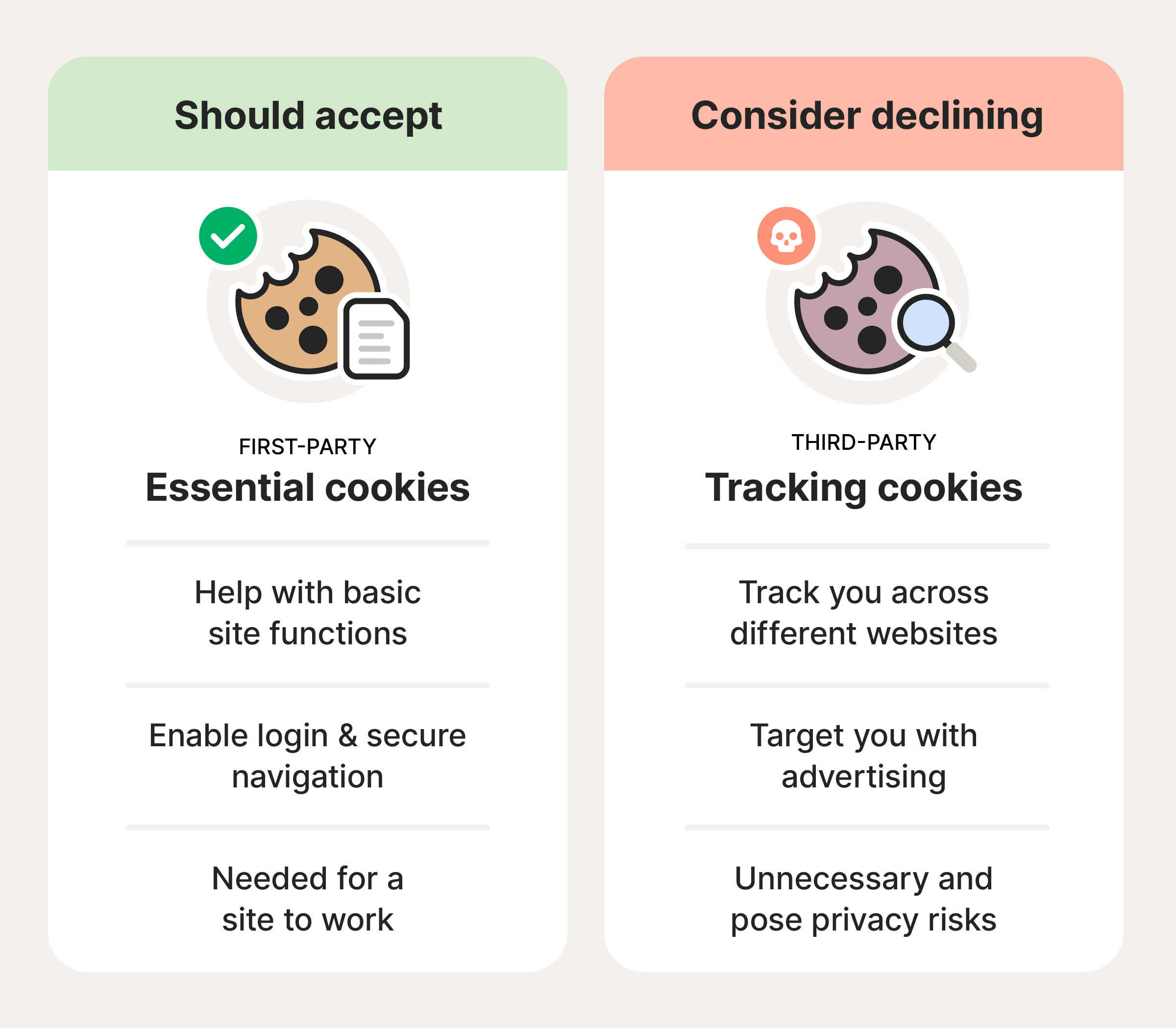
In most cases, you can safely allow essential and first-party cookies, as these are often needed for a website to work properly.
Essential cookies are often enabled by default so that core features like logging in and navigating securely function correctly. They may also be used by sites to remember items in your shopping cart during a single visit. These are usually first-party cookies.
Non-essential cookies aren’t required, but they can improve your experience or help sites measure performance, so you may want to accept some. Some are first-party, while others are third-party cookies that may be used to track your activity across sites for advertising or analytics purposes.
What types of cookies should you avoid?
Some types of non-essential cookies may pose privacy risks because they track your activity across multiple websites or collect data for reasons beyond improving your experience.
You may want to consider declining:
- Third-party cookies: These are set by domains outside of the one you’re visiting and often used for cross-site tracking (for instance, tracking your browsing habits).
- Advertising cookies: A type of third-party cookie that gathers and analyzes your browsing data to personalize the ads you see.
- Analytics cookies: Especially third-party or cross-site analytics cookies, which track the pages you visit and how long you spend on them.
- Social media cookies: Enable features like sharing content on social platforms, but may also track your activity across multiple sites and build a profile linked to your social account.
Accepting these cookies can put your personal information at risk, as you often have limited visibility into what data is collected, how it’s stored, or how it’s shared with other parties.
What happens if you don’t accept cookies?
If you don’t accept a cookie that’s necessary for a website to function, some features may not work properly. For example, if a site relies on cookies to store shopping cart data, your cart may be cleared if you navigate away before checking out.
In some cases, websites may limit access or block content until you accept certain cookies, particularly essential ones.
If you decline non-essential cookies, like third-party and advertising cookies, the website you’re on should still function properly. However, it won’t be able to track your activity across sites, and the ads you see will be generic.
Having too many cookies stored in your browser cache could eventually slow down your computer. Routinely clearing your cookies can help keep your browser running smoothly and improve your computer’s speed (at least when you surf the internet).
5 times you shouldn’t accept cookies
While some cookies are necessary for website performance, there are some scenarios where it’s best to decline non-essential cookies or avoid the site altogether. If a website appears insecure or untrustworthy, you’ll want to click “no” when asked to accept cookies and avoid sharing any personal info.
Here are five situations when it might be a good idea to decline a cookie.
1. Unencrypted websites
You shouldn’t accept cookies when you’re on an unencrypted website — a site that’s missing an SSL certificate, where the URL starts with “http” instead of “https.” Why is this risky? Unencrypted sites aren’t necessarily malicious, but they lack basic security protections for your data. Accepting cookies on these sites, especially session cookies, can increase the risk of unauthorized access.
2. Third-party cookies
It’s generally a good idea to decline third-party cookies as they’re commonly used to track your activity across multiple websites.
This data may be shared with or sold to other companies for advertising or profiling purposes. In regions without strong privacy regulations, users often have limited control over how this data is collected, stored, or reused. If a third-party provider has weak cybersecurity practices, that data could be exposed in a breach.
Many browsers, including Safari and Firefox, now block third-party cookies by default to help protect user privacy.
3. On public Wi-Fi or a shared device
On public Wi-Fi networks or shared devices, it’s best to decline non-essential cookies whenever possible. Cookies can store login sessions and browsing data that may remain on the device when you finish, making it easier for others to access your accounts or see your activity.
Public Wi-Fi networks are also less secure, increasing the risk of session hijacking, a type of attack where hackers intercept session data, such as login cookies, to access your account without your permission.
4. Flagged websites
If your antivirus software or browser flags a website as potentially unsafe, you should not accept cookies. Instead, avoid the website completely. Accepting cookies from untrustworthy sites can increase exposure to invasive tracking, fraud, or malicious activity and viruses.
To help you identify if a website is safe, use a secure browser like Norton Private Browser, which automatically blocks suspicious sites, URLs, downloads, and scams. Install it now, and enjoy free protection for your digital life.
5. When sharing sensitive personal information
If you need to provide sensitive personal information — such as your phone number or financial details — you should decline non-essential and third-party cookies to limit unnecessary data collection.
Personal information can be valuable to fraudsters if it’s improperly stored, shared, or exposed: in severe cases, data exposure can lead to identity theft and other forms of fraud.
When should you accept cookies?
Not all cookies need to be blocked, and it makes sense to accept essential cookies that allow a website to function. You might like to accept cookies that make your experience smoother and improve site performance.
Here are some scenarios when accepting cookies is beneficial:
- Website access: Some websites will block you or limit access if you decline cookies.
- Functionality: Many cookies support useful site features. As well as essential functions, cookies can remember language or currency preferences so you don’t need to reset them each time you visit.
- Faster loading speeds: Cookies can help a website remember your settings or recent activity, which may reduce page load times on subsequent visits.
- Improved user experience: Cookies can make websites easier to use. Session cookies, for instance, remember items you’ve added to a shopping cart, making online shopping more convenient.
- Easy logins: Authentication cookies are what websites use to keep you logged in between pages or across visits.
When determining whether or not a cookie is safe, it’s important to understand what data the cookie stores and how it’s used. Some cookies track the links you click or the time you spend on a page, while others store practical data like your user ID. If you’re not comfortable with the information being stored, then you should avoid accepting that cookie.
How to manage cookie settings
Cookies often operate in the background unseen, but that doesn’t mean you don’t have some control over them. Every modern internet browser should give you tools for managing new and existing cookies.
Here’s how to change your cookie settings on Chrome:
- Open Chrome and click the three dots next to your profile icon, then choose Settings.
- Select Privacy and security on the left, then third-party cookies.
- Click the button next to Block third-party cookies.
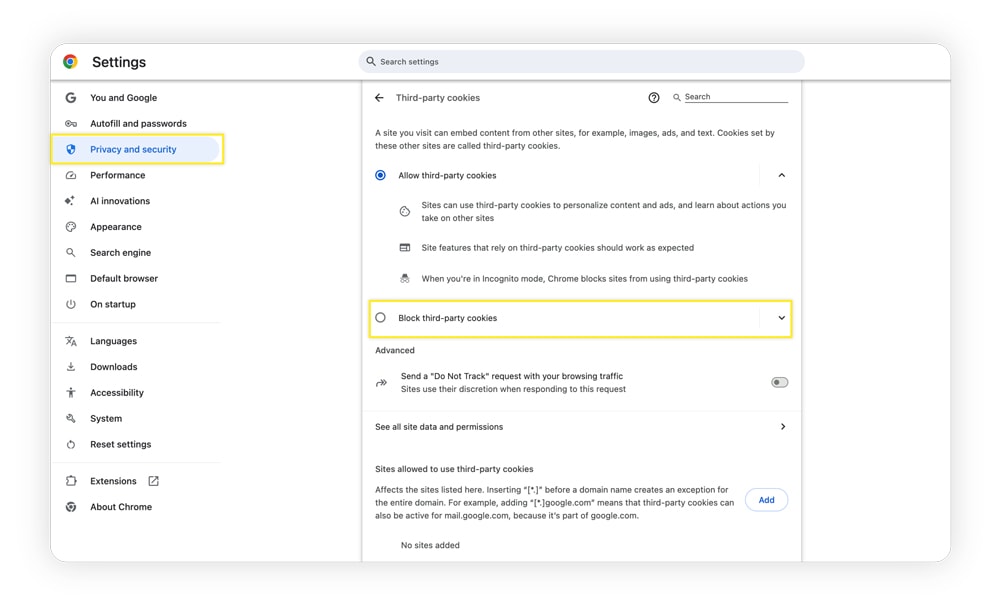
The process on other browsers is largely the same, with minor differences in folder names and optional settings. To improve your online privacy, consider blocking third-party cookies, turning off suggested ads (and ad measurement), and routinely clearing cookies.
Protect yourself from invasive tracking cookies
Cookie pop-ups are just the start. Even when you say no to cookies, tracking can continue. Norton AntiTrack helps protect your online privacy by reducing cookies, disguising your digital fingerprint, and giving you unlimited email aliases.
Get Norton AntiTrack today to help manage your digital privacy from one simple dashboard, so you can surf with greater peace of mind.
Editors’ note: Our articles offer educational information and are written to raise awareness about important topics in Cyber Safety. Norton products and services may not protect against every type of threat, fraud, or crime we write about. For more details about how we research, write, and review our articles, see our Editorial Policy.








Want more?
Follow us for all the latest news, tips, and updates.