


Should you keep your VPN on 24/7?
The short answer is: yes (usually). Keeping a trusted VPN connected to benefit from enhanced online privacy and security is generally a good idea. But there are times when disconnecting can make sense. Here’s when to keep your VPN on, when you might want to switch it off, and how a VPN with split tunnelling can help you enjoy the best of both worlds.

2025
Consumer
Security Innovator


A 2025 Forbes survey found that 49% of respondents use a VPN on at least some devices, and an estimated 1.75 billion people worldwide (nearly one-third of all internet users) use VPNs. That’s a good start, but in most cases, using a VPN to go online should be second nature — like locking the door when you leave home.
A VPN creates an encrypted tunnel between your device and a VPN server. Instead of sending your internet traffic directly through your network, it travels through this protected connection, masking your real IP address and making your internet activity harder to identify or monitor.
Keeping your VPN connected means you always benefit from its privacy and security protection and don’t have to remember to switch it on before using public Wi-Fi, making payments, or sharing personal information.
But there are times, such as when experiencing slow internet speeds or fast battery drain, when switching off your VPN may be a good idea. And it’s important to note that a VPN connection doesn’t make you completely anonymous online; cookies, account logins, browser fingerprinting, and other tracking technologies can still be used to follow you online.
Below, we’ll explain when you should keep your VPN switched on, when turning it off may help, and what protection you gain — or give up — either way.
When should you keep your VPN on?
You should keep your VPN on whenever online privacy and security matter, but especially when using public Wi-Fi or unfamiliar networks, accessing financial accounts, making payments, or sharing sensitive information. Beyond security, a VPN can also give you greater freedom online by helping you access the internet with fewer network or regional restrictions.
Here’s a closer look at the situations where keeping your VPN connected matters most.
When a VPN is essential for privacy and security
Some online activities carry greater privacy and security risks than others. In these cases, turning on your VPN is a no-brainer, but it's best to keep your VPN connected so a powerful extra layer of protection is already active when the threat level rises.

You’re using public Wi-Fi
Whether you’re checking email at an airport or browsing from a coffee shop, public Wi-Fi is convenient but riskier than a properly secured home or office network. Open networks without passwords in particular can expose you to danger because anyone nearby is able to connect.
Attackers on the same airport Wi-Fi or other public network may try to monitor or manipulate traffic. In a man-in-the-Middle (MitM) attack, for example, an attacker attempts to position themselves between your device and its destination. Cybercriminals can also create convincing fake hotspots known as evil twin networks or use packet-sniffing tools to monitor network activity.
Keeping your VPN on helps protect against these risks by encrypting the traffic between your device and the vpn server. This makes intercepted traffic much harder for someone on the local network to read or exploit.
You don’t want online trackers and your ISP watching
Websites, advertisers, and other third parties can collect information about your online activity using IP addresses, cookies, browser fingerprinting, and other tracking technologies. Ordinarily, your internet service provider (ISP) can also see certain information about your internet traffic, including which sites you visit.
A VPN won't stop every form of tracking. Importantly, cookies and browser fingerprinting can still tie your browsing activity to your identity. However, masking your real IP address gives websites, advertisers, and other third parties one less piece of information they can use to track your activity. Some VPNs also include tools that block intrusive ads and trackers, providing another layer of privacy alongside IP masking.
You’re using your phone on the move
Your phone can switch between home Wi-Fi, cellular data, and public networks throughout the day, sometimes without you noticing. Each network can carry different privacy and security risks, particularly when your device automatically connects to unsecured Wi-Fi.
VPN protection isn't limited to laptops and PCs. A VPN can protect internet traffic on smartphones and tablets over both Wi-Fi and cellular connections, while masking the device's real IP address.
Keeping your VPN on provides continuous protection as you move between networks, rather than relying on you to remember to reconnect it each time your phone hooks up to a higher-risk network.
You're shopping or banking online
Online banking and shopping involve sensitive information such as account credentials, payment details, and personal data. While reputable financial and retail websites use HTTPS to encrypt information exchanged with your browser, the network you use to access them can introduce additional risks.
And when it comes to online transactions, it pays to be cautious. Keep your VPN on for a powerful layer of protection, and always check that a website is safe before entering payment or login details.
You land on an unsecured website
Websites that use HTTP instead of HTTPS don’t encrypt the connection between the site and your browser. Your browser may flag these pages as “Not secure,” and information you send to them can be exposed once it leaves the VPN server.
A VPN encrypts traffic between your device and the VPN server, helping protect it from people monitoring your local network. However, it doesn’t add HTTPS encryption between the VPN server and an unsecured HTTP website.
Keeping your VPN on is still essential for securing you on the network you’re using, but a VPN can’t make an unsafe website safe. Avoid entering passwords, payment details, or other sensitive information on HTTP sites, and leave suspicious websites rather than relying on your VPN for protection.
When a VPN helps power your online freedom
A VPN can also give you greater freedom in how you connect, browse, and stream online. By encrypting your traffic and masking your IP address, it helps you enjoy a more secure, flexible internet experience, especially when you are traveling, working remotely, or using restrictive networks.
You're traveling abroad
Websites, apps, and streaming services can use your IP address to determine your approximate location, so the content and services available to you may change when you travel. Some websites may also be restricted or unavailable in certain countries because of local laws or regional policies.
Connecting to a VPN server in another location changes the IP address websites see. This can help you access familiar online services while abroad, although availability depends on the provider, and using a VPN to change your apparent location may violate some platforms’ terms.
Keeping your VPN on while traveling also helps protect your connection when you rely on unfamiliar hotel, airport, or café Wi-Fi. Before using one abroad, check local VPN laws and the terms of the services you plan to access.

A firewall blocks your way
Workplaces, schools, universities, hotels, and other organizations may use a firewall to restrict access to certain websites, apps, or online services. These restrictions may be designed to improve security, manage bandwidth, or enforce acceptable-use policies.
A VPN can sometimes bypass network-level restrictions by routing your traffic through an encrypted connection. However, doing so may violate the organization’s rules or interfere with security controls.
Before using a VPN to access blocked content, check the network’s acceptable-use policy. And bear in mind that being able to bypass a restriction doesn’t necessarily mean you should.
Local censorship limits access
Some governments restrict access to social media, news sites, messaging apps, and other online services. The extent of these restrictions varies by country and can change quickly, with platforms such as Facebook blocked or restricted in some regions.
A VPN may help you reach services that are unavailable locally by routing your connection through a server in another country. This can be particularly important for travelers, journalists, activists, and others who rely on access to information and communication tools.
However, VPN use is itself restricted or regulated in some countries, and penalties for circumventing censorship can be severe. Check current local laws before using a VPN and consider the legal and personal risks involved.
Your ISP slows you down
Some ISPs may deliberately slow certain types of internet traffic, such as streaming or large downloads. If the throttling is based on the type of activity you’re performing, you may notice that some online tasks run significantly slower than normal browsing.
A VPN makes your specific activity harder for your ISP to identify, which may help reduce activity-based throttling. However, it can’t prevent slowdowns caused by network congestion, data caps, or other forms of traffic management.
And while keeping your VPN on can improve consistency by mitigating some forms of ISP throttling, it isn’t an internet speed booster. In fact, because routing and encrypting your traffic introduces additional overhead, VPNs may sometimes reduce speeds.
How to keep your VPN on all the time
Many VPNs can connect automatically when your device starts or joins a particular network, so you don’t have to remember to turn them on manually. The exact settings vary by VPN provider and operating system, but here’s where to look:
- Windows PC or Mac: Open your VPN app and go to Settings or Preferences. Look for options such as Launch at startup, Open on login, or Auto-connect. Enabling both startup and auto-connect options can help ensure the VPN reconnects whenever you restart or sign in to your device.
- Android: Your VPN app may include its own auto-connect option. Android also supports Always-on VPN for compatible VPNs. Go to Settings > Network & internet > VPN (the exact path varies by device), tap the settings icon next to your VPN, and enable Always-on VPN.
- iOS: Start by checking your VPN provider’s app for automatic connection options. Compatible VPN configurations can also support Apple’s Connect On Demand feature, which automatically establishes a VPN connection under specified conditions. Availability and setup depend on your VPN provider, protocol, and configuration.
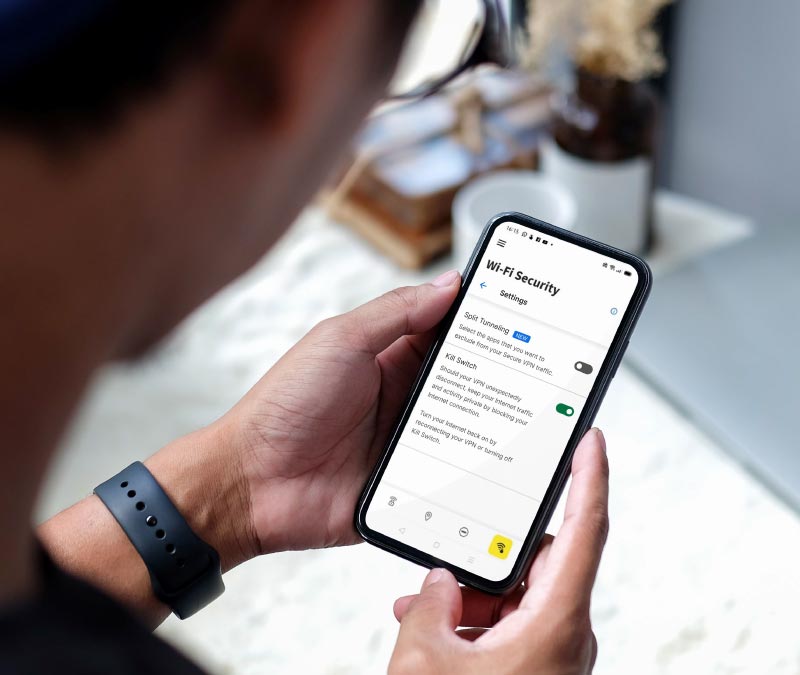
Even with your VPN enabled automatically, connections can occasionally drop, which could leave your internet traffic exposed. But the best VPNs, like Norton VPN, include a kill switch that helps keep your data protected even when the VPN connection is interrupted by automatically blocking internet access if the VPN disconnects.
When it makes sense to hit the off switch
Keeping your VPN on is generally the safest default, but there are times when temporarily disconnecting can resolve compatibility or performance problems. Before switching it off, make sure you’re connected to a trusted, secure network.
- Online banking issues: Some banks may flag or block VPN connections as part of their fraud-prevention systems. Try switching to a nearby VPN server first. If you still can’t use your banking app, temporarily disconnecting may help — but avoid doing so on public Wi-Fi.
- Low battery: Maintaining a VPN connection uses additional processing power and can increase battery consumption. If battery life is a concern, first close unnecessary background apps and try other ways to reduce battery drain before disabling your VPN.
- Gaming or video calls: A VPN can increase latency because your traffic takes an additional route through a VPN server. If games lag or video calls become choppy, try a nearby server or a faster VPN protocol, such as WireGuard, to help lower your ping before disconnecting.
- Smart home issues: A VPN installed on your router can sometimes interfere with smart-home devices or local network discovery. If that happens, consider using a device-based VPN instead or excluding affected devices from the VPN connection.
- Software conflicts: Some apps and services may not work properly while a VPN is active. Try changing servers or checking the app’s network settings before temporarily disabling your VPN to determine whether it’s causing the problem.
If you feel torn between privacy and performance, split tunneling may be the solution. This feature lets selected apps connect directly to the internet while the rest of your traffic continues through the VPN.
Pick a VPN with split tunneling and a kill switch
If you plan to keep your VPN on most of the time, the right features can make a big difference. Split tunneling lets selected apps bypass the VPN when needed, while a kill switch helps prevent your data from being exposed if your connection drops unexpectedly.
With Norton VPN, you get bank-grade encryption, fast connection speeds, and a simple setup that makes privacy feel effortless — not complicated. It is a smarter way to stay protected without giving up convenience or flexibility.
FAQs
Should I use a free VPN on public Wi-Fi?
Free VPNs can vary significantly in security and privacy. Some free VPNs are safe to use, but many collect user data, display intrusive ads, or provide weaker protections. On public Wi-Fi, be sure to use a reputable VPN provider with strong encryption and a clear privacy policy, such as Norton VPN.
Do VPNs make you completely anonymous?
No, a VPN can mask your IP address and encrypt your internet traffic, but it can’t make you completely anonymous. Websites may still identify you through account logins, cookies, browser fingerprinting, and other tracking methods. Privacy tools such as Tor provide additional anonymity by routing traffic through multiple relays, but they also come with their own trade-offs.
Is it reasonable for my employer to require a VPN?
Yes, requiring a VPN is a common security measure for remote work. A corporate VPN can provide an encrypted connection to company networks and resources, helping protect sensitive business data when employees work outside the office.
What countries should I use a VPN in?
You can benefit from using a VPN in any country, particularly when connecting to public Wi-Fi or unfamiliar networks. A VPN may be especially useful in countries with extensive online tracking, censorship, or internet restrictions. However, some countries restrict or regulate VPN use, so check local laws before using one while traveling.
Editors’ note: Our articles offer educational information and are written to raise awareness about important topics in Cyber Safety. Norton products and services may not protect against every type of threat, fraud, or crime we write about. For more details about how we research, write, and review our articles, see our Editorial Policy.







Want more?
Follow us for all the latest news, tips, and updates.