




How to tell if someone hacked your router: 10 warning signs
Is your Wi-Fi acting up? The problem could be something simple, like misconfigured network settings. But it could also be a sign that someone has hacked your router. Learn 10 common warning signs of a compromised home network, what you can do to fix it, and how to protect your Wi-Fi connected devices with powerful security software.

2025
Approved
Anti-Phishing

2025
Top Rated Product



- 1. Slow internet speed
- 2. Router login failure
- 3. Browser redirects
- 4. Suspicious network activity
- 5. Unfamiliar software downloads
- 6. Session hijacking
- 7. Ransomware messages
- 8. Fake antivirus notifications
- 9. Increase in pop-up advertisements
- 10. Alerts from your internet provider
- Common causes of a compromised router
- Why router hacking is dangerous for you
- How to check if your router is hacked
- How to fix a hacked router
- How to prevent router hacking
- Protect your router with Norton
- FAQs
You might be confident that your devices are protected against malware, but without security for your router, your home network could still be vulnerable to cybercriminals. Routers can be hacked, just like phones or computers. And if a hacker gets access to your network, they could see data you transmit, like your financial account logins, or be able to inject malware onto connected devices.
Read on to learn about 10 key warning signs that could indicate someone has hacked your router and get tips you can use to help secure your network before small issues turn into serious security breaches.
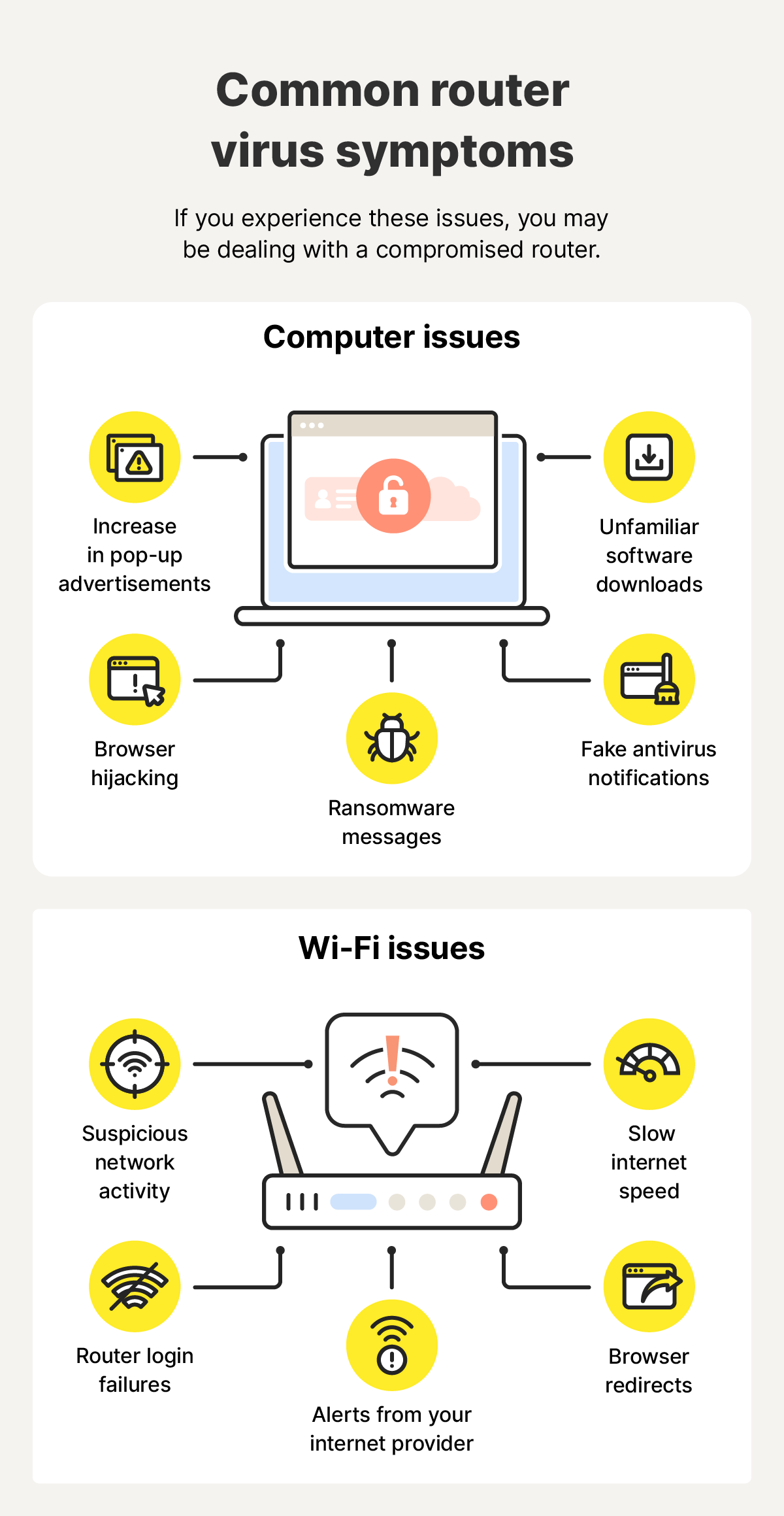
1. Slow internet speed
Slow internet, on its own, can be a normal symptom caused by factors like bad router placement, signal interference, poor weather conditions, or too many connected devices. But when other issues accompany sluggishness, or slow speeds persist over time with no apparent reason, then it’s time to investigate.
Cybercriminals with access to your Wi-Fi network could be using it for botnet activity, malware distribution, or cryptomining. All of these activities can consume high amounts of bandwidth, significantly slowing your internet performance. So, if your connection suddenly turns unusually slow, it may indicate that your router has been compromised.
2. Router login failure
If you’re having trouble logging into your router’s admin settings (typically accessed by typing your router’s IP address, like 192.168.0.1, into your browser) with the login credentials you normally use, it could be a sign that a hacker has managed to get access and changed your password.
Hackers may have used brute force password attacks to break into your router’s settings, or managed to trick you into sharing your password with them using social engineering tactics. However they got in, a cybercriminal with access to your router settings can create security flaws to further exploit your data.
3. Browser redirects
Browser redirects are when your internet browser takes you to a completely different website than the one you intended to visit. Hackers who gain access to your router’s admin account can use browser hijacking techniques, modifying your domain and IP address settings to forcefully redirect you to a website they control.
This is usually a malicious website hosting malware or viruses that can infect your device if you click a link, or it may contain fake forms that capture sensitive information you enter and send it to the cybercriminal.
4. Suspicious network activity
Habitually reviewing your Wi-Fi activity logs can help you spot unfamiliar IP addresses that are using your internet. This could be an indication of a Wi-Fi hack, with unauthorized devices accessing your network to compromise your security settings or silently transfer data without triggering alerts.
Or, it could just be a lucky neighbor who guessed your Wi-Fi password. Either way, you want to protect your bandwidth from being gobbled up by unwanted network visitors.
5. Unfamiliar software downloads
If you notice new apps or software appearing on devices connected to your home network, and you didn’t download them, it could be a sign that someone has gained unauthorized access.
When your router is hacked, cybercriminals may be able to intercept your network traffic and inject malicious programs that get installed on your device. These “drive-by downloads” may include spyware or remote access Trojans that let hackers see your sensitive data or control your device.
6. Session hijacking
Noticing signs of session hijacking, when an attacker takes over your internet session, is another red flag that your network may have been hacked. Hackers can exploit router vulnerabilities (such as the Cisco SNMP flaw that allowed attackers to install rootkits on older networking devices) to intercept all the traffic passing through your wireless network.
From there, they can steal session tokens or login credentials to hijack your session, potentially allowing them to access sensitive data or even make changes to your online account settings.
7. Ransomware messages
If your router has been compromised, cybercriminals may try to scare you into paying them by sending ransomware-style messages via email or pop-ups on devices connected to the network.
While ransomware cyberattacks traditionally involve the attacker encrypting digital files, systems, and other assets until you pay a demanded ransom, hackers with access to your network may instead threaten to intercept your data or disrupt your internet connection if you don’t pay.
8. Fake antivirus notifications
If you suddenly start seeing pop-ups claiming your device is infected and urging you to download or activate an antivirus program, it could be a sign that your network has been hacked. Hackers with access to your router could be redirecting your web traffic to fake websites that act like scareware, pushing fake antivirus notifications to your device that are designed to trick you into downloading harmful software.
9. Increase in pop-up advertisements
If you’re seeing far more pop-up ads than normal, especially if it’s across multiple devices on your network, it could indicate that someone has compromised your router. These ads also often have adware hidden inside which may install itself on your device if you click them. That exacerbates the issue, leading to even more pop-ups that contain additional malware.
10. Alerts from your internet provider
Finally, your internet service provider (ISP) might alert you if they notice increased or unusual activity on your network — a good way to know if someone is using your Wi-Fi without authorization.
If you receive an alert from your ISP, take it seriously. But if you have reason to suspect it might be a fake message, call your internet provider directly and verify that they contacted you.
Common causes of a compromised router
Now that you know some of the signs to look out for that might indicate your router has been hacked, you might be wondering how hackers manage to hack them in the first place.
There are a few common causes, including:
- Weak passwords: Using basic passwords (like "admin" or "password123" or even your birthday) for your router admin login makes it easy for hackers to break into your router's settings. If they crack your password, they could change your network settings and intercept your data or lock you out.
- Outdated firmware: Router manufacturers regularly release firmware updates to patch security vulnerabilities. But, if you don't update your router’s firmware, these weak points might remain open on your network, giving attackers easy entry paths to exploit.
- Remote management enabled: Remote management features allow you to access your router's settings from outside your home network. While convenient, this also creates an entry point for hackers scanning the internet for exposed routers.
- Unsecured Wi-Fi: Networks without passwords or using outdated encryption (like WEP or WPA) can be easily infiltrated by hackers using a technique called wardriving, where they prowl local areas looking for vulnerable networks to latch onto.
- Malicious firmware: In sophisticated attacks, hackers replace legitimate router firmware with modified versions containing backdoors and rootkits. This gives them almost undetectable access to your internet connection.
- Infected connected devices: Even one compromised device — like a laptop infected with malware after using public Wi-Fi — can put your entire network at risk. Hackers can use that device to scan for weaknesses and attack your router from the inside.
- DNS hijacking: If attackers get access to your router, they can change its DNS settings to redirect you to fake websites. You might think you’re logging into your bank, but you’re actually handing over your credentials to a hacker.
- Social engineering: Cybercriminals don’t always compromise your router through force. Sometimes, they convince you to give them access through social engineering schemes. For example, they may pose as tech support or your ISP, then request your login credentials to access your router and “fix” a problem.
Why router hacking is dangerous for you
A hacked router can leave you vulnerable to various follow-up attacks because it’s the node that sits between your personal devices and the internet. Even if you have solid protection on your devices, a compromised router can still leave your data exposed to hackers.
Even devices known for strong security, like iPhones, become vulnerable when they're connected to a hacked network. Here are some things hackers can do once they hack your Wi-Fi:
- Data theft: Sophisticated hackers can capture unencrypted traffic on your network, potentially allowing them to read passwords, emails, and sensitive financial data. They can even trick you into visiting fake versions of real websites.
- Identity theft: With enough personal info stolen from monitoring your online activity, attackers may be able to steal your identity to open bank accounts or even take out loans in your name.
- Financial loss: Criminals with access to your network may be able to monitor your activity in real time to steal financial data (like your credit card number) or your banking logins, allowing them to hack your account and drain your funds. They may even sell stolen financial information to other criminals on the dark web.
- Device takeover: Once hackers control your router, every connected device — from laptops and phones to smart TVs and CCTV cameras — is at risk. Attackers could inject your devices with malware, hijack them to run botnets, or snoop through your personal files.
- Man-in-the-middle attacks: Attackers can sit between you and the websites you visit, modifying pages, injecting malicious code, or creating fake “evil twin” networks. These strategies leave you vulnerable any time you connect to the internet, potentially giving hackers access to sensitive information.
How to check if your router is hacked
Suspecting your router has been compromised can be stressful, but acting fast can help reduce the risk of your data falling into the wrong hands. Follow these simple steps to test if you can still access your router’s admin settings, check what devices are connected to your network, and analyze network traffic:
- Log into your router: Open a web browser and enter your router’s IP address (typically found on the bottom of your router) into the address bar. Then, try to log in with the credentials also displayed on your router, or your own login credentials if you’ve updated them. If they don’t work, it may mean that a hacker has changed your logins.
- Check connected devices: If you can log in, the next step is to review all connected devices. If you spot unfamiliar devices that nobody in your household owns, manually remove them from the network. But, first, make a note of their MAC addresses so you can detect if the same devices keep appearing.
- Inspect logs and firmware: Find your router’s system logs in the admin settings and look for unusual activity like failed logins or unexpected configuration changes. While you’re exploring the settings, you can also check if remote management is enabled and verify that your firmware is up to date.
- Monitor activity and bandwidth: Finally, keep an eye on your router’s traffic. High usage or constant background uploads, even when your devices are idle, could indicate that your network is being used for shady activities, such as botnetting.
How to fix a hacked router
If you can confirm that your router has been hacked or your home network is compromised, there are some quick actions you can take to try and kick hackers out and regain control.
Here’s a step-by-step guide covering what to do if your Wi-Fi network is hacked:
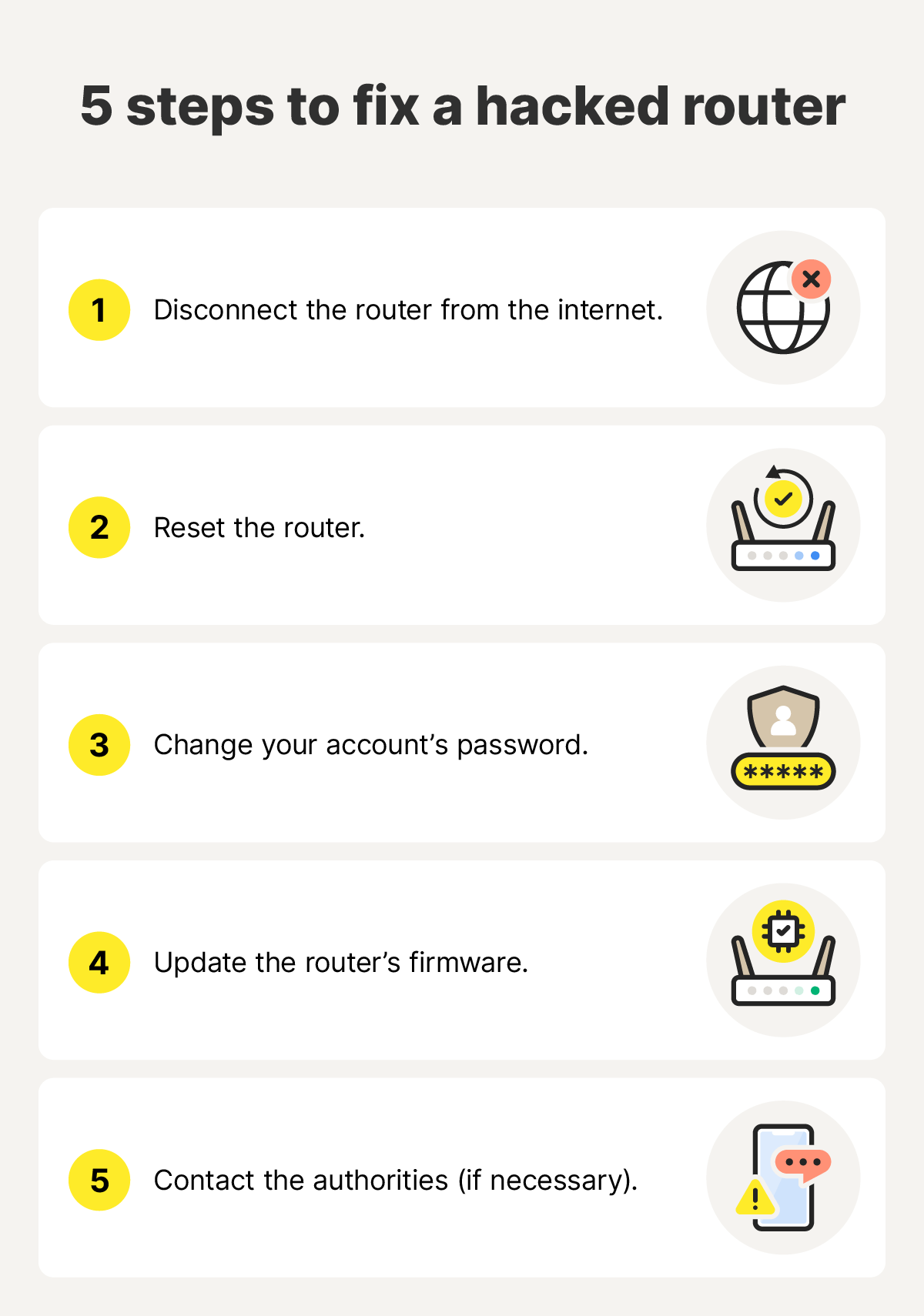
Step 1: Disconnect the router from the internet
Disconnecting your router from the internet can stop any cyberattacks that are already in place on your network from progressing any further. Simply unplug the Ethernet cord that connects your router to the modem or unplug the router altogether to cut off the internet.
Step 2: Reset the router
Depending on how the hacker compromised it in the first place, a simple power cycle can kick attackers off your router and clear its memory, removing any malicious code. All you need to do is unplug the router, wait 30 seconds, and plug it back in.
If this doesn’t work, resetting your router to its factory settings is the next best option. Most routers’ factory reset option can be triggered by pressing the power button for 10-20 seconds, or until a light flashes to indicate a reboot, but check your manual for the exact steps for your model.
Step 3: Change your router admin password
After resetting your router, your next step should be to change the login credentials used to access your router’s admin account. This will help ensure that any hackers you’ve managed to kick out of your network can’t get access again. Just make sure you use a long, strong password that’s hard to guess, and consider using a password manager to save it securely.
Step 4: Update your router’s firmware
It’s best practice to keep your router protected against vulnerabilities by installing firmware updates whenever they become available. Check that you have the latest firmware version from your router admin settings and, if you have the option, enable automatic updates to keep your router better protected in the future.
Step 5: Contact the authorities (if necessary)
If your router being hacked resulted in other crimes, such as identity theft or financial fraud, you should contact the authorities immediately. Filing a report at ReportFraud.ftc.gov can equip you with a personalized recovery plan, while also supporting the Federal Trade Commission’s efforts to fight similar types of fraud.
How to prevent router hacking
Taking a few proactive steps now can save you from headaches later, such as stolen data, malware infections, or financial fraud following an attack on your home network. Here are some important steps you can take to protect your router against hackers and other threats:
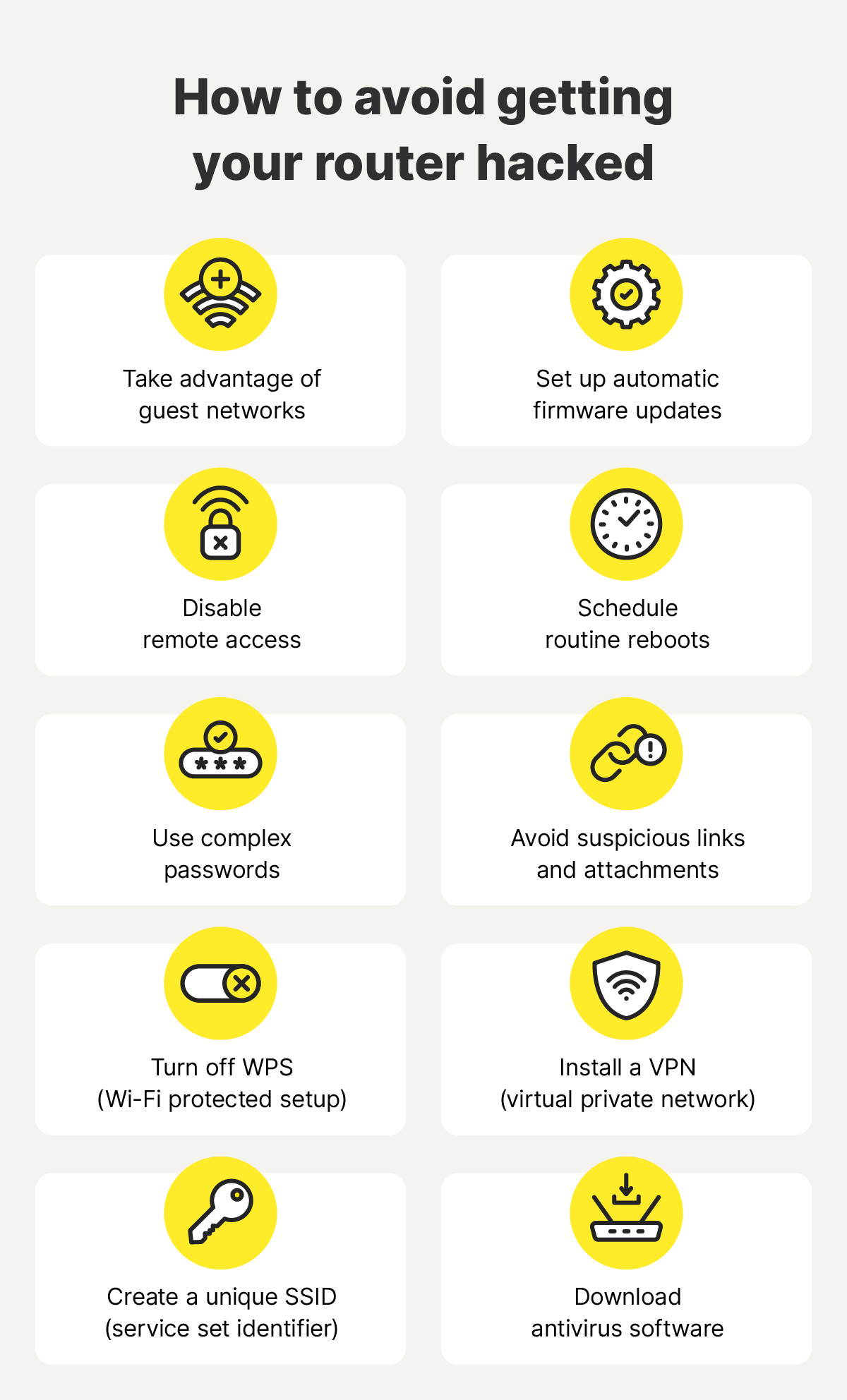
- Enable automatic firmware updates: Many routers offer a feature that installs firmware updates automatically, ensuring you always have the latest security patch without having to manually install them.
- Disable remote access: Remote management might be convenient in niche situations, but it also introduces risk. Disable it from your router admin settings to make sure hackers can’t control your router from outside your network.
- Schedule routine reboots: Restarting your router every month or so can clear temporary files and remove potential malicious code. It also renews the public IP address associated with your router, often used by hackers to track your device’s network and internet activity.
- Use complex passwords: Protect your router admin account with a strong password that you don’t use for any other accounts. Aim to make it at least 15 characters long, use a combination of letters, numbers, and symbols, and never share it.
- Create a unique SSID: Changing your network’s name (SSID) can make it harder for hackers to identify your router and attempt attacks.
- Use guest networks: If you can create guest networks on your router, set one up for guests who visit your house. This can help prevent potentially infected devices from spreading malware or compromising your primary network, and also means you don’t have to share your main Wi-Fi password.
- Turn off WPS: WiFi Protected Setup (WPS) is a convenient way of connecting new devices to your network, but it’s generally not seen as a secure option. Disable it and rely on your SSID and password, instead.
- Install a VPN: A VPN can mask your public IP address and encrypt your online activity, making it harder for hackers to track or target your network.
- Avoid suspicious links: Don’t click on links or download attachments from unknown emails — hackers may use phishing tactics to compromise your device and gain access to your network.
- Use trusted antivirus software: Protecting your connected devices with powerful antivirus software reduces the risk of them being infected with malware that could spread over your network.
Protect your router with Norton
Securing your Wi-Fi router is one of the most crucial steps you can take to safeguard your home network, and the devices connected to it, against hackers, malware, and other cyberthreats. But network protection only goes so far, and it’s also important to protect your devices themselves.
Norton 360 Deluxe can help you boost your device security, providing antivirus, anti-malware, and anti-scam protection across up to five devices, including PCs, Macs, tablets, and phones. You also get a VPN that can improve your online privacy for safer browsing.
FAQs
Can someone access my Wi-Fi remotely?
Yes, hackers may be able to access your router and Wi-Fi remotely if you have remote management turned on in your router settings and you’re using a weak admin password that could be guessed easily.
What can a hacker do with my Wi-Fi password?
If a hacker gets access to your Wi-Fi password, they can connect to your network. This could lead to other devices connected to the network being vulnerable to attacks, and hackers may also be able to steal sensitive info or install malware by intercepting, redirecting, or altering your network traffic.
How do I disable remote access to my router?
Log in to your router’s admin account, look for a “Remote Administration,” “Remote Access,” or “Remote Management” tab, and make sure the setting is disabled.
Does a router provide security?
Routers typically come with preloaded security, like a firewall that helps block malicious requests from the internet, and regular firmware updates can ensure these security settings are kept current. However, this security isn’t necessarily enough to prevent all attack vectors.
How can I tell if someone is using my Wi-Fi?
The easiest way to check what devices are using your Wi-Fi is to access your router's admin panel and inspect the list of connected devices, typically available in a section called "Connected Devices," "Attached Devices," or "DHCP Client List." If you notice a device that you don’t recognize, it could be a hacker.
Does resetting a router remove hackers?
Resetting your router can temporarily remove hackers from your network, but it doesn’t address the root cause, and they may be able to regain access just as easily. Changing your router’s login credentials and updating its firmware after the reset can help prevent them from getting back in.
Editors' note: Our articles offer educational information and are written to raise awareness about important topics in Cyber Safety. Norton products and services may not protect against every type of threat, fraud, or crime we write about. For more details about how we research, write, and review our articles, see our Editorial Policy.





Want more?
Follow us for all the latest news, tips, and updates.