







Yes, iPhones can get hacked: Here’s how
iPhones are known for being secure, but they’re not completely hack-proof. A compromised iPhone can put your messages, photos, financial information, and even your identity at significant risk. Learn how to tell if your iPhone is hacked, what you can do about it, and how solutions like Norton Mobile Security can help keep hackers off your phone.

2025
Consumer
Security Innovator




Your iPhone contains almost your whole life: from calendars and payment cards to saved passwords, messages, medical records, and personal identifiers.
What the experts say
"You’re not just carrying a phone anymore, you’re carrying your identity, your memories, your finances, your secrets. And that’s exactly what cybercriminals are after." - Gen 2025 Threat Report
Luis Corrons, Security Evangelist
Apple’s robust security measures, including sandboxing, rigorous app reviews, and data encryption, generally keep this information safe. But no device is entirely immune, and iPhones become much more vulnerable if built-in protections are bypassed.
Recently, Apple revealed that hackers had exploited WebKit vulnerabilities to install spyware on a small number of iPhones. Although these were targeted attacks, they serve as a clear reminder that even well-secured devices and operating systems aren’t immune to compromise.
Read on to learn how an iPhone can be hacked—and the practical steps you can take to reduce your risk.
How can iPhones get hacked?
Criminals can hack iPhones through various cyber attacks, including malicious code hidden in apps, or by installing malware directly if they gain physical access to your device. The risk increases if your phone is jailbroken, missing critical software updates, or connected to unsafe or public Wi-Fi networks.
Here are some ways someone can hack your iPhone:
Phishing attacks
One of the most common ways an iPhone can be hacked is through phishing scams, a form of social engineering in which attackers use deception to trick users into divulging sensitive information. They often come through email, texts, social media DMs, or online ads.
The attack may arrive as an inconspicuous link or attachment, usually from what looks to be a trusted source. For example, hackers may impersonate a bank representative, customer service agent, employer, friend, or someone else you’re likely to trust to make you click.
Malicious apps
Even though apps available through the Apple App Store undergo a strict review to check for malware, malicious or compromised apps occasionally slip through. In some cases, hackers may create a seemingly legitimate app and bury malicious code within it, or exploit app vulnerabilities to gain unauthorized access.
A recent example was the WhatsApp zero-click attack, in which attackers combined a flaw in WhatsApp with an iOS vulnerability to stealthily install spyware on the iPhones of select targeted individuals.
If you jailbreak your iPhone to access apps from third-party app stores, you significantly increase your susceptibility to malware. By bypassing Apple’s built-in security, you lose critical safeguards and expose yourself to apps and software that may never have been vetted for safety.
Direct malware installation
An attacker with physical access to your iPhone may be able to directly install malware. Apple’s USB Restricted Mode helps limit many of these attacks, but if you tap “Trust This Computer,” you may grant access that allows a malicious device to read data, monitor activity, or even hack your camera.
These attacks typically occur when a phone is connected to an unfamiliar computer, untrusted accessory, or even certain public charging stations. In some cases, attackers use specialized cables or forensic tools to exploit the USB connection and attempt to bypass protections to extract data from a locked device.
Compromised Wi-Fi networks
Public Wi-Fi is often unencrypted, which makes it easier for attackers to intercept traffic such as login credentials, financial details, and browsing activity. Hackers may also launch evil twin attacks by setting up fake Wi-Fi networks that mimic legitimate ones and redirecting you to malicious websites or capturing data through man-in-the-middle attacks.
For example, Apple disclosed a 2025 vulnerability in its Passwords app that allowed attackers to intercept certain unencrypted web requests and redirect users to convincing fake login pages. In practical terms, someone on the same public Wi-Fi network could tamper with those requests and send victims to spoofed sites designed to steal credentials.
What can happen if your iPhone gets hacked
If your iPhone gets hacked, the consequences can range from data theft to full device takeover. Hackers may even use your device as a launchpad for further attacks. Here’s a closer look at what may happen once attackers gain access:
- Data theft: Attackers may steal and exploit photos, messages, contacts, account details, or other stored information.
- Financial loss: If they access banking apps or saved logins, they may attempt unauthorized transactions or take over linked accounts. Even streaming services like Netflix and Spotify have been targeted in account hijacking schemes.
- Remote takeover: Certain spyware can track location, read communications, or, in more advanced cases, activate the microphone, camera, or apps, opening a door to other scams.
- Device disruption: They can install malware that causes crashes, slows performance, or renders the phone unusable. Some may deploy ransomware to lock your system or data and demand payment to restore it.
- Further attacks: Compromised accounts can be used to send phishing or spam messages to your contacts, spreading the scam further.
The Wall Street Journal previously reported on a wave of iPhone thefts in which attackers observed victims entering their passcodes, then stole the device and used the code to lock them out of their Apple accounts.
Similar tactics can be used by someone in your workplace or social circle who gains brief access to your device, potentially allowing them to install tracking tools or other malicious software.
Signs your iPhone was hacked
It’s not always easy to tell if your iPhone has been hacked. Many suspicious glitches or slowdowns can be traced back to aging hardware, software bugs, or simple user error. Still, there are several red flags worth watching for.
Here’s how to check for hackers on your iPhone:
Your phone is slow or hot
If your iPhone feels unusually slow or hot, it could signal a hack. Malicious software often executes resource-intensive processes quietly in the background, overloading the CPU and GPU. This hidden activity generates heat and degrades performance as the system struggles to keep up.
Here’s how to see if malicious apps are causing your iPhone to run hot or slow:
- Open Settings on your iPhone.
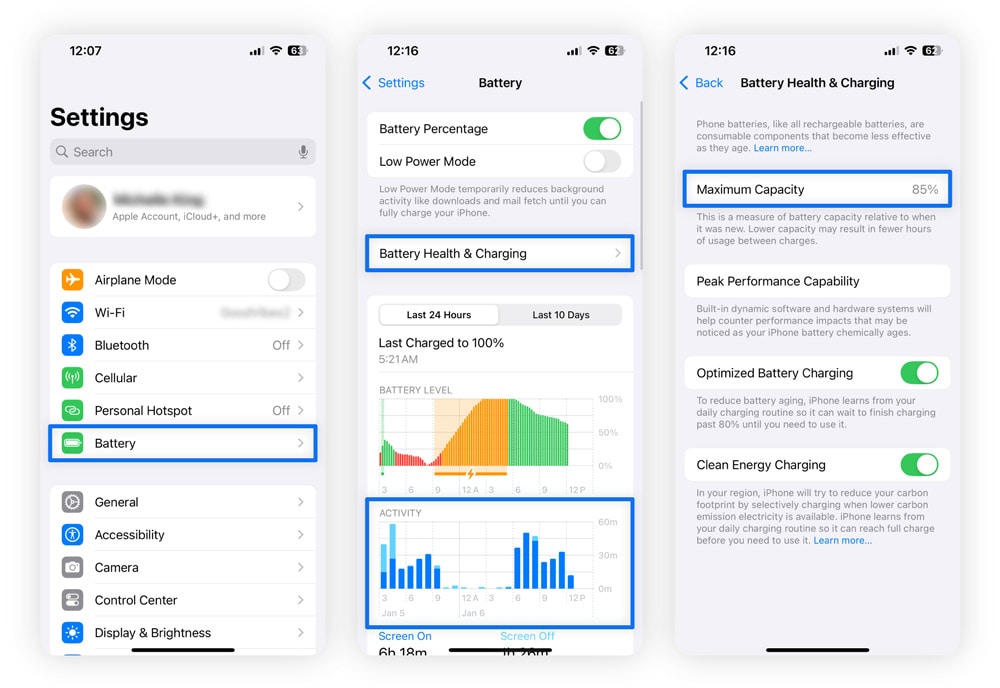
- Go to Battery and review the Battery Usage and Activity charts for any apps using an unusual amount of power.
- Return to Settings and open Privacy & Security.
- Select Analytics & Improvements and review analytics logs for any apps or processes that appear suspicious or out of place.
This data can help reveal unusually power-hungry or misbehaving apps.
You’re locked out of your Apple ID or unfamiliar devices are connected
One of the first things many hackers do once they have access to an iPhone or another iOS device is change the Apple ID password to lock the owner out of their account. When this happens, you might be unable to sign into iCloud, download apps from the App Store, or access your digital wallet, iMessage, or FaceTime.
To check for unauthorized access on your iPhone:
- Open Settings and tap [Your Name] at the top.
- Scroll down to view the list of devices linked to your Apple ID and look for anything unfamiliar, paying close attention to device names, types, and when they were last used.
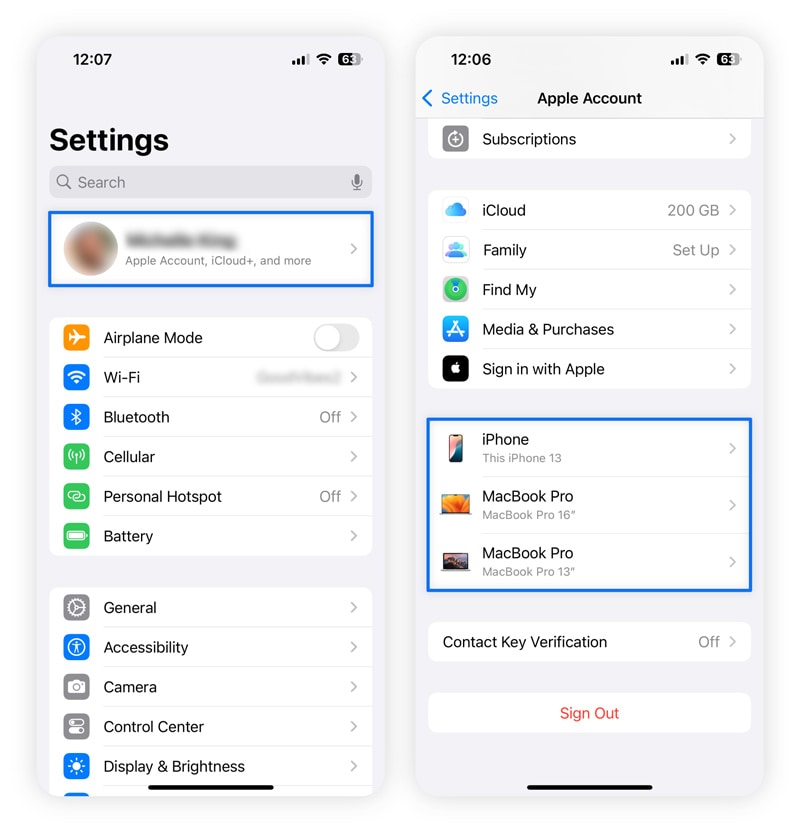
3. If you see something suspicious, tap on it and select Remove from Account immediately, then change your Apple ID password.
If the hacker booted you off your account, the easiest and safest way to regain control is by visiting iforgot.apple.com. You’ll just need to provide your phone number and identifying information to reset your password and remove unrecognized devices.
When you do this, reset your password on another device. Attackers can steal your new password if a keylogger or spyware is active on your device.
Your data consumption is high
Another way to check if your iPhone has been hacked is a sudden surge in data usage. Malware, spyware, and other malicious software communicate with remote servers or the hacker, even when you aren’t using your phone. This round-the-clock activity eats up a lot of mobile data.
To check your data usage:
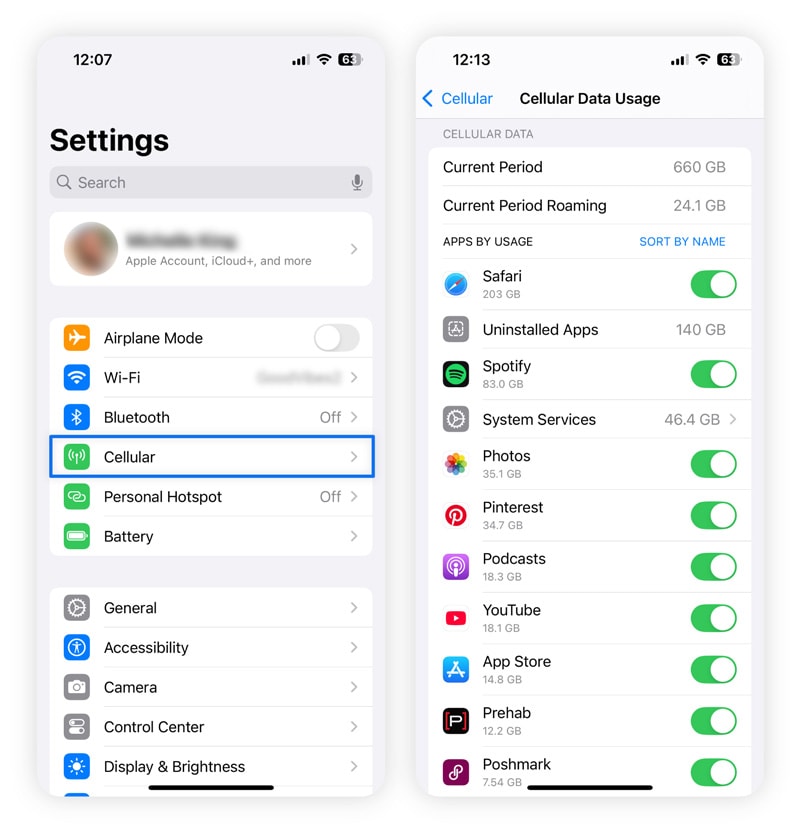
- Open Settings on your iPhone.
- Tap Cellular (or Mobile Data, depending on your region).
- Review the list of apps to identify which ones use the most cellular data.
You can also check your phone bill for any unexplained data overage charges that might suggest unusual activity.
Unfamiliar apps appear
If you start seeing apps you didn’t download on your home screen or in settings, it could mean that a hacker has a foothold in your iPhone. The app could be spyware that steals your information, malware that hijacks system resources, or a backdoor that gives attackers remote access to your device.
In some cases, you may even see two versions of the same app — an indicator of a potential Trojan. These malicious apps mimic legitimate ones, often copying the name or icon of software you already use, while running hidden code in the background. Once installed, they can capture sensitive data, redirect activity, or open the door to additional malware without obvious warning signs.
For example, in 2024, researchers uncovered an iOS Trojan distributed through Apple’s TestFlight platform. Victims who installed the seemingly legitimate “test” app unknowingly exposed ID documents, messages, and even facial recognition data to attackers.
Your battery drains faster than it should
A phone’s battery typically drains faster as it ages, but if you’ve noticed a sudden and significant drop in battery life, it might mean somebody hacked your iPhone. That’s because malicious software can run silently in the background, constantly consuming battery power.
If you’re seeing fewer hours per charge, start with these checks:
- Open Settings, then go to Battery and Battery Health & Charging.
- Look at Maximum Capacity to confirm whether the battery is still in good condition.
If the battery’s condition is healthy and its capacity remains high (above 80%), the reason behind the rapid battery drain could be hidden malware.
Your contacts get strange messages
If people in your contacts start receiving texts, emails, or DMs you never sent, it could signal that someone has compromised your iPhone or Apple account. Attackers can send messages with phishing links using your name, phone number, and even through the same messaging app to make them look legitimate.
This can also occur after a SIM-swap attack, where a criminal convinces your mobile carrier to transfer your phone number to a SIM card they control. Once they hijack your number, they can send and receive messages as you, reset passwords that rely on SMS verification, and impersonate you across multiple accounts.
Attackers can also hijack WhatsApp accounts via GhostPairing attacks and send phishing links to the victim’s contacts.
You get an alert
Depending on what an attacker targets and how, they may trigger alerts from different sources:
- Apple: If someone attempts to sign in to your Apple ID from an unfamiliar device or location.
- Security apps: Tools like Norton Mobile Security may flag suspicious apps or malicious activity.
- Your bank or credit card provider: You may receive notifications about unusual or unauthorized transactions.
- Your mobile carrier: Alerts about suspicious account changes or SIM card replacements can signal a SIM-swap attempt.
- Social media platforms: Login alerts from unrecognized devices or locations may indicate account compromise.
Legitimate alerts are usually tied to specific activity on your account and include official branding and contact details. If you receive one, treat it seriously — it may indicate that someone attempted to access your device or accounts.
What to do if your iPhone has been hacked
If you suspect your iPhone has been hacked, start by turning on Airplane Mode. This cuts all network connections and blocks further access to your device. From there, follow the steps below to remove the hacker from your phone and regain control.
Run a malware scan
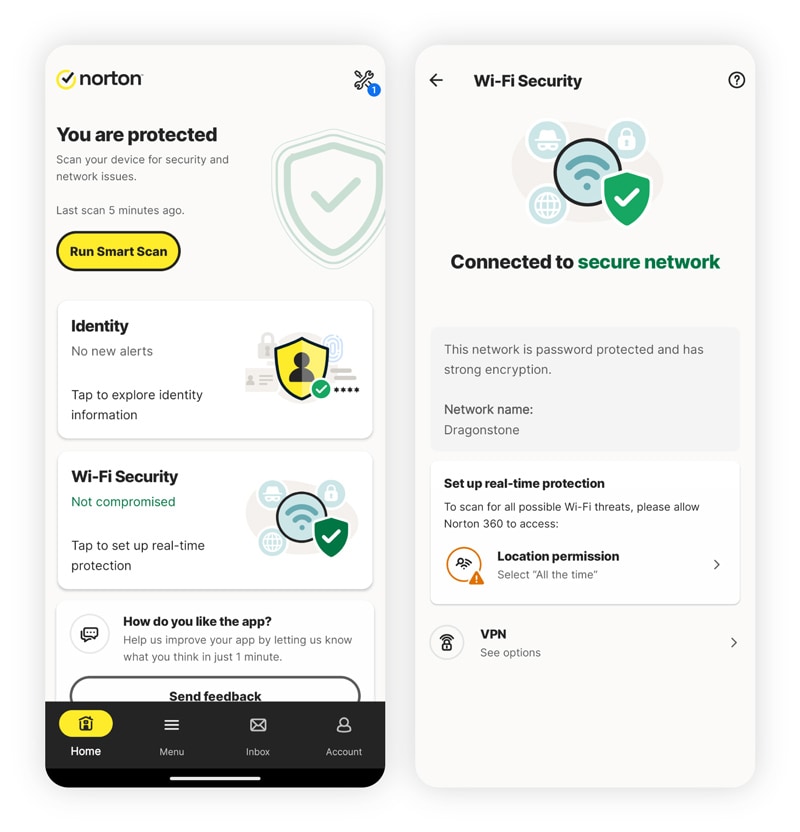
iPhones don’t warn users about malware with pop-ups. If you notice signs of malware on your smartphone, run a scan with a trusted tool like Norton Mobile Security. This is one of the most reliable methods for detecting malicious software that may have bypassed Apple’s built-in defenses. The software blocked over 400,000 attacks from adware (across both Android and iOS) in September 2025 alone.
Delete unfamiliar apps and devices
Keep your iPhone clean by removing unused or unknown apps. This minimizes your exposure to vulnerabilities and can disrupt existing hacking by removing the tool the hacker used. On your iPhone, hold the app icon until it opens a new window, and tap Remove App. Then, tap Delete app and Delete to remove the app from your phone and delete its data.
Alert your bank
If you use mobile banking or credit card apps on your iPhone, contact those providers to freeze, monitor, or close vulnerable accounts after a hack. Also, place a fraud alert with one of the three major credit bureaus (they’ll notify the others) to help prevent hackers from opening new accounts in your name.
Clear your cache and browsing history
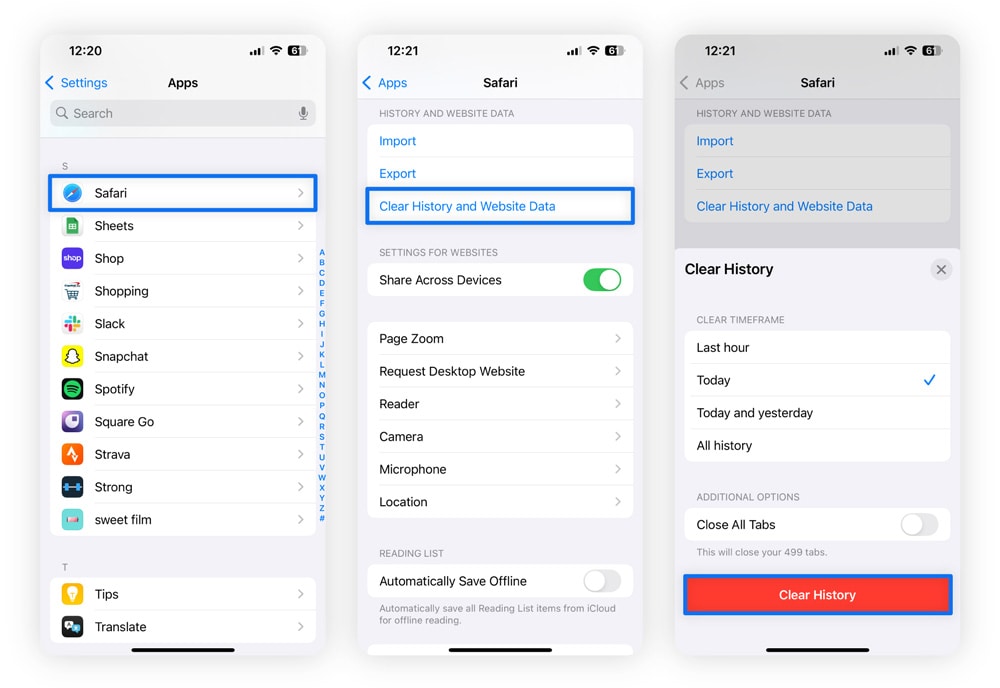
Hackers can exploit your browser’s cache to track activity and steal data. Clearing your cache and browsing history helps wipe any stored information they might use. Here’s how to clear history and website data on iPhone:
- Open Settings, select Apps, then scroll down and tap Safari.
- Select Clear History and Website Data.
- Click Confirm to remove cookies, cached files, and your browsing history.
This removes cookies, cached files, and browsing history, making it harder for attackers to follow your activity.
Change your passwords
If you suspect your iPhone has been compromised, start by changing your Apple ID password first, then update the passwords for any other accounts that may have been affected. We also suggest you use a passphrase or a combination of letters, numbers, and special characters to make your passwords harder to crack through brute-force attacks.
For stronger protection, use a password generator to create ultra-secure passwords for your accounts. A tool like Norton Password Manager, for example, can help you quickly create strong, unique passwords for every account and store them securely so you don’t have to manage them on your own.
Factory reset your iPhone (last resort)
A factory reset is your last resort. It restores your iPhone to its original state and can remove even deeply embedded malware. However, it also erases all your apps, files, settings, and personal data, so it should be used only when other solutions fail.
Here’s how to reset your iPhone:
- Open Settings and tap General.
- Select Transfer or Reset iPhone > Erase All Content and Settings.
- Tap Continue and follow the prompts.
3 common security myths about iPhones
iPhones are secure, but despite popular belief, they’re not invulnerable. They can be infected with malware, apps in the App Store aren’t immune to vulnerabilities, and phishing attacks can target iPhone users just like any other device.
Here are some common iPhone security myths, debunked:
1. “iPhones can’t get viruses.”
Why this is false: Bad actors are less likely to infect iOS devices with viruses because of their “closed ecosystem.” Nevertheless, in 2025, Apple disclosed nine zero-day vulnerabilities that hackers exploited.
2. “All App Store apps are safe.”
Why this is false: Malicious apps can sometimes bypass Apple’s review process by hiding harmful code inside legitimate functions or delaying activation until later. While such cases are rare (thanks to Apple’s tightly controlled “walled garden”), 2024 saw Trojan apps enter the App Store, with Apple taking down around 20 malicious apps in early 2025.
3. “Non-jailbroken iPhones can’t be hacked.”
Why this is false: Jailbreaking an iPhone can make it more susceptible to hacking because it removes the device’s built-in guardrails and defenses. But even a standard iPhone can get hacked if you fall for a phishing or Scam-Yourself scam like FakeCaptcha. In fact, there was a 614% increase in Scam-Yourself scams in Q3 2025, when compared to the previous year.
Protect your iPhone from hackers
Staying alert to suspicious links and using Apple’s built-in protections are smart first steps, but they don’t stop every threat. An added layer like Norton Mobile Security for iOS helps close the gaps.
It can flag scam texts, block dangerous websites, and check Wi-Fi networks for security issues, all while running quietly in the background. And thanks to advanced AI-powered scam protection, you can also detect social-engineering tactics designed to trick you into handing over personal information.
FAQs
Can iPhones get hacked from text messages?
Yes, iPhones can be hacked via text messages if you click a malicious link that leads you to a phishing website or directs you to download malware or spyware. For example, a scam text may urge you to scan a QR code or tap a link that steals credentials or installs a harmful app.
Can iPhones get hacked from websites?
Yes, iPhones can be hacked by visiting a malicious or malware-laden website. Attackers create malicious websites that can steal your login credentials through phishing pages or attempt to exploit iOS vulnerabilities to install malware.
In some cases, simply loading a compromised page can trigger a drive-by exploit that gives hackers limited access to your device or data, even if you don’t download anything.
What should I dial to see if my phone is hacked?
There’s no single code you can dial to confirm your iPhone is hacked. But you can use dial codes to check if your calls or texts are being secretly forwarded. This is something hackers do when they want to spy on your communications.
For example, dialing #21# shows whether forwarding is active, and *#62# reveals where your calls or messages are being redirected.
Can someone hack my iPhone and remotely access it?
Yes, hackers can access an iPhone remotely if a remote access trojan (RAT) is installed, permissions are granted through a phishing scam, or software vulnerabilities are exploited. However, keeping your device updated and using online security tools like Norton Mobile Security can significantly reduce risks, as they can block malicious sites and alert you about scam messages.
Was there an Apple security breach?
Yes, there have been multiple incidents of zero-day cyberattacks and iPhone breaches in 2025. In a recent incident, Apple disclosed a flaw in its ImageIO framework that attackers had already been exploiting. The bug allowed a malicious image file — sent via messaging apps or social platforms — to corrupt a device’s memory.
Editors’ note: Our articles offer educational information and are written to raise awareness about important topics in Cyber Safety. Norton products and services may not protect against every type of threat, fraud, or crime we write about. For more details about how we research, write, and review our articles, see our Editorial Policy.



Want more?
Follow us for all the latest news, tips, and updates.