






What is a ransomware attack? How it works and prevention tips
Ransomware can lock you out of your device or hold your files hostage, leaving you with a difficult choice: pay the attacker or risk losing valuable data forever. Learn how ransomware works, the warning signs to watch for, and how to safeguard your devices and personal information from these potentially devastating attacks.







Ransomware is a type of malware that locks, encrypts, or otherwise restricts access to a targeted device or specific files. The ransomware attackers then demand that the victim pays them to restore access.
It’s not a new threat, but it continues to evolve, with groups like FunkSec reportedly using generative AI to launch large-scale attacks that encrypted files and disabled key system services across more than 100 targets. Although, in this specific case, researchers later discovered a flaw that helped some victims recover data, not all targets are so lucky.
Keep reading to learn more about how ransomware attacks work and what steps to take and avoid if you ever become a target.
How a ransomware attack works
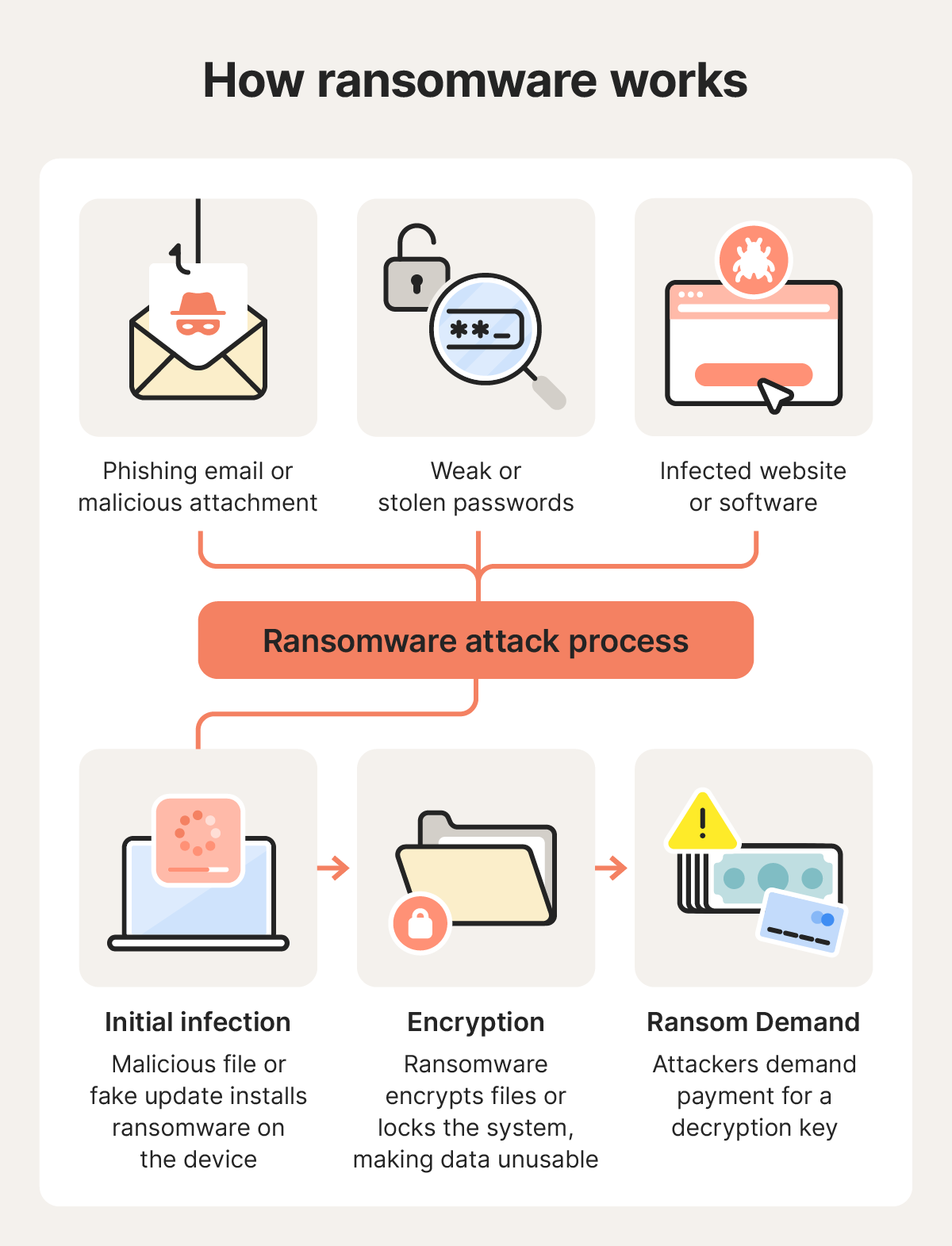
Ransomware attacks typically begin when cybercriminals gain access to a device or network through a social engineering attack or unpatched software vulnerability. Once inside, they deploy malware that encrypts files, disrupts systems, or locks devices altogether so they can extort a victim for a ransom payment.
Here’s how a ransomware attack plays out, step by step:
1. Initial infection
Attackers establish access through phishing, stolen credentials, malicious downloads, or software vulnerabilities, then deploy ransomware onto the targeted device or network.
Attackers typically slip ransomware onto devices using the following methods:
- Social engineering attacks: Attackers use phishing emails, fake messages, or malicious attachments to trick victims into clicking links or opening files that secretly install ransomware. These messages may impersonate trusted contacts, companies, or coworkers to appear legitimate.
- Remote Desktop Protocol (RDP) abuse: Cybercriminals may target exposed or poorly secured Remote Desktop Protocol (RDP) services by guessing weak passwords, using stolen credentials, or exploiting misconfigured systems. Once they gain remote access, they can manually deploy ransomware across a device or network.
- Exploit kits and drive-by downloads: Some ransomware campaigns use exploit kits hidden on compromised websites or in malicious advertisements. These tools scan visitors’ devices for unpatched vulnerabilities and can silently install malware without requiring the user to download anything intentionally.
2. Encryption and disruption
Once ransomware is active on a device or network, it typically begins encrypting files using strong cryptographic algorithms that make the data unreadable without a decryption key. Depending on the attack, the malware may target documents, photos, databases, backups, or shared network drives.
Some ransomware variants also disable security software, delete backup copies, or interfere with recovery tools to make removal and restoration more difficult.
Modern ransomware attacks are often designed to cause maximum disruption before they’re detected. In business environments, attackers may move laterally across a network to compromise lots of systems at once, leading to seriously impactful downtime that incentivizes the target organization to pay the ransom.
3. Ransom demand
After files are encrypted or systems are locked, victims typically receive a ransom note explaining what happened and demanding payment in exchange for a decryption key or restoration instructions. These demands are usually made in cryptocurrency, such as Bitcoin, and often include deadlines or threats intended to pressure victims into paying quickly.
Some strains, such as Trinity ransomware, also use “double extortion” tactics, where attackers steal sensitive data before encrypting it and then threaten to leak the information publicly unless an additional ransom is paid.
However, paying the ransom does not guarantee recovery. Untrustworthy cybercriminals may fail to provide a working decryption key, demand additional payments, or disappear entirely after receiving the money. Even if files are restored, attackers may have already stolen sensitive data or left behind malware that could lead to future attacks.
Common targets of ransomware attacks
Ransomware attackers often focus on targets they believe are more likely to pay quickly or suffer serious disruption if data becomes inaccessible. Research by Gen from Q4 of 2025 shows a shift away from broad, indiscriminate campaigns toward smaller, more targeted attacks.
Here are some of the most common ransomware targets:
- Entities with weaker security protocols: Universities and similar institutions often have overly broad file-sharing permissions and uneven security controls. In the first nine months of 2025, Comparitech tracked 180 ransomware attacks against the U.S. education sector, with average ransom demands exceeding $444,000.
- Organizations under pressure to restore operations quickly: Government agencies, healthcare providers, and other essential services are attractive targets because downtime can immediately disrupt critical operations.
- Firms that handle sensitive data: Law firms and professional services face heightened risk because attackers may threaten to publish sensitive data if demands are not met, potentially causing serious legal and reputational consequences.
- Small and mid-sized businesses (SMBs): Ransomware increasingly targets SMBs because these organizations tend to lack enterprise-grade cybersecurity defenses but still depend heavily on digital systems. According to the U.S. Chamber of Commerce, 60% of small businesses cite cybersecurity threats, including ransomware, as a top concern.
- Businesses in wealthier markets: Cybercriminals frequently focus on organizations in countries like the U.S., U.K., and Canada, where businesses may have greater financial resources and broader digital infrastructure.
Should you pay the ransom?
Cybersecurity experts and law enforcement agencies generally advise against paying ransomware demands. Once payment is made, victims have little control over what happens next, and there’s no guarantee attackers will actually restore access to the encrypted files. The FBI has also warned that ransom payments can encourage further attacks by funding and incentivizing criminal operations.
Even when attackers provide a decryption key, recovery is not always successful. Files may remain corrupted, systems may still contain malware, or attackers may stop communicating entirely after receiving payment.
Paying the ransom also doesn’t guarantee stolen information will be deleted or kept private. Cybercriminals may still leak or sell the data, or demand additional payments to keep it off the dark web. As a result, many organizations have increasingly shifted away from paying ransoms and instead focused on maintaining up-to-date backups, incident response planning, and recovery strategies.
How to respond to a ransomware attack
Responding to a ransomware attack quickly can help limit the damage and improve the chances of recovery. The priority is usually to contain the infection, preserve evidence, and safely restore systems — not to negotiate with attackers.
Here are the key steps to take after discovering you’re being targeted with a ransomware attack:
- Isolate the infected device: Immediately disconnect the affected device from Wi-Fi, wired networks, Bluetooth connections, and external drives. This can help stop the ransomware from spreading to shared storage, cloud-sync folders, or other connected devices on the network.
- Identify the ransomware type: If possible, record details like the ransom note, encrypted file extensions, or unusual filenames. This information may help security researchers or incident responders determine which ransomware strain is involved and whether a decryptor tool already exists.
- Collect evidence: Take screenshots of ransom messages and save copies of encrypted files or suspicious emails associated with the attack. Preserving this information can help with reporting, forensic analysis, insurance claims, or future recovery efforts.
- Report the attack: Report the incident to relevant authorities such as the FBI’s Internet Crime Complaint Center (IC3) in the United States. Even if recovery isn’t immediately possible, reporting attacks helps investigators track ransomware campaigns and support broader crimefighting efforts.
- Wipe and restore systems: Once evidence is preserved, the safest recovery approach is often to fully wipe the infected system and restore files from clean data backups created before the attack occurred. Avoid restoring unknown files or backups unless you’re confident they’re free of malware.
- Update all passwords: Create new, secure passwords for email, banking, cloud storage, work accounts, and any other services accessed from the infected device. If the ransomware attack involved credential theft or data exfiltration, attackers may attempt to reuse exposed passwords elsewhere.
If you’re able to identify what type of ransomware you’ve been targeted with, check whether a free decryptor is available from a trustworthy source.
Security researchers and law enforcement agencies occasionally release these tools after discovering weaknesses in a ransomware strain or recovering encryption keys during investigations. For example, researchers at Gen Digital developed a free decryptor for Midnight ransomware, helping some victims recover their files without paying the ransom.
How to help prevent ransomware
To reduce the risk of ransomware, keep your devices updated, avoid suspicious links and attachments, use strong passwords and multi-factor authentication, and maintain reliable backups. Using a virtual private network (VPN) and cutting-edge security software can add extra protection against network-based threats and malicious downloads.
Here are the best practices to follow to help avoid ransomware attacks:
- Use security software: Install a trusted ransomware protection tool that goes beyond basic antivirus features to help detect ransomware and other threats across your devices.
- Keep your software updated: New ransomware variants emerge constantly, so regular updates are essential for staying protected. Software updates often fix security vulnerabilities that attackers may try to exploit.
- Avoid opening unexpected email attachments: Be especially cautious with messages from unfamiliar senders or urgent requests that pressure you to click links or download files — they’re likely phishing attacks.
- Be wary of macros: Some malicious documents will ask you to enable macros, which can secretly execute harmful code. Unless you fully trust the source, don’t enable them.
- Back up data offline: Ensuring that you always have offline or cloud backups from a recent date can help reduce the potential impact of ransomware, allowing you to reliably restore your files without paying attackers.
- Be cautious on public Wi-Fi: Avoid sensitive online activity on public Wi-Fi or other unsecured networks when possible. If you must connect, use a trusted VPN to encrypt your traffic.
- Don’t pay the ransom: Payment doesn’t guarantee your files will be restored, and it may encourage attackers to continue making demands for money.
It’s also a good idea to create a simple incident response plan, in the event that a ransomware attack does slip through. Make sure you know where your backups are stored, which accounts you may need to act quickly to secure, and how to disconnect affected devices quickly to help limit the impact.
Protect against ransomware
Ransomware can strike hard and fast, and it’s not always possible to recover affected devices or files, so prevention is the best solution. Norton AntiVirus Plus helps stop threats in their tracks before they can lock your files or compromise your device, with real-time ransomware protection working continuously in the background.
And with a smart firewall and AI-powered scam protection helping block the latest tactics cybercriminals rely on to gain access to your devices, you get cutting-edge, layered security built for today’s evolving threats.
FAQs
What's the main cause of ransomware attacks?
Most ransomware attacks begin with social engineering tactics, such as phishing emails, malicious attachments, deceptive links, or fake software downloads, with attackers relying on human error to get device access. In some cases, ransomware also spreads through unpatched software vulnerabilities or poorly secured remote access services.
Can ransomware spread through Wi-Fi?
Yes, ransomware can spread across a Wi-Fi network, especially if connected devices share files, use weak passwords, or run outdated software with known vulnerabilities. Once one device is infected, attackers or malware may attempt to move laterally across the network and compromise other connected systems.
How do I know if I have ransomware?
The clearest sign of ransomware is a ransom note or payment demand appearing on your screen after files become inaccessible. You may also notice files suddenly changing, failing to open, or being encrypted. In some cases, your first warning sign might be security software like Norton AntiVirus Plus notifying you that it has detected and blocked ransomware activity before the attack is fully executed.
Can ransomware be removed?
Ransomware itself can often be removed using security software or by wiping and reinstalling the affected system. However, removing the malware does not automatically restore encrypted files. Data recovery usually requires clean backups or, in some cases, a trusted decryptor tool created for a specific ransomware strain.
Does antivirus software stop ransomware?
Yes, modern antivirus and endpoint security tools can help block ransomware before files are encrypted. The best solutions use real-time monitoring, behavioral analysis, and ransomware-specific protections to detect suspicious activity. Keeping your security software fully updated is important for recognizing and responding to emerging ransomware strains.
Editors’ note: Our articles offer educational information and are written to raise awareness about important topics in Cyber Safety. Norton products and services may not protect against every type of threat, fraud, or crime we write about. For more details about how we research, write, and review our articles, see our Editorial Policy.








Want more?
Follow us for all the latest news, tips, and updates.