




What is phishing? How to spot it and avoid it
Phishing attacks, where scammers try to trick you into revealing sensitive info, are at the center of many scams. And they’re only getting harder to detect. Discover the latest tactics and learn how to protect yourself against scammers. Then, get Norton 360 Deluxe for AI-powered scam detection tools that can help you stay safer.
2025
Approved
Anti-Phishing

2025
Top Rated Product




Falling victim to a phishing attack can cost you money in the short term and leave you vulnerable to follow-up fraud or identity theft afterward. And, with new tech constantly emerging, fraudsters are developing increasingly effective approaches capable of tricking more people.
A 2024 study found that fully-automated AI phishing emails were 350% better at encouraging victims to click a fake link than traditional ones, performing on-par with phishing emails developed by experts. That means the average scammer can now launch attacks just as sophisticated as pro fraudsters.
In this context, learning how to spot phishing attacks is more crucial than ever. Read on to learn about the different types of phishing, how AI is changing the game, and what you can do to help defend your data and hard-earned money.
What is a phishing attack?
Phishing is a type of cyberattack involving social engineering tactics, where a scammer impersonates a trustworthy person or organization to trick you into revealing sensitive data like passwords, credit card numbers, or personally identifiable information (PII). If you fall for it, the scammer can then hack your accounts, steal money, or even commit identity theft.
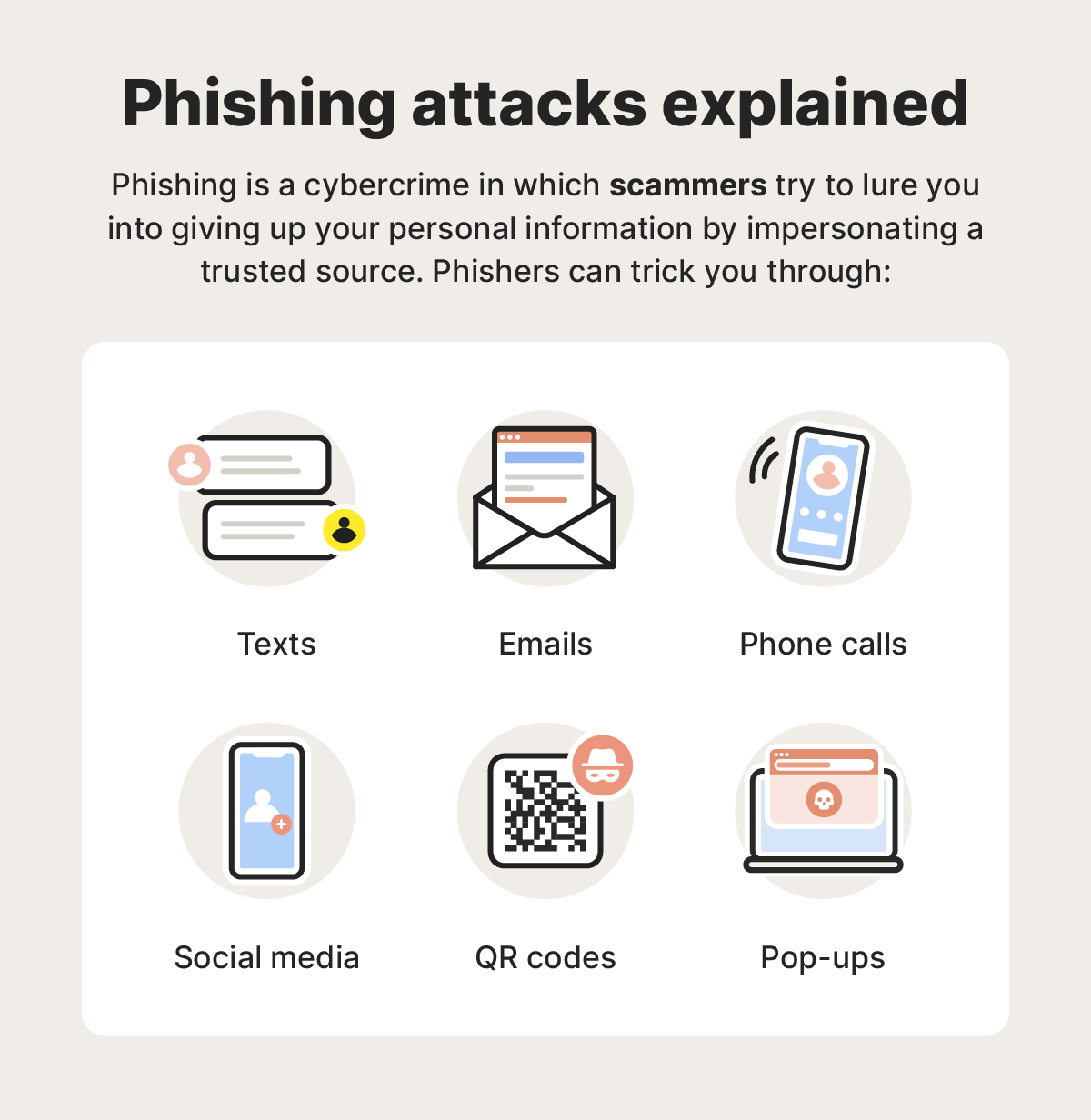
Phishing attacks can use lots of different strategies to trick you. Some, like tech support scams, may involve a scammer calling you out of the blue, claiming to be a support agent needing to resolve an urgent issue with your device. Others might rely on convincing fake emails containing dangerous links that trigger malware downloads.
These types of cyberattacks are a constant threat, with the Anti-Phishing Working Group (APWG) reporting more than 1 million phishing attacks in the first quarter of 2025 alone, marking the highest single-quarter record since 2023.
How phishing works
Phishing attacks manipulate your trust and use urgency tactics to get you to willingly hand over your personal data. Scammers use a variety of pretexts, contact methods, and social engineering strategies to convince victims they are who they say they are.
Here are the four basic steps that describe a typical phishing attack:
- Setup: First, scammers need your personal information, which they might find on a public people-search site or in a data breach. They’ll then create a convincing pretext to contact you, like a fake prize, account alert, or direct threat, sometimes personalized to target you specifically.
- Lure: The scammer will impersonate someone trustworthy like an IRS support agent, a legitimate company, or IT help desk assistant and make contact with you in a text, email, social media message, or phone call. They’ll often use convincing branding to make the approach look real.
- Capture: If you click a phishing link in an email, download a fake file attachment, or willingly provide details to the scammer, they may be able to capture sensitive information, like financial data or passwords, after which they’ll cut contact.
- Exploit: Finally, the scammer can use the information they stole for personal gain, whether that’s by selling it on the dark web, using it to steal directly from your bank account, or committing identity theft or fraud, like opening new credit cards in your name.
Scammers employ various strategies to trick you into giving up your sensitive information. Some of the tactics they may call upon include:
- Social engineering: This is when a criminal manipulates a person’s emotions and sense of trust.
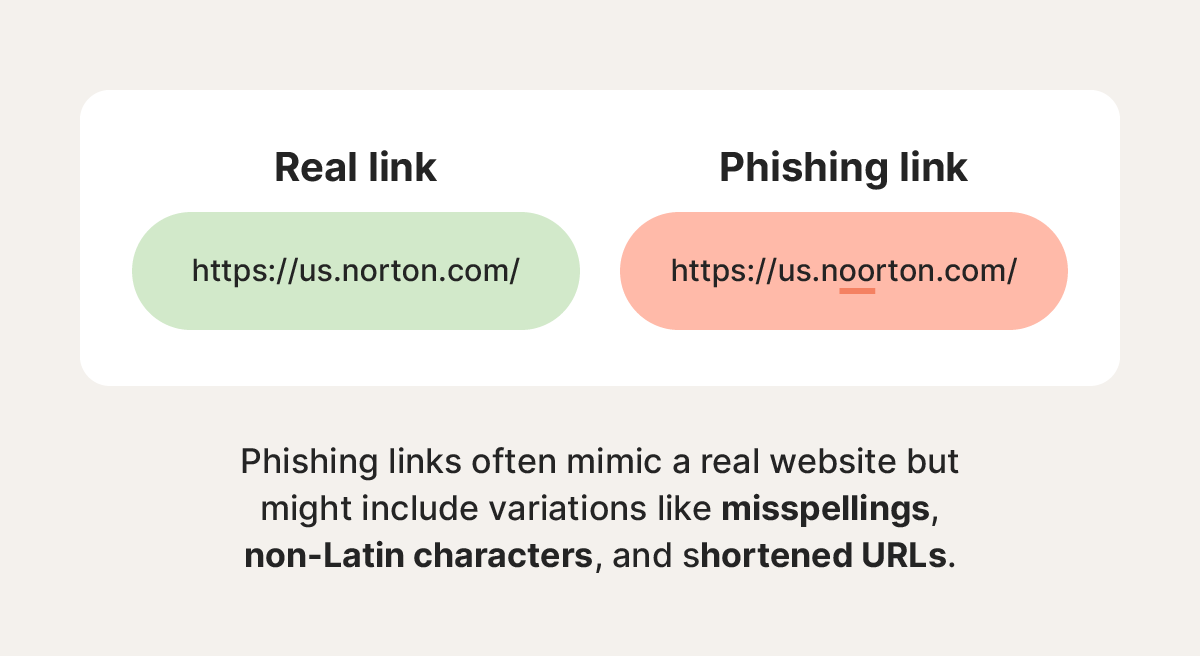
- Hyperlink manipulation: Cybercriminals often hide phishing websites behind legitimate-looking URLs.
- Graphical rendering: Attackers may send emails as images to bypass phishing scans and filters.
- Site redirects: Criminals may send you to a phishing site before redirecting you to a legitimate site.
- Link shortening: Cybercriminals may disguise dangerous website URLs by shrinking them.
- Typosquatting: Attackers imitate common websites with typo URLs, replacing letters with numbers, for example.
- AI voice generators: AI technology enables scammers to disguise their voice to sound like someone else or imitate someone you trust.
- Chatbots: Cybercriminals may use AI chatbots to create highly personalized, error-free phishing messages at scale.
Types of phishing attacks
Phishing scams can take many forms — the type of attack that a scammer uses depends on their preferences, what they know about the target, the communication platform of choice, and the end goal.
Here’s an overview of a few of the most common types of phishing attacks.
Email phishing
According to the Cybersecurity and Infrastructure Security Agency (CISA), over 90% of successful cyberattacks start with a phishing email. Fraudsters send phishing emails impersonating legitimate companies, often banks or credit card providers.
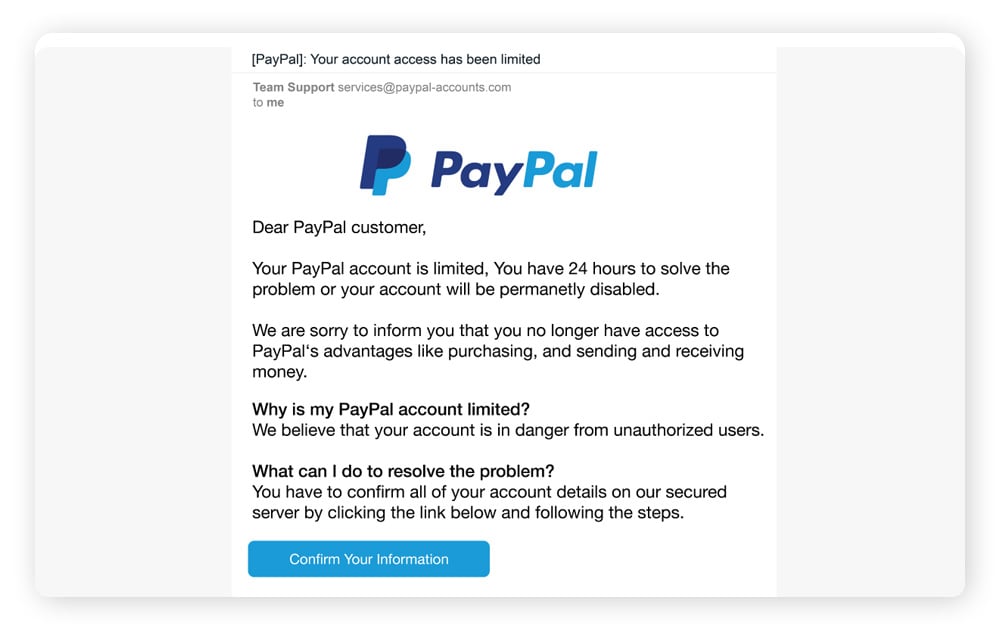
Phishing email examples show how cybercriminals try to trick victims into providing sensitive information by getting them to download malware unknowingly or directing them to an unsafe website where they’re asked to voluntarily enter private information.
Smishing (SMS phishing)
Phishing attacks delivered by text messages are called smishing. They involve scammers sending texts designed to look like they come from legitimate sources, such as a bank, retailer, or delivery company like USPS. But the message will usually contain a link that leads to a fake login page or triggers a malware download.
A major wave of smishing attacks occurred in 2024 and 2025 in the form of toll scams. Scam texts claimed that victims had unpaid toll fees and were at risk of fines or suspension, with a link directing them to a website where their payment information was fraudulently collected. The group behind this was so successful in stealing money and credit card info that Google is now suing them.
Vishing (Voice phishing)
In a vishing attack, scammers call victims and trick them into disclosing personal information, such as Social Security numbers, passwords, or bank account details, typically by posing as law enforcement officers, government agencies, or bank representatives.
They use tactics like caller ID spoofing and AI voice cloning to make the calls seem more believable, and attempt to create a sense of urgency on the phone to prevent their victims from thinking critically. Even the FBI has been impersonated in vishing attacks, with the bureau issuing a warning after discovering that scammers were posing as senior US officials.
Spear phishing
Spear phishing attacks target a specific individual, business, or organization rather than casting a wider net. Typically, spear phishers invest significant time and effort into researching their targets and building a credible persona. This helps them craft more personalized approaches that have a higher chance of successfully tricking the chosen victim.
For example, in a recent spear phishing attack in Utah, the scammer pretended to be a professor and targeted students with an opportunity to join a professor-led project, ultimately milking one student out of $3,000.
Whaling
Whaling attacks are like spear phishing attacks but specifically target chief executive officers (CEOs), chief operating officers (COOs), or other high-ranking executives in a company. The goal of a whaling attack is to trick powerful people into giving up confidential corporate data that can be used in fraud or extortion.
These attacks are often more sophisticated than typical phishing attacks and require extensive research by scammers. They usually rely on fake emails that appear to be from trusted sources within the company or legitimate outside vendors or agencies.
Clone phishing
In clone phishing attacks, scammers create a nearly identical version of an email that victims have already received. The cloned email is sent from an email address very similar to the one used by the message’s original sender, with the only difference being a new attachment or link.
Clone phishing emails attempt to confuse victims into clicking the wrong version of the message. And if victims then follow a link or download an attachment in the fake version, they’ll be taken to a malicious website or unknowingly infect their device with data-stealing malware.
Pop-up phishing
Pop-up ad phishing scams trick people into installing various types of malware on their devices by leveraging scare tactics. A common pop-up phishing example involves a fake virus alert that pops up and warns the target that their device has been infected.
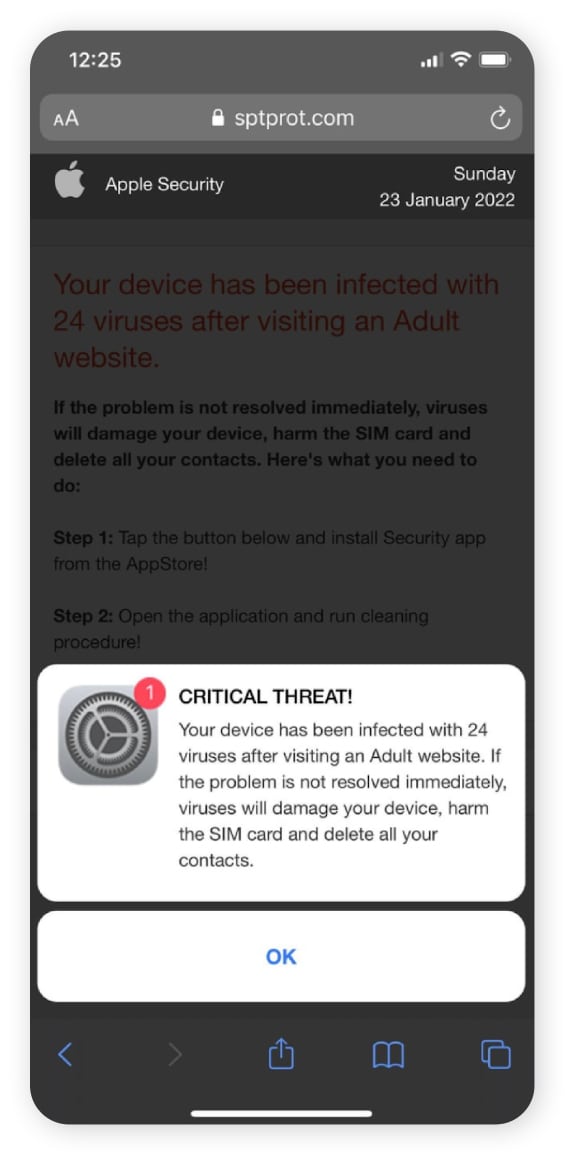
The alert might claim the only way to remove the virus is to install antivirus software, but victims will actually be pointed toward a fake version that steals data if installed. Popular brands are often mimicked, with scammers leveraging trusted names to trick targets in Microsoft and Norton antivirus scams, for example.
Business Email Compromise (BEC)
Business email compromise attacks involve cybercriminals posing as a trusted figure within a company, like an HR representative, the CEO, or the owner, to manipulate employees into sending money or sharing valuable data. These attacks are designed to bypass business spam filters by looking legitimate and often strike small business owners hard.
For example, a scammer could impersonate a member of a payroll team and send a request to a more junior employee requesting that another employee’s banking details be updated. If they’re successful, the victim’s salary will be sent to the scammer’s account instead. In 2025, so-called payroll pirates successfully used BEC to gain access to several universities' Workday accounts, hijacking payroll.
Angler or social media phishing
Angler phishing is a social media scam that occurs on platforms like Facebook and X. Scam artists wait for targets to post questions or complaints on company pages, then impersonate the support team to convince you to provide personal information or click malicious links.
For example, say you post a complaint on the American Airlines Facebook page. A scammer posing as customer support might respond, asking for your reservation details and payment information. If you fall for it, they can then use your details to make payments on another website.
QR code phishing (quishing)
Quishing scammers embed a fake or fraudulent link into a QR code and send it via an email or text message. If you scan it, you’ll be redirected to a scam site designed to capture sensitive information like your username, password, or financial information. Because many security systems struggle to analyze URLs embedded in images — and QR codes don’t offer link previewing — quishing attacks can often bypass spam filters entirely.
Quishing scammers have even been known to physically place QR code stickers over valid QR codes in the real world, particularly in places people expect to see them, like parking meters or restaurant tables.
AI-powered phishing
Through deepfakes, automation, and personalization, AI-powered tools are spawning new, more deceptive, and unfortunately, more successful attacks. An estimated 67.4% of phishing attacks now use AI in some form or another.
AI can analyze your online behavior to automatically generate targeted, customized, and error-free phishing emails. It can also create realistic-looking fake websites and convincing voice and video deepfakes.
The good news is that advancements in AI can also help protect you. A recent Gen Threat Report revealed that their AI was able to detect and block over 140,000 AI-generated websites successfully.
How to spot a phishing attack before clicking a link
These days, phishers are much more adept at baiting their targets and luring them in thanks to evolving technology. Still, there are several ways you can spot a phishing attack before it becomes a problem. Look for:
- Unbelievable deals: Be wary of emails offering wildly cheap products or services. If it seems too good to be true, it probably is.
- Requests for personal information: Legitimate institutions like banks will never ask for account details via email — never share sensitive information in response to an unsolicited email.
- Spelling and grammar errors: Emails littered with typos and awkward phrasing are common in phishing emails and text messages. However, this sign is less common now that scammers can use AI to generate error-free text.
- Generic greetings: Phishers usually don’t bother personalizing emails because they just want to cast a wide net and catch as many people as possible. You may receive an email with a generic greeting, such as “Hello, Sir” or “Dear Account Holder.”
- Urgent language: Phishers aim to create a sense of urgency to rush you into clicking links. Don't be pressured — take your time when reading and responding to emails.
- Unfamiliar senders: Delete emails from unknown senders without clicking anything. This is especially important if you can’t verify the sender’s identity.
- Familiar senders: Even seemingly familiar email addresses can be fake. If the tone, communication channel, or content feels off, try confirming their identity by reaching out using another form of communication, like texting, calling, or messaging.
- Suspicious links and attachments: Before clicking a link or downloading an attachment, hover over the link and inspect the URL for any signs that it might be fake, like numbers in place of letters.
How do I know if I clicked a phishing link?
You may not immediately realize that you clicked a phishing link because it can take some time for red flags to appear. However, key warning signs that you’ve been duped include arriving at a website that doesn’t seem quite right, noticing that a download has started in your browser, and seeing inappropriate requests for sensitive information.
If you’ve clicked a link and have reason to doubt its legitimacy, look out for:
- Suspicious redirects: If clicking a link redirects you to a URL that doesn’t match the one you originally clicked, you might have been redirected to a malicious website.
- Fake website URLs: If the website a link leads to doesn’t look like the legitimate version, it's probably a fake phishing website. Search for the real website on Google to verify if you’re on a fake site.
- Personal information requests: Is there a form that requests sensitive details, such as your Social Security number or account information, seemingly for no good reason? If so, it might be a scammer trying to get your information.
- Too-good-to-be-true offers: If a website on the other side of a link suggests you can get a free vacation or an easy job with a sky-high salary, it’s a red flag that you’re being tricked.
- High-pressure language: Urgent language in messages, website copy, or pop-ups may be an attempt to encourage you to click a link or enter information without thinking.
- Grammar mistakes: Even if the email is clear of grammar mistakes, if the link takes you to a webpage or download featuring strange grammar or spelling mistakes, be wary.
- Malware infections: After you click a link, if your browser or computer immediately pops up with a download notification or malware infection alert, the link might have been malicious.
What to do if you clicked on a phishing link
If a phishing scam lures you into clicking a malicious link, it’s important to act quickly to minimize the fallout. First, cease all interactions — stop communicating with the attacker, cancel any active downloads, and close out of the spoofed website if the URL took you to one. Then, secure your device and begin the process of monitoring your credit and other accounts for signs of fraud.
Here’s a simple step-by-step guide covering what to do if you realize you clicked a phishing link:
- Stop interacting: Immediately stop responding to the scammer and cancel any in-progress actions, like active downloads. Report the call, email, or message as spam and block the sender.
- Disconnect your internet: Disconnecting from the internet can force-stop ongoing data transfers and limit the spread of malware, giving you time to resolve the problem.
- Scan your device for malware: Use antivirus software like Norton 360 Deluxe to scan your device for lingering malware and remove it, restoring your privacy.
- Change your passwords: Update your passwords on any potentially compromised accounts, using new secure passwords.
- Enable two-factor authentication (2FA): Keep your most sensitive accounts safer with the extra verification step required by two-factor authentication.
- Contact your credit card providers and review your statements: If you shared your credit card information with a phisher or downloaded malware that could have stolen it, contact your credit card issuer to freeze your card and stop unauthorized purchases.
- Alert the credit bureaus: If you gave sensitive information to fraudsters or worry that it was stolen, freeze or lock your credit to help stop criminals opening new credit accounts or taking out loans in your name.
- Check your credit report: Regularly check your credit reports for signs of identity theft and fraud. These can appear months after a phishing attack, so consider setting up credit monitoring for ongoing coverage.
- Report the phishing attack: Report phishing attacks to the authorities and counter-cybercrime groups like the FTC, IC3, and APWG.
In 2024, the APWG reported more than 3.7 million phishing attacks, amounting to approximately 10,174 attacks per day. So if you find yourself a target, know that you’re far from being alone. What’s important is that you take action to prevent further damage and build better defenses to minimize risk in the future.
Defend against phishing attacks with Norton
As cybercriminals continue to evolve their phishing and scam strategies, advanced security software can help bolster your defenses. Norton 360 Deluxe helps you protect your devices and browse the web more safely, with AI-powered scam detection that can help block phishing attempts and prevent scammers from stealing your data when you click malicious links.
Plus, with powerful malware and virus protection, you’ll have an effective way to identify and remove any malicious software that finds its way onto your device via a phishing attack.
FAQs
Who are the targets of phishing attacks?
Anyone can be targeted in a phishing attack. To increase their chance of success, phishers will often target as many email addresses or phone numbers as possible.
Can you get scammed by a drive-by download?
Yes, a drive-by download is when a website or app downloads malicious software on your device without your knowledge or consent. This can result from clicking a link in a phishing message, and might increase the risk that your passwords, personal details, or financial information fall into the wrong hands.
Should I reset my phone if I click on a phishing link?
In most cases, resetting your phone after clicking a phishing link won’t do much to help. The exception is that factory resetting your phone can help clear spyware or viruses installed during a phishing attack. But this should be treated as a last resort, as you’ll also lose any data stored on your device, unless you create a backup.
Can you get scammed by opening a text message?
No, opening a scam text message itself isn't risky. However, clicking links within those text messages, downloading attachments, or replying can expose you to malware or trick you into revealing personal information.
Editorial note: Our articles provide educational information for you. Our offerings may not cover or protect against every type of crime, fraud, or threat we write about. Our goal is to increase awareness about Cyber Safety. Please review complete Terms during enrollment or setup. Remember that no one can prevent all identity theft or cybercrime, and that LifeLock does not monitor all transactions at all businesses. The Norton and LifeLock brands are part of Gen Digital Inc.





Want more?
Follow us for all the latest news, tips, and updates.