






Does your Android phone or tablet need an antivirus?
Mobile devices, including Android phones and tablets, are at risk of viruses and malware, just like computers. Learn how your device can become infected, then equip it with a cybersecurity app that offers a complete security suite that goes beyond antivirus protection.






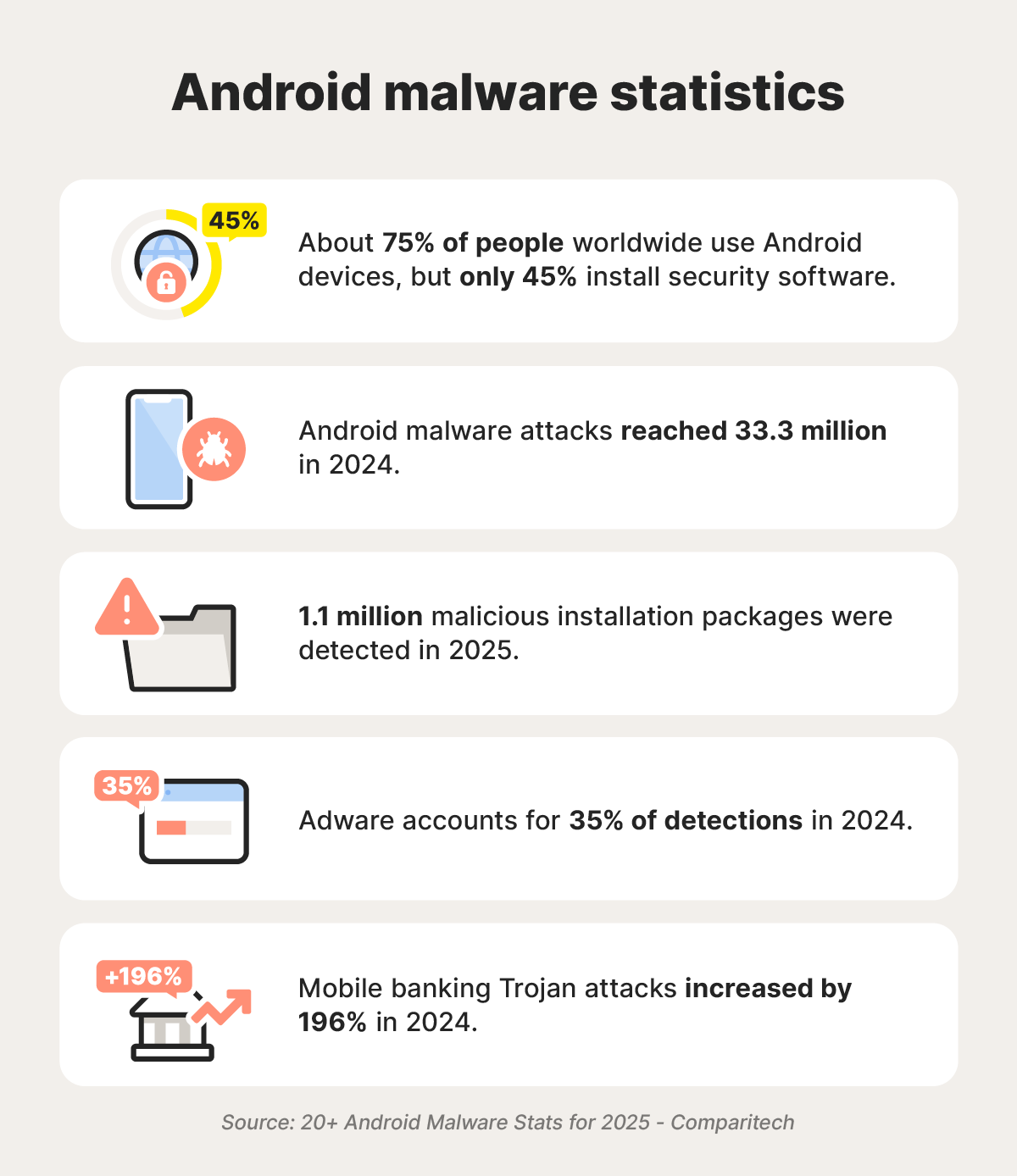
Over a decade ago, Google’s head of Android security said Android devices probably don’t need an antivirus. But the threat landscape has changed, with sophisticated risks like AI scams and remote-access Trojans (RATs) potentially leaving Android users vulnerable to device performance issues, data theft, and worse.
For example, cybersecurity researchers identified the Datzbro banking Android Trojan in 2025, which targeted seniors by creating Facebook groups promising fun activities. Victims were prompted to download a fake community chat app that disabled Android’s security controls, providing remote access to the cybercriminals behind it.
While Android has built-in security measures, a dedicated antivirus app adds an extra layer of protection against malware and provides valuable safeguards against other online threats like scams, fake websites, and risky Wi-Fi networks. So, for security-conscious Android users, antivirus software is worth it.
For more context, read on to learn about Android’s vulnerabilities, safety features, and what you can do to keep your devices and data safer online.
How can Android phones get viruses?
Like any connected device, Android phones and tablets can get malware, including viruses, through emails, texts, websites, social media platforms, or compromised wireless networks. Tapping a single malicious link or opening a dodgy attachment could infect your phone or tablet.
Android devices can also get malware through unique attack vectors, such as push notifications that link to malware-filled websites. According to a recent 2025 Gen Threat Report, malicious push notifications jumped by more than 300% from April through June, compared to the previous three months.
Another malware delivery tactic, called malvertising, involves cybercriminals distributing seemingly real ads that actually lead to fake websites hosting malware when clicked. These ads can even be found on legitimate platforms — Bleeping Computer found malware-laden Microsoft Teams installers in paid ads on Bing, for example.
What safety features do Android devices have?
Google provides a few security features to help protect Android users from malware, including Google Play Protect, safe browsing tools, and regular software updates.
Google Play Protect
Google Play Protect detects, disables, and removes potentially harmful Android apps containing malware. This protection applies to apps you download from the Google Play Store. However, the service doesn’t scan all files you download to your device, potentially leaving users vulnerable to hidden malware.
Google Safe Browsing
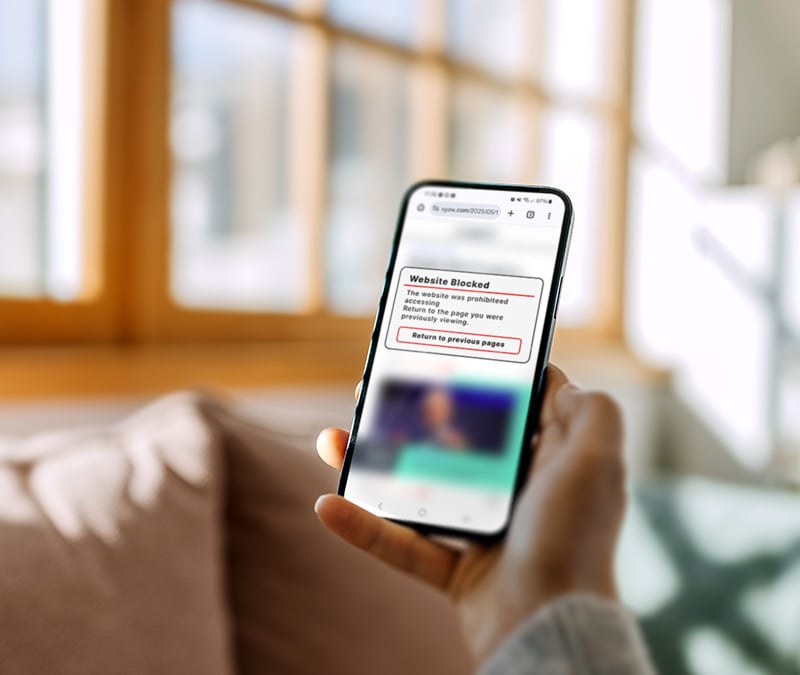
Google Safe Browsing warns you of potentially dangerous websites, including malicious pages that hide malware in your browser’s cache. While it blocks unsafe sites, it doesn’t block third-party trackers, so it’s less helpful than a dedicated private browser for privacy-minded users.
Blocking apps from Google Play
Android blocks third-party APKs (Android Package Kits) on websites outside the Google Play Store by default. Apps downloaded from these sites pose a higher malware risk because they aren’t screened for malware, unlike apps hosted on the official Google Play Store.
App permissions
Android lets you disable app permissions through settings, controlling which apps can access specific device features (like your camera) or data (like your contacts). Android phones and tablets can also automatically disable permissions for unused apps, limiting exposure if they become vulnerable to malware attacks.
Biometrics
Android phones and tablets offer biometric options, including fingerprint and facial recognition, to control device access. Biometric verification helps protect your phone data from being compromised if somebody steals your device. It can also help protect you against remote access Trojans (RATs), which may not be able to access your phone if it’s locked with a fingerprint.
Software updates
Android phones receive regular updates that address vulnerabilities present in outdated software, such as your operating system (OS). Pixel phones tend to receive OS updates faster, with phones from other manufacturers getting updates more slowly. However, Google is streamlining development times to reduce delays.
What to look for in a good Android antivirus?
A good antivirus app should provide security through real-time malware detection, perform well in third-party testing, and offer additional features such as deepfake protection.
Here’s some more detail on what to look for when selecting an Android antivirus:
- Real-time malware detection: Most premium Android antivirus programs include real-time protection to catch malware when it first reaches your device. Look for options with a detection rate of 95-100%, like those included in the Security.org breakdown of the best Android antivirus apps.
- Third-party testing: Antivirus programs go through third-party testing to prove their effectiveness, while avoiding bias present on some review sites. Visit a website like AV Test as you’re considering options to see which apps perform best in real-world situations.
- AI scam detection: To help keep you safer from social engineering attacks, some antivirus apps include AI scam detectors that allow you to scan texts or emails for red flags, potentially giving you the info you need to avoid clicking a malicious link.
- Deepfake detection: Deepfake detection features can help you spot fake AI video or audio that may be part of a scam. According to research from iProov, only 0.1% of 2,000 respondents correctly identified deepfakes, so AI detectors are important as the threat landscape continues to evolve.
- Wi-Fi network vulnerability scanning: Some mobile security apps include Wi-Fi network vulnerability scanners, which help you spot unsecure networks that might leave your devices vulnerable to attacks. They’re handy when using public Wi-Fi, a popular target for man-in-the-middle attacks.
- System resource usage: Good antivirus software should have a negligible effect on performance, even when it’s scanning your device. In contrast, fake antivirus programs are actually malware in disguise, often identifiable through unusually high power or data usage.
While malware protection is at the center of an antivirus app, full mobile security suites also offer additional tools. Norton Mobile Security for Android includes AI-powered scam detection, Wi-Fi vulnerability scanning, and an App Advisor, along with award-winning antivirus protection to help protect you from a variety of digital threats.
What are the signs my Android is infected?
Suspicious behavior that could signal an infected Android phone or tablet includes unusually high battery drain, random pop-ups and notifications, and frequent crashes.
Here’s a breakdown of common signs your Android might be infected:
- Unusual battery drain: Malware can consume significant system resources as it searches for and transmits data, resulting in excessive battery usage. This can cause overheating, which could potentially damage your battery and other components.
- Poor performance: High system resource usage by a virus can cause slow performance, sometimes causing complete system crashes. Cryptomining malware, for example, uses your phone’s resources to mine cryptocurrency and send it to cybercriminals.
- High data usage: Data-stealing viruses, like spyware that monitors your keystrokes or browsing history, can eat up your data limit and slow your connection as they communicate with cybercriminals.
- Unexpected pop-ups: Random push notifications or pop-ups on your phone could indicate that a malicious app has changed your alert settings. Adware is a specific type of malware that floods your phone with annoying advertisements.
- Changes to security settings: Some Android malware modifies your security settings so hackers can take over your phone. Others can add your phone to a botnet that’s remotely controlled by cybercriminals.
- Unauthorized account changes: Some remote-access malware allows hackers to access your Google account, where they can change your password or associated phone numbers, leaving you vulnerable to an account takeover attack.
How to protect your Android phone or tablet from malware
Protecting your devices from malware requires a multi-pronged approach to cybersecurity. This includes knowing how to spot a scam, learning how to detect suspicious links and emails, enabling built-in Android security tools, updating your phone, and removing unnecessary permissions.
Here are some tips to help protect your Android device from malware:
- Avoid suspicious links: Unknown numbers, email contacts, or social media users may send you suspicious links, sometimes claiming to be companies offering free software. Avoid these links and block unknown contacts to avoid these scammers in the future.
- Ignore suspicious attachments: Scammers impersonating your friends or family may send you emails containing malware in attachments. These spoofed emails can come from fake email accounts that look just like real contacts, so verify the sender’s address carefully before opening any attachments.
- Enable Google Play Protect: While Google Play Protect doesn’t replace a premium antivirus app completely, it can help protect your device from malicious apps. It’s typically enabled by default, but you can check it’s turned on from your Google Play Store account settings.
- Keep apps updated: Outdated software is more vulnerable to malware infections. Updating apps and your phone’s operating system regularly may close security vulnerabilities that malware exploits to access your phone.
- Download from trusted sources: Download apps from the Google Play Store instead of third-party sites. Google checks apps for malware before listing them, keeping you better protected against malware.
- Scrutinize app permissions: Deny unnecessary app permissions. Pay extra attention to sensitive permission changes, such as those affecting your camera, microphone, location, or SMS data.
- Get a mobile security app: Dedicated antivirus software can spot sophisticated malware threats. For instance, some come with AI-powered scam detectors that can help you identify text-based and online scams aiming to trick you into downloading malware.
Go beyond antivirus software
A quality antivirus can help you detect and block intrusive malware, which is a great start, but a comprehensive security suite should also help protect you against other online threats. Norton Mobile Security for Android combines award-winning antivirus software with scam detection, Wi-Fi security, and private browsing tools, providing a complete security suite for Android phones.
FAQs
How effective is Google Play Protect?
Google Play Protect effectively spots most malicious software, but falls short of a premium antivirus. According to July 2025 AV Test results, Google Play Protect received a 5.5 protection rating, while most other antivirus software received a 6, the highest rating.
Do antivirus apps affect performance?
Some antivirus software can slow down your phone’s performance, but most shouldn’t cause issues. If you’re noticing major slowdowns during an antivirus scan, it may be a sign that you have too many apps running.
Can malware take over my Android device?
Types of malware that can take over your Android device include remote access Trojans (RATs), ransomware, and botnet malware. A recent example is Crocodilus, an Android banking Trojan, which allows device takeover.
Which antivirus is best for Android?
Deciding on the best antivirus for your Android depends on what you’re specifically looking for. However, aim to choose one that includes award-winning, real-time protection and defensive tools against other online threats.
Do I need an antivirus on a jailbroken (rooted) Android?
Quality antivirus software on a rooted Android can be helpful, as jailbreaking your phone exposes it to additional security risks. Rooting could also void your warranty, so be very cautious before considering this option.
How often should I scan my Android for malware?
You should run a full scan every week or so. This helps you spot malware that could linger for extended periods. If your phone experiences unusual slowdowns, overheating, or random pop-ups, you should run a scan straight away. Always use a reputable antivirus that offers real-time protection for the best security.
Editors’ note: Our articles offer educational information and are written to raise awareness about important topics in Cyber Safety. Norton products and services may not protect against every type of threat, fraud, or crime we write about. For more details about how we research, write, and review our articles, see our Editorial Policy.




Want more?
Follow us for all the latest news, tips, and updates.