







13 practical tips on how to protect your data online
Your data is valuable, which is why advertisers, data brokers, cybercriminals, and hackers are all willing to go to great lengths to get it. Learn how to protect your personal information online, then get Norton 360 Deluxe for helpful tools like a VPN, online privacy monitor, and password manager.







- 1. Secure your accounts
- 2. Guard your devices
- 3. Limit how much you share
- 4. Be careful on social media
- 5. Be on the lookout for phishing and scams
- 6. Reduce internet tracking
- 7. Be wary of sketchy websites
- 8. Remove your information from online databases
- 9. Get a VPN
- 10. Secure your home network
- 11. Monitor for data exposure
- 12. Back up your data
- 13. Safely dispose of old devices
- Safeguard your personal information with one app
- FAQs
Being proactive about data protection can help protect you from a range of nasty online threats and costly consequences. When your personal information is exposed, threat actors could compromise your accounts, target you with personalized scams, and even try to steal your identity.
Data exposure and identity theft are frighteningly common: results of surveys commissioned by Gen (the company behind Norton) indicate that nearly 50% of consumers have experienced a data breach,1 and one in four Americans have been a victim of identity theft.2 Read on to learn 13 smart ways to better protect your personal information online.
Tip |
How to start |
|---|---|
1. Secure your accounts |
Enable multi-factor authentication and use a password manager to keep track of unique passwords. |
2. Guard your devices |
Enable automatic app and software updates, lock your devices, and use a reputable antivirus. |
3. Limit how much you share |
Don’t share personal information with third-party sites unless you have to. |
4. Be careful on social media |
Set profiles to private, ignore random friend requests, and be suspicious of social media ads. |
5. Be on the lookout for phishing and scams |
Be skeptical of urgent messages, verify links manually, and be aware of trending scams. |
6. Reduce internet tracking |
Use tools like private browsers and tracker blockers to limit who can see your browsing data. |
7. Be wary of sketchy websites |
Check website encryption and use scam protection software to get alerted to fake websites. |
8. Remove your information from online databases |
Opt out of people-search listings and request removal on data broker sites. |
9. Get a VPN |
Use a trustworthy no-log VPN, especially when browsing on public Wi-Fi. |
10. Secure your home network |
Change the router admin password, use WPA2/3, and set up a separate guest network. |
11. Monitor for data exposure |
Make sure you’re aware if your personal data is circulating on the dark web. |
12. Back up your data |
Back up your data using an external hard drive or cloud storage. |
13. Safely dispose of old devices |
Perform a factory reset before recycling or selling old devices. |
1. Secure your accounts
Locking down your online accounts helps prevent criminals from accessing the sensitive data they contain to make purchases, impersonate you, or carry out fraud in your name.
To secure your accounts, use a password manager to store complex, random passwords, enable multi-factor or two-factor authentication, and regularly check accounts’ connected devices.
- Set strong passwords: When creating new accounts, stick to strong passwords that are at least 15 characters long — and ensure each password is unique. Don’t share your passwords with anyone.
- Use a password manager: Memorizing dozens of complex passwords can be hard, so consider a secure password manager to help stay on top of them. Norton Password Manager, available as a browser extension or as part of the Norton 360 app, generates and stores strong passwords for you.
- Enable MFA or 2FA: Two-factor or multi-factor verification adds extra steps to the login process. Even if someone steals your password, they’d still need a one-time code sent to your phone, email, or an authentication app to access your account. Codes sent via authentication apps are often the most secure, since they’re less vulnerable to SIM swapping attacks or email account compromises.
- Limit third-party app connections: Check which apps and websites are linked to your Google, Apple, Facebook, or other accounts, and remove any you don’t recognize or no longer use. If one account is compromised, attackers may be able to access connected services as well.
- Pick hard-to-guess security questions: If you need to provide security questions, make sure they’re hard to guess. Don’t select questions like your mother’s maiden name or your childhood pet that a dedicated internet sleuth could guess the answers to.
- Check connected devices: Regularly check if any unfamiliar devices are connected to your online accounts, and revoke access if you don’t recognize them. Unfamiliar linked devices could indicate account compromise.
Case in point: GhostPairing attacks
Cyberthreat researchers at Gen, the company behind Norton, recently discovered a new cyberthreat targeting WhatsApp users. Dubbed GhostPairing, this threat uses social engineering techniques to trick victims into adding a cybercriminal’s device to their WhatsApp account — granting the hacker access to synced messages, photos, and other media. Unless you regularly check your linked devices, GhostPairing attacks can be very hard to spot.
2. Guard your devices
Your devices contain virtual treasure troves of valuable personal information. To keep the sensitive data on your device safer from bad actors, keep your software up to date, regularly review app permissions, and install robust antivirus software.
- Update your software: Software updates help patch security vulnerabilities that cybercriminals can exploit to gain unauthorized access to your device or data. Turn on automatic updates for your operating system, apps, and antivirus software to ensure you receive the latest security fixes as soon as they’re available.
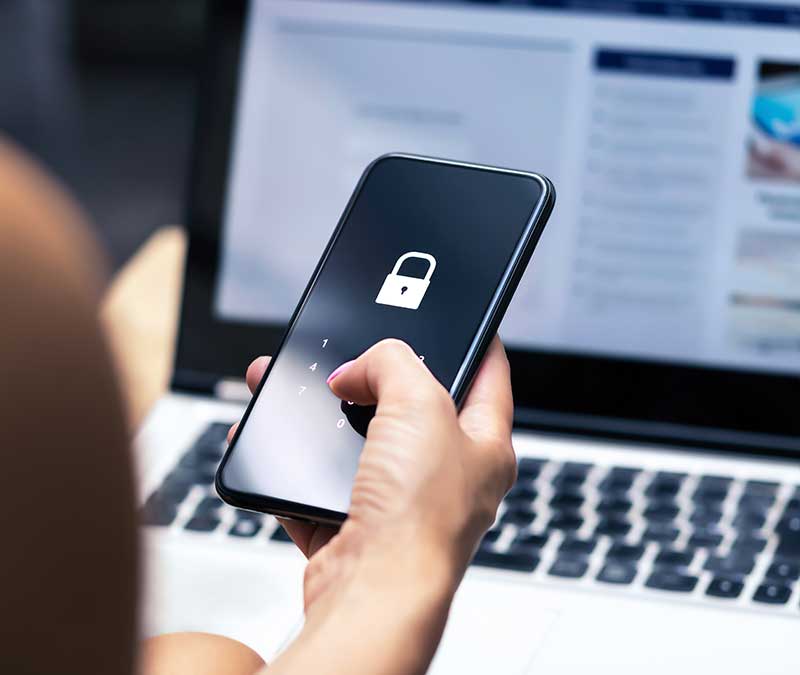
- Lock your phone: Use a strong PIN or password and enable biometric authentication to help prevent unauthorized access. If your device is lost or stolen, these safeguards can make it much harder for someone to access your personal data.
- Turn on stolen device protection: Enable built-in features like Find My (Apple) or Find My Device (Android/Windows) to help locate a lost or stolen device and lock it remotely. Many device security apps also let you remotely erase your data if you believe the device won’t be recovered.
- Uninstall old apps: Uninstall apps you no longer use to reduce your exposure to security vulnerabilities. Fewer apps also mean fewer potential entry points that could allow cybercriminals to hack your phone.
- Be careful of what you download: Only download apps and programs from official app stores or trusted websites. Malware disguised as legitimate software — aka trojans — can steal your data, spy on your activity, or even give attackers remote access to your device.
- Revoke unnecessary permissions: Regularly review which apps have access to your location, contacts, camera, microphone, and files, and disable anything that isn’t essential. Limiting permissions helps minimize the impact if an app is compromised or turns out to be a trojan.
- Watch out for shoulder surfing: Pay attention to people looking over your shoulder or getting uncomfortably close to you. They may be trying to read information on your device.
- Install Cyber Safety software: Invest in trusted cybersecurity tools, like Norton 360 Deluxe, to help defend against malware, viruses, malicious apps, and other device-level threats to your data.
3. Limit how much you share
One of the best ways to safeguard your personal information is to limit how much you share in the first place. Many companies ask for personal information when you create accounts, make purchases, or sign up for services. While some details are necessary, not every field is required. Before submitting forms, consider whether the information requested is relevant.
Remember that if a company suffers a data breach, all the personal information you’ve shared could be exposed. And if information ends up on the dark web after a breach, it could be almost impossible to remove.
4. Be careful on social media
Reduce how much of your personal information is publicly available by adjusting your privacy settings and being mindful of what you post. Keep your accounts private where possible, avoid connecting with strangers, and approach social media ads and links with caution. Here are some more social media safety tips:
- Keep your socials private: Switching to a private social media profile limits who can see your posts and personal details — so you can share breakfast pictures without making it a global announcement. You can usually adjust privacy settings in your account settings menu.
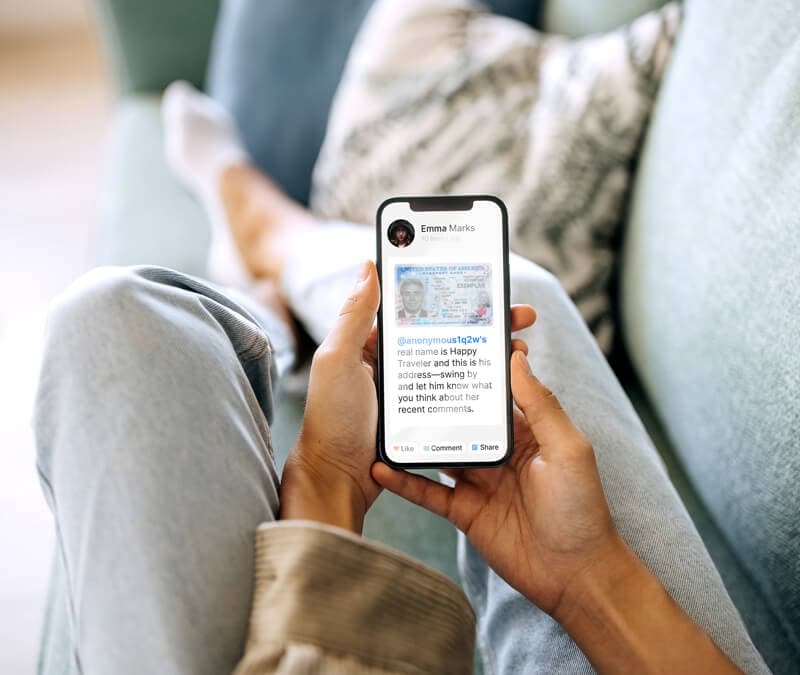
- Avoid oversharing: Be cautious of what you post on social media and avoid disclosing your current location. Oversharing, even on LinkedIn, can make it easier for cybercriminals to impersonate you, cyberstalk you, target you with spear phishing attacks, or guess answers to your security questions.
- Vet friend requests: Friend requests from people you don’t know are risky. They may be from scammers, pig butcherers, or cybersnoops in search of personal information.
- Don’t trust social media ads: Just because an ad appears on a legitimate platform doesn’t mean it’s safe. Researchers at Gen, the company behind Norton, analyzed 14.5 million ads on Meta platforms across the EU and the UK and found that nearly one in three of them pointed to a scam, phishing, or malware link. The aim of many such scam ads is to steal personal information.
- Strip geolocation data from images: Your phone may automatically attach location data to the photos you take. This hidden information, called metadata, can reveal exactly where the picture was taken. To protect your privacy, disable location tagging in your camera or photo app settings.
Case in point: Cyberthreats on social media
Data published by the cybersecurity team behind Norton indicates that the riskiest social media platform may be Facebook: Cyber Safety products by Norton and Gen’s other brands protected users from more threats stemming from Facebook than any other social network.
Malvertising and phishing are the two most common threats on social media, both of which can end in stolen personal information.
5. Be on the lookout for phishing and scams
Clicking on a phishing link or falling for an online scam can result in serious data exposure. Cybercriminals impersonate trusted companies, tech support, government agencies, or even people you know to trick you into sharing passwords, financial details, or other sensitive information.
To protect your data from scammers, be cautious of urgent messages, unsolicited calls, attachments, or requests for personal data. Verify links by navigating directly to the official website instead of clicking embedded URLs.
Remember, artificial intelligence is making scams more convincing and easier to execute. Attackers can use AI to generate realistic emails without obvious spelling errors, mimic writing styles, create deepfake voices, or even personalize messages using information pulled from social media. This makes phishing attempts harder to spot at a glance.
Increasingly, intuition isn’t enough to spot today’s sophisticated scams. Cyber Safety software like Norton 360 Deluxe includes robust scam protection features that can help alert you to phishing links, scam websites, deepfake scams, and fraud signals in online content — helping ensure your personal information stays out of the hands of cybercriminals.
Case in point: Scams targeting singles and job seekers
Scammers have seemingly infiltrated all parts of digital life, with job scams and romance scams being notable examples. Survey data on online dating indicates that 34% of current online daters have been targeted by online scams.
Similarly, in a study on job scams, 33% of respondents said they’d encountered a job scam or suspicious job posting. Threat researchers at Norton note that malware-laden attachments, sometimes containing infostealers, are a particularly common attack vector in job scams.
6. Reduce internet tracking
Many websites collect data about your browsing activity through cookies, fingerprinting, and other online tracking techniques.
Much of this is relatively low risk, but third-party trackers may compile more information than you’re comfortable sharing — some of which can be linked to identifiers like your email address or IP address and used to build detailed profiles about you. Aggregated browsing data can reveal patterns about your habits, interests, location, and even major life events.
You can reduce tracking risks by limiting how much data is collected in the first place. Using a good private browser in combination with an anonymous search engine like DuckDuckGo is a great way to start.
Many private browsers, including Norton Private Browser, have tools that help prevent third-party trackers from loading, reduce fingerprinting, and block ads. Together, these tools help shrink your digital footprint and reduce unnecessary exposure of your personal information and browsing habits.
7. Be wary of sketchy websites
Even on the surface web, internet users can encounter dangerous fake websites designed to steal personal and financial information. To help check if a website is safe, see if it has an SSL certificate (which means the URL will start with https, not http), look for trust signals like clear privacy policies, and install Cyber Safety software to get alerts about potentially fake websites.
And, remember that due to AI technology, scam websites may pass your initial “vibe check,” appearing trustworthy and legitimate at first glance.
- Look for SSL certificates: A legitimate website should have an SSL certificate. Look for “https://” and the padlock icon in the address bar. This means the connection at least encrypts your data — even if it’s not a guarantee that the site is trustworthy.
- Read the privacy policy: Legitimate sites should explain how they collect, use, and share your data. Check whether they clearly explain your rights and provide a real contact method for privacy questions and deletion requests.
- Confirm contact information: Trustworthy businesses list clear contact details, such as a phone number or a physical address that can be verified on Google Maps. If you can’t find real contact info, proceed with caution.
- Be cautious with public QR codes: Scammers can use quishing (QR phishing) to send you to fake websites. Avoid scanning random QR codes — especially those in public places like bus stops.
- Verify trust seals independently: Trust badges like BBB or TrustPilot logos can be faked. Rather than blindly trusting a trust seal, search for the business directly on the organization’s official website and ensure the URLs match.
- Watch out for typosquatting: Scammers create URLs that closely mimic legitimate websites, often with small spelling changes, extra characters, or a deceptive domain structure. Double-check the domain name carefully before entering passwords, payment details, or other sensitive information.
- Use cybersecurity software: Security tools like Norton 360 Deluxe can help warn you about phishing sites and block malicious pages. This adds an important layer of protection when browsing the internet or shopping online.
Case in point: VibeScams
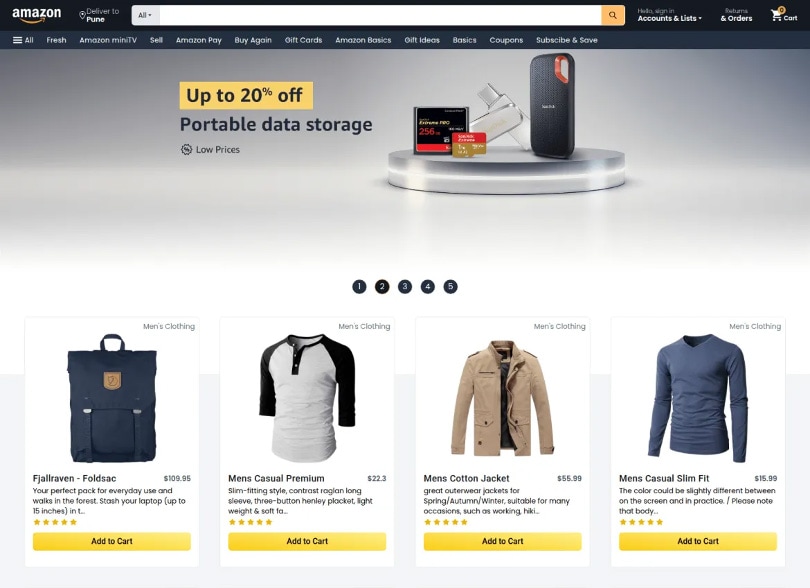
Using AI-powered web builders, scammers can build convincing fake websites almost instantly. These phishing sites, dubbed VibeScams by the threat researchers behind Norton, often look and feel very real — passing casual internet users’ initial “vibe check.”
They may promise too-good-to-be-true deals on popular items or “insider” crypto tips. However, their true purpose is to manipulate you into revealing sensitive information, like your payment details.
Below is a screenshot of an AI-built fake e-shop impersonating Amazon, designed to steal payment details.
8. Remove your information from online databases
Removing personal information from data brokers, also known as people search sites, can help you protect your data. These organizations gather personal information from public records, often including birth dates, phone numbers, marriage records, and addresses, to package up and sell on. While they generally operate within the law, they may still increase your exposure to identity crimes.
You can ask data brokers to remove your info, but that process isn’t always very straightforward. An easier way to opt out and protect your data is to use dedicated privacy tools, like Norton 360 Deluxe’s Privacy Monitor. This feature shows you which major data broker sites are selling your personal information, then either sends an automatic opt-out request or provides you with clear instructions on how to do it yourself.
If a website is unlawfully exposing your personal information or attempting to dox you, you can report it to Google or to Bing, although this approach will not generally work for major data broker sites.
9. Get a VPN
A virtual private network (VPN) encrypts the data you send and receive online and routes it through a secure server. This creates an encrypted tunnel between your device and the VPN server, helping protect your personal information from being intercepted while it’s in transit. This is especially important on unsecured public Wi-Fi networks, where attackers may use techniques like packet sniffing to capture unencrypted data shared over the same network.
10. Secure your home network
Your home Wi-Fi network connects your devices to the internet, and all the personal information they transmit passes through it. If your network is poorly secured, cybercriminals may be able to intercept unencrypted traffic or access connected devices. For example, in a type of attack known as wardriving, cybercriminals slowly drive through neighborhoods looking for vulnerable networks.
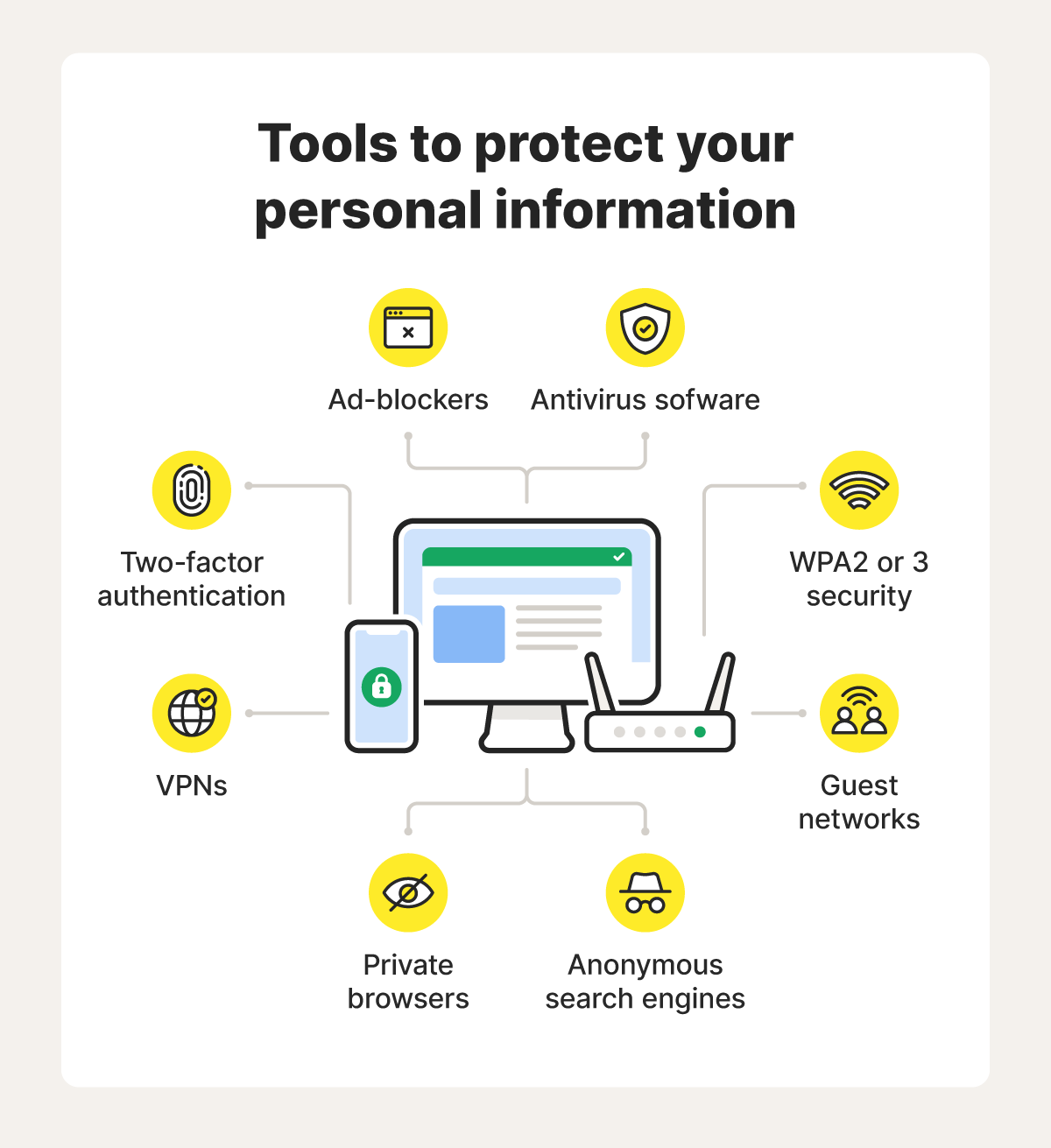
- Use a secure Wi-Fi password: While your SSID (network name) doesn’t need to be secret, your Wi-Fi password does. Use a long, unique passphrase to help prevent unauthorized access.
- Update the router’s admin credentials: Your router’s admin username and password control access to its settings. If you leave the default login in place, attackers who know common manufacturer credentials may be able to take control of your router. Create a strong, unique router admin password.
- Use modern encryption (WPA3 or WPA2-AES): Set your Wi-Fi security to WPA3 if your router supports it, or WPA2-AES at minimum. Avoid outdated standards like WEP or WPA, which have known security weaknesses and can be cracked.
- Keep router firmware up to date: Router manufacturers release firmware updates to patch security vulnerabilities and improve performance. Check periodically for updates or enable automatic updates if available.
- Create a guest network: A separate guest network lets visitors access the internet without connecting to your main network. This helps isolate your primary devices, such as laptops, phones, and smart home equipment, if a guest device is compromised.
11. Monitor for data exposure
Knowing what data is already exposed can help you better protect your personal information. By monitoring for data exposure, you may be able to spot signs of identity theft or fraud early and take action quickly. This includes:
- Keeping an eye on your financial statements.
- Checking your credit reports for unfamiliar accounts or inquiries.
- Watching for suspicious account activity or password reset alerts you didn’t initiate.
If manually monitoring all of your important accounts sounds daunting, try identity monitoring tools, like those included in Norton 360 with LifeLock. These features notify you about suspicious financial transactions, keep an eye on your credit activity, and alert you to potential identity misuse, bringing everything together in one easy-to-manage dashboard.
Similarly, dark web monitoring, which is included in Norton 360 Deluxe, can help inform you if your data may be circulating on underground forums and marketplaces. These services are particularly helpful now that Google’s free dark web report has been sunset.
See if we find your information on the dark web
By simply entering your email, we search for potential threats to your identity.
We do not search all personal information at all criminal websites and may not find all breached data. We use the information you provide in accordance with our Global Privacy Statement.
12. Back up your data
Backing up your data helps protect you from permanent data loss if your device is infected with malware or compromised in a cyberattack. For example, a ransomware infection could leave your files encrypted unless you comply with the hacker’s demand of payment for their release, potentially keeping you permanently locked out of important documents, photos, or work files if you don’t pay.
Regular backups ensure you can restore your data without relying on attackers. Consider using a secure cloud backup service, an external hard drive, or another offline storage device. For stronger protection against ransomware, keep at least one backup disconnected from your main device when it’s not in use.
13. Safely dispose of old devices
Old devices with data you haven’t removed can be treasure troves for thieves. They can extract data from discarded or resold devices, then use it to gather more information about you or steal your identity.
Before selling or donating an old device, sign out of your accounts, perform a factory reset, and make sure your personal data is fully removed. If you’re disposing of a device, take it to a certified electronics recycling center, which can help ensure the data is wiped and the hardware is handled safely. Avoid throwing devices in the trash, as they may still contain recoverable data — not to mention hazardous materials that can harm the environment.
Safeguard your personal information with one app
Safeguarding your personal data requires a multi-pronged approach to digital privacy. That’s a lot easier to do when you have a single app that unifies essential privacy and security features.
With Norton 360 Deluxe you get a secure VPN, a password manager with bank-grade encryption, a private browser that reduces internet tracking, comprehensive spyware protection, dark web monitoring, and a privacy monitor to help automatically remove your personal information from data broker sites — all from the most reputable brand in consumer Cyber Safety.3
FAQs
What are direct identifiers?
Direct identifiers are pieces of information that can identify you on their own, without needing additional context. Some direct identifiers, such as your Social Security number, driver’s license number, and passport number, are highly sensitive. Others are less sensitive and not as risky, like your email address or name.
What are quasi identifiers?
Indirect (or quasi) identifiers don’t identify a person by themselves, but could be used to collect more information for fraud. These identifiers don’t have legal protections like direct identifiers because they aren’t as risky when exposed.
Can you permanently remove your information online?
It’s difficult to remove your information permanently. Data exposed on the dark web cannot be taken down, and people search sites may reupload your personal information later.
Why should you keep personal information private?
Keeping personal information private helps protect you against identity theft, financial fraud, account compromise, and other forms of exploitation.
How do I protect my data if a 3rd party app experiences a leak or a data breach?
Protect your data if a third-party app experiences a data breach by changing compromised passwords, enabling multi-factor authentication (MFA), and monitoring financial accounts, depending on what type of data is leaked. You should also take care to watch for phishing attempts, as you’re more likely to be a target if a criminal already has some of your information.
1 Based on an online survey of 1,000 U.S. adults conducted by The Harris Poll on behalf of Norton, February 2021.
2 The study was conducted online within the United States by Dynata on behalf of Gen from October 23rd to November 4th, 2025 among 1,000 adults ages 18 and older. Data are weighted where necessary by age, gender, and region, to be nationally representative.
3 Data based on an online survey of 16,458 adults globally (markets include UK, US, France, Germany, Japan, Australia, Italy, Netherlands, Belgium, Brazil, Mexico, Canada) conducted by Walnut Unlimited on behalf of Gen™, October 2024 - January 2025.
Editors’ note: Our articles offer educational information and are written to raise awareness about important topics in Cyber Safety. Norton products and services may not protect against every type of threat, fraud, or crime we write about. For more details about how we research, write, and review our articles, see our Editorial Policy.






Want more?
Follow us for all the latest news, tips, and updates.